3-6
1245678
3
96
8
1
2
3
4
5
7 10
11
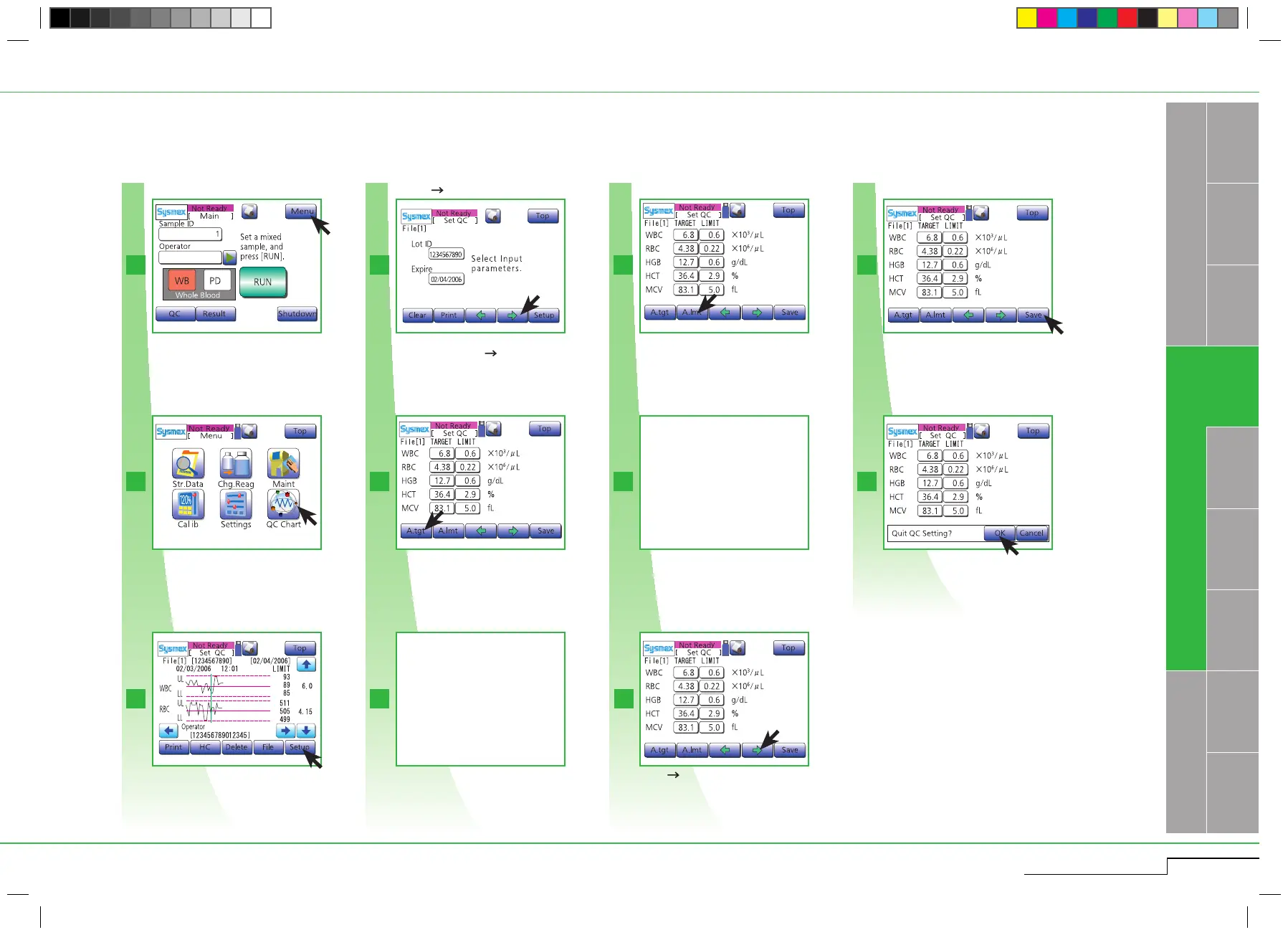
Press " " to switch to remaining 5 QC file
setting screens.
No automatic calculation
is possible with less than
2 plots.
3.2.1. STEP 1: b) Automatic settings
Press "Save".
Press "OK".
Press "OK".
INTRODUCTION
QUALITY CONTROL
pocH-100
i
Revised June 2008
Switch to remaining 5 QC file
setting screens.
No automatic calculation
is possible with less than
2 plots.
Press "Menu".
Press "Menu".
Press "QC".
Press "QC".
Press "Setup".
Press "Setup".
Enter "Lot ID" and "Expire", then
press " ".
Press "A.Tgt". (Automatic calculation of the
average of all plots).
Press "A. Tgt".
Press "A.Lmt". (Automatic calculation of 2SD
or 3SD of all plots).
Press "A.Lmt".
After completion of automatic calculation of
all parameters, press "Save".
Enter "Lot ID" and "Expire" manually or by
barcode reader. Press " ".



 To Next Page