5-9
1234 678
5
1
3
4
5
6
2
pocH-100
i
Revised June 2008
SETTINGS & CALIBRATION
INTRODUCTION
5.1. SETTINGS
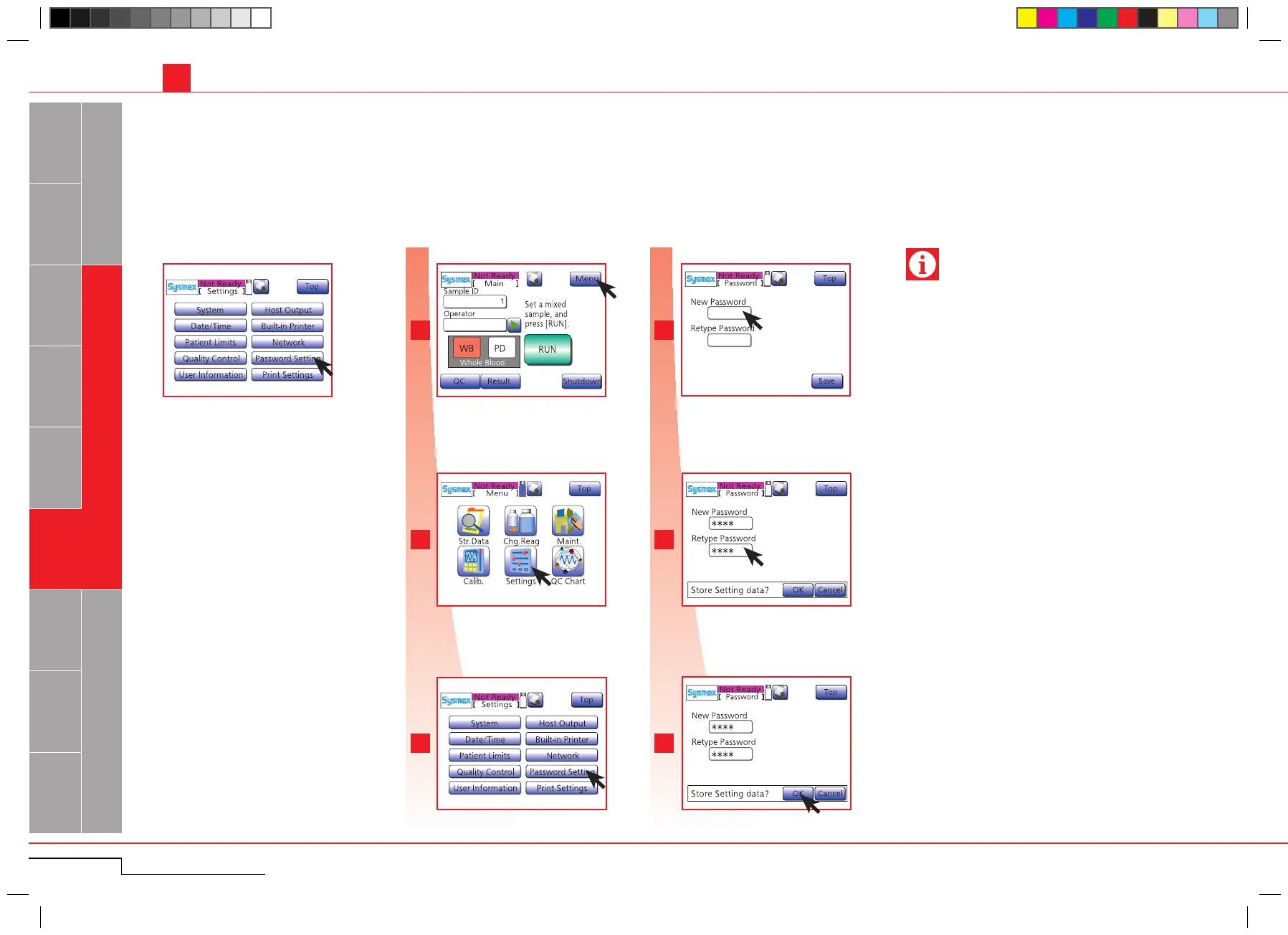
5.1.2.9. Password setting
To prevent unauthorized change of the settings, a password can be set.
Password-protected functions: Calibration and Setting.
Press "Menu".
Press "Password Setting".
Press "New Password", the numerical keys
dialog will appear. Enter max 10 digits. Press
"Ent.".
Press "Retype Password". Repeat password
and press "Ent.".
Press "OK".
Press "Menu".
Press "Settings".
Press "Password Setting".
Enter password and press "Ent.".
Enter password again for confir-
mation and press "Ent.".
Press "OK".
• In case the password has been forgotten, contact
your Sysmex service representative.
• Enter maximum 10 digits of numerals (0-9) or hy-
phens (-) .
Important
Press "Menu" > "Settings" > "Password Set-
ting".
Press "Menu" > "Settings" >
"Password Setting".
Press "Settings".



 To Next Page