4-2
12 35678
4
1
2
3
4
4a
pocH-100
i
Revised June 2008
CLEANING & MAINTENANCE
INTRODUCTION
• Whencleaningtheinstrumentsurfaceorthetouchpanel,usea"softdrycloth",
"clothsoakedinneutraldetergentthenwrungtightly",or"softclothdampenedwithethanol".
• Donotuseanyorganicsolvent,acid,oralkalineagent.Thesewillaffecttheinstrumentsurface‘snishandmaycausecorrosionordiscoloration.
4.1.2. Check instrument status
4.1.1. Clean instrument surface
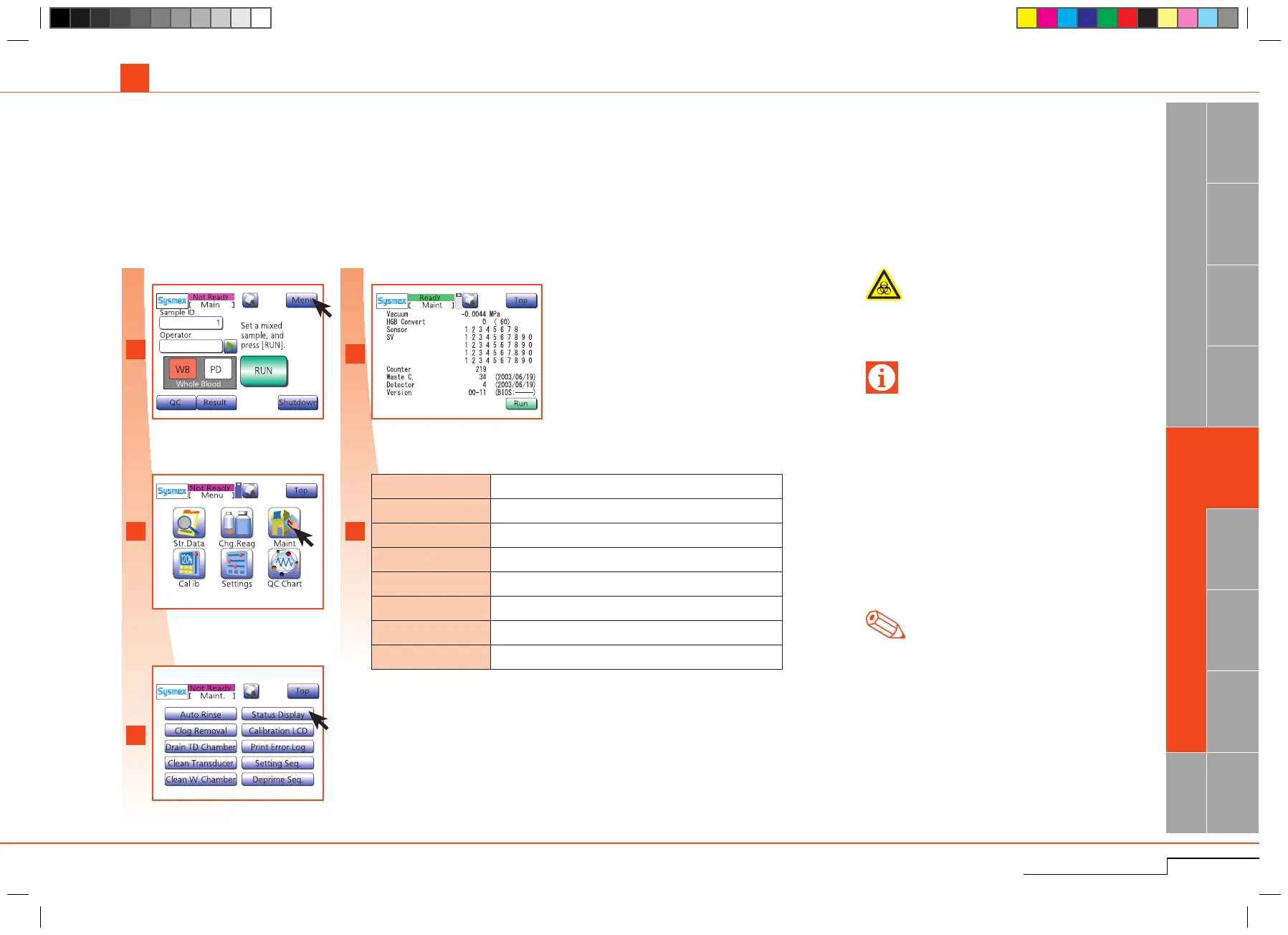
Press"Menu".(
*
1
)
Press"Maint.".
Press"StatusDisplay".
Toavoidinfections,wearprotectivegarmentsand
glovesforcleaningand/ormaintenance.Aftercom-
pletionofwork,washhandswithdisinfectant.
Biological risks
Checkoperationcounter,programversionandotherinformationbeforecontactingyourSysmexServicerepresentative.
Note
*
1.
If"Run"ispressed,analysisoperationstarts,
and the instrument status can be checked dur-
ingoperation.
Press "Menu".
Press "Maint.".
Press "Status Display".
The screen displays information.
4.1. CLEANING
Important
• Toensureproperfunctioningoftheinstrument,
periodicalcleaningandservicingisnecessary.
• SecurityInformationforUsingCELLCLEAN:
- CELLCLEAN is a strong alkaline cleaning mate-
rial.Itmustnot comeincontactwithskinor
clothing.Shouldthishappen,rinseskinorcloth-
ing with plenty of water to avoid injury or dam-
age.
- CELLCLEAN cleaning material contains sodium
hypochlorite.If CELLCLEAN makes contact
withtheinstrument‘ssurfaces,itwillaffectthe
surfacenishandthereisdangerofcorrosion.
Immediately wipe off CELLCLEAN with a damp
cloth.
Vacuum Current vacuum valve
HGB Convert HGB convert value
Sensor ON/OFF status of each sensor
SV ON/OFF status of each solenoid valve
Counter Number of cycles since instrument production
Waste Chamber Number of cycles since last cleaning of waste chamber
Detector Number of cycles since last cleaning of transducer
Version Program version
The following information is displayed on
thisscreen.(
*
1
)



 To Next Page