ANALYSIS
1 345678
2
2 -13
4
5
6
1
2
3
ANALYSIS
INTRODUCTION
pocH-100
i
Revised February 2011
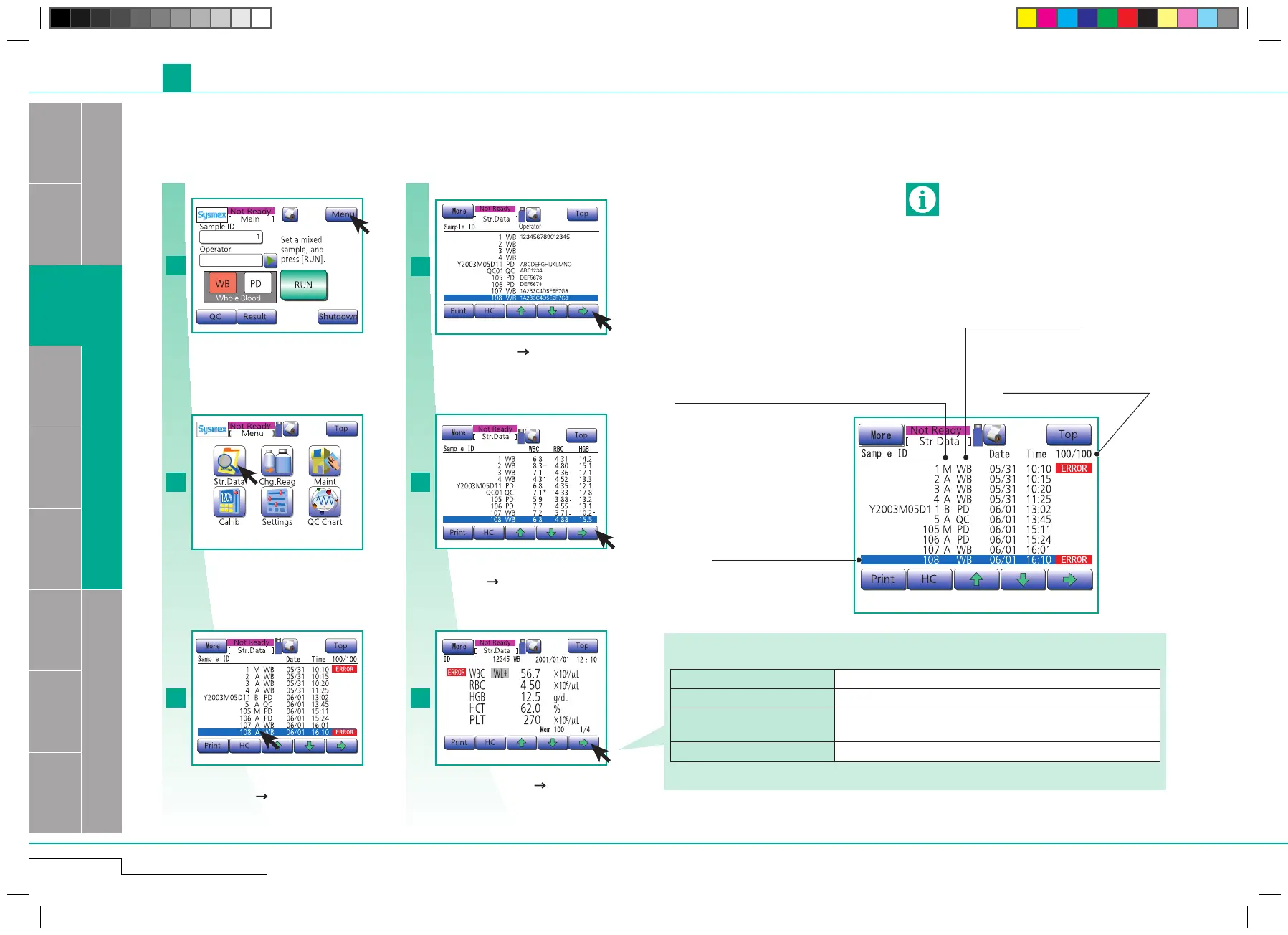
M: number entered manually
A: number assigned automatically
B: number read out by barcode reader
Sample ID attribute
Analysis mode
Memory No./No. of samples
Cursor sample
Important
In the list screens and the stored data screens, the
data can only be displayed in the order of the op-
eration counter.
2.1. ANALYSIS
2.1.9. Stored data
The most recent 100 analysis results are automatically stored and can be recalled.
If there are 100 results stored, the fresh set will cancel the oldest.
First stored data screen WBC, RBC, HGB, HCT, PLT
Second stored data screen WBC, RBC, HGB, HCT, MCV, MCH, MCHC, PLT
Third stored data screen
WBC, LYM% (W-SCR), MXD% (W-MCR), NEUT% (W-LCR),
LYM# (W-SCC), MXD# (W-MCC), NEUT# (W-LCC)
Fourth stored data screen RBC, MCV, RDW-SD, RDW-CV, PLT, PDW, MPV, P-LCR
Analysis data for following parameters:
Press "Menu".
Press "Str. Data".
Choose stored data (cursor sample). Switch
to second list screen for current cursor sam-
ple by pressing " ".
Switch to third list screen for current cursor
sample by pressing " ".
The first list screen
The second list screen
The third list screen
First stored data screen
Press "Menu".
Press "Str. Data".
Switch to fourth list screen, and to first
stored data screen for current cursor sample
by pressing " ".
Switch to second, third and fourth stored
data screen by pressing " ".



 To Next Page