1-16
2345678
1
1
2
3
4
5
6
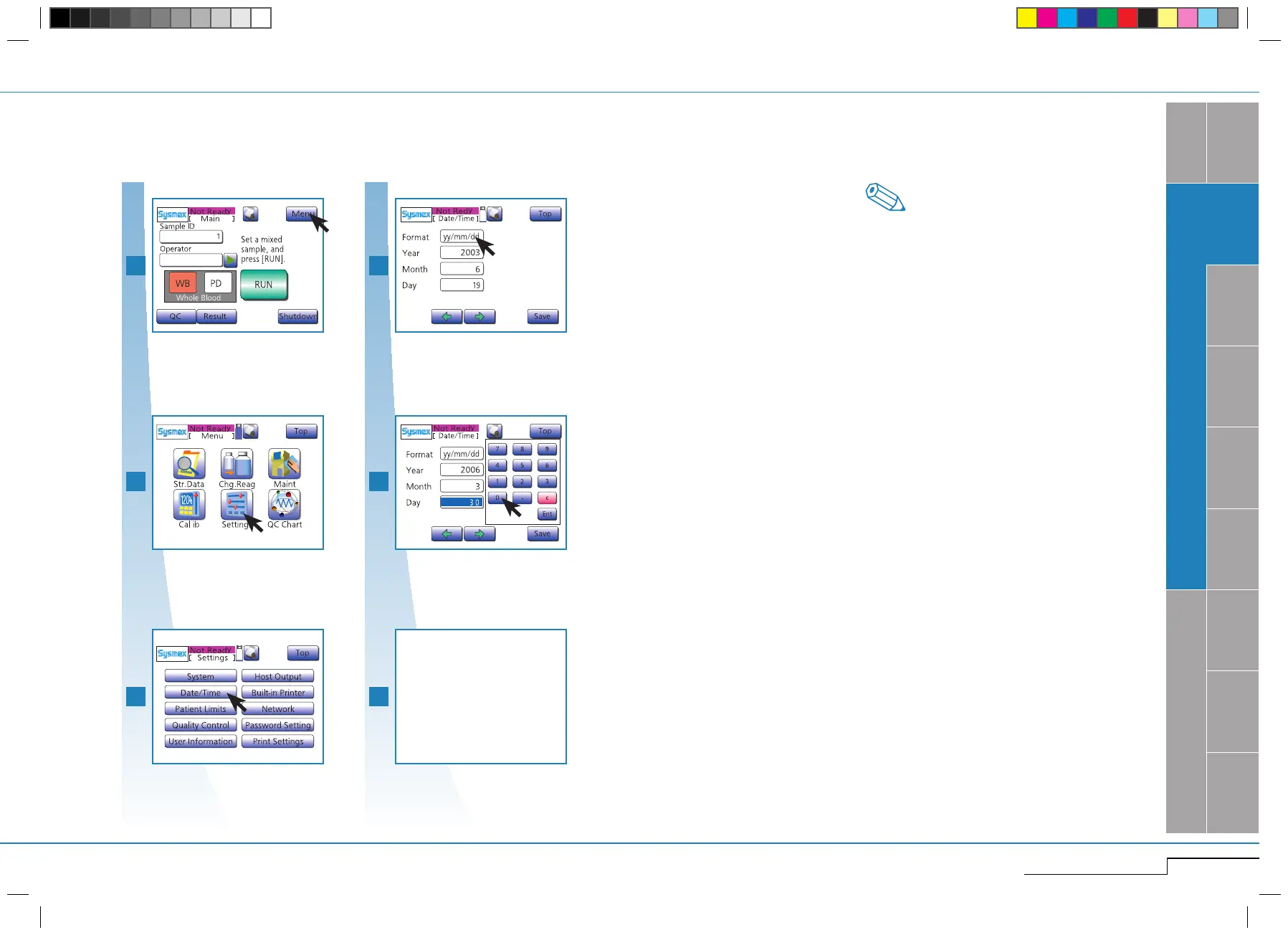
Press "Menu".
Press "Menu".
Press "Settings".
Press "Settings".
Press "Date/Time".
1.3.9. Date & Time
To be able to identify analysis results properly, set time and date correctly.
Choose Format.
Choose Format. (
*
1)
Enter date.
Press "Save".
"Save" settings.
•Inthissection,onlythesettingsrelevantforin-
stallation are described. For details on all possible
settings see "Settings & Calibration" page 5-1.
•Whentimeswitchesto"standardordaylightsav-
ing time" respectively, the clock must be set ac-
cordingly.
*
1.
If an implausible date has been entered (e.g.
4/31 or 2/29 in a year which is not a leap year),
it will be indicated by a beep.
Enter the correct date.
Note
pocH-100
i
Revised June 2008
INTRODUCTION
SYSTEM OVERVIEW, TECHNICAL INFORMATION & SETUP
Press "Date/Time".
Enter date.
Enter hour, minutes
the same way



 To Next Page