3-11
12 45678
3
2 5
7
6 9
1
10
11
3
4
8
The sample tube caps have to be removed
before measurement.
QUALITY CONTROL
INTRODUCTION
3.2. PERFORMING QUALITY CONTROL
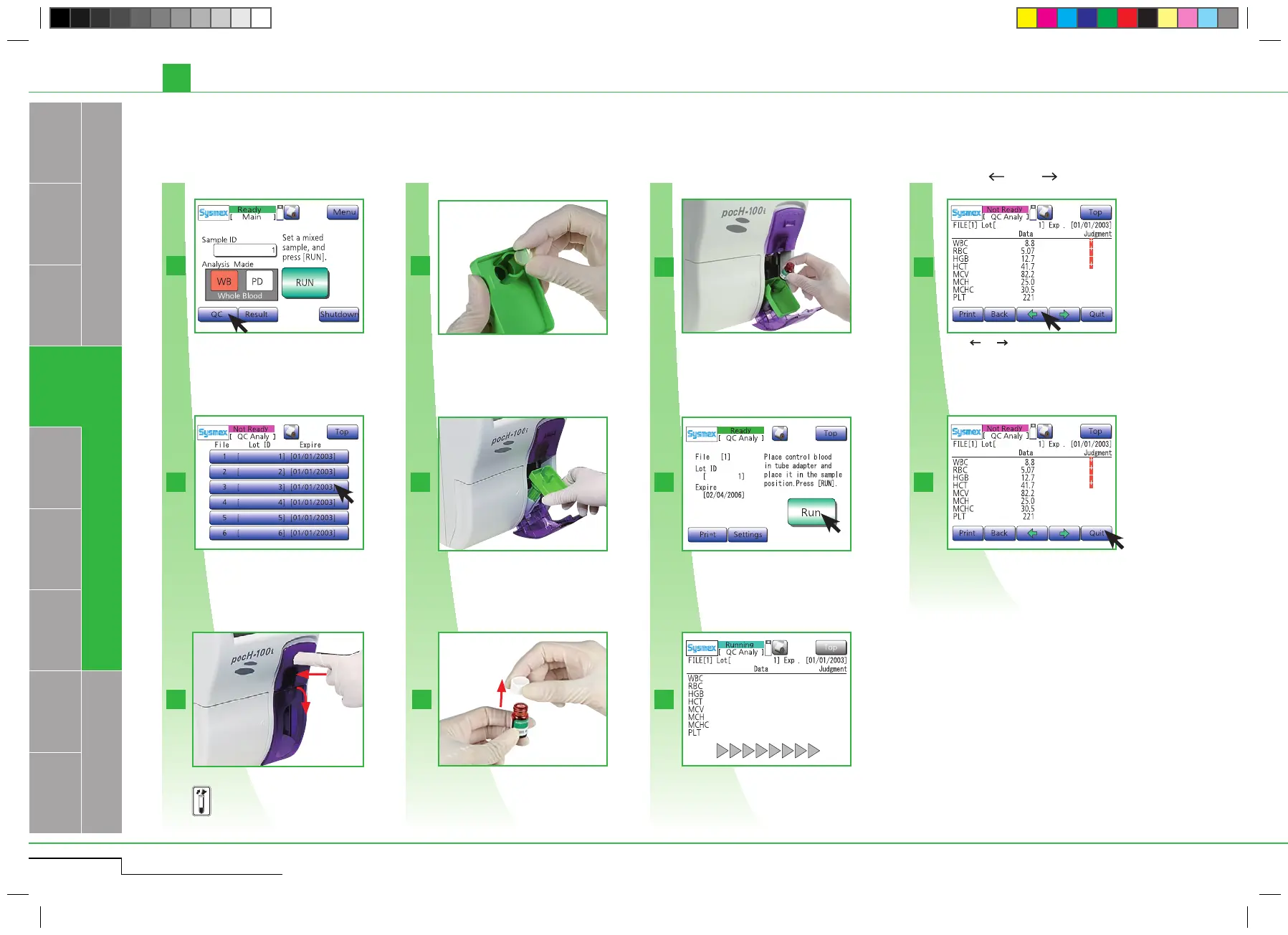
3.2.3. STEP 3: a) Performing quality control: L-J method (factory setting) (for open pipette)
Daily
Press "QC".
Insert control blood and close door.
Insert control blood and close
the door.
Set the spacer to an adapter.
Set the spacer to an adapter.
Press " " or " " to scroll
screens.
Press " " or " " to scroll the results screens.Press "QC".
Open sample position.
Open sample position.
Select analyzing File.
Select analyzing File.
Press "Quit" to accept analysis results.
Depending on QC settings, results will be
printed/sent to host computer automatically.
Press "Quit".
The analyzing screen will appear.
The analysis starts.
Press "Run".
Press "Run".
Insert correct adapter.
Insert adapter.
Remove the cap.
Remove the cap.
pocH-100
i
Revised February 2011



 To Next Page