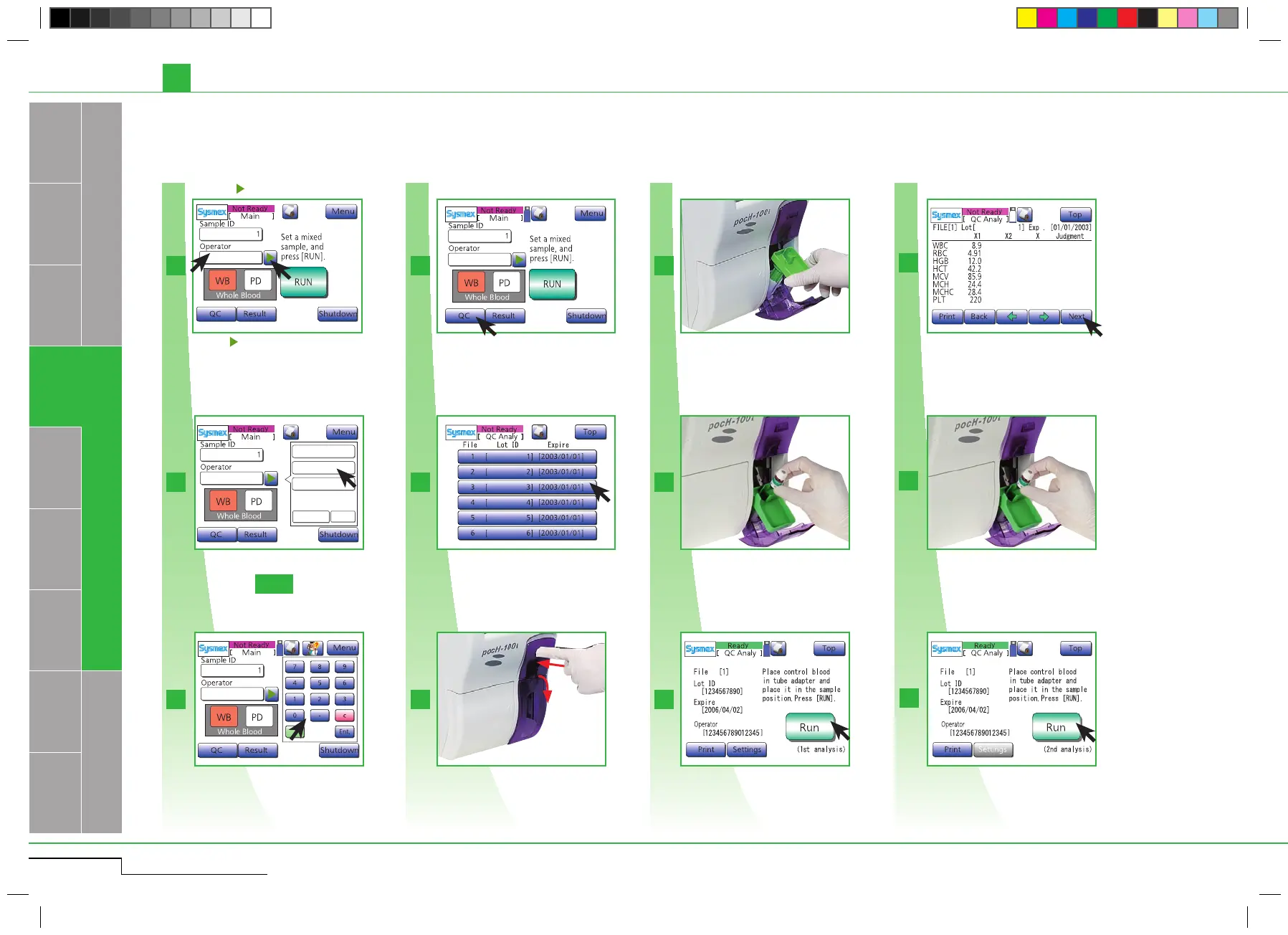
3-13
12 45678
3
2a 7
9
11
1
2b
6
10
4
3
5 8
Operator 1
Operator 2
Operator 3
more close
1/2
A
or
Select a operator ID.
Enter the operator ID and press "Ent.".
Select a operator ID.
Enter the operator ID and press
"Ent.".
pocH-100
i
Revised February 2011
INTRODUCTION
QUALITY CONTROL
3.2.3. STEP 3: b) Performing quality control: X
_
method (for close piercer)
Daily
Insert correct adapter.
Insert adapter.
Insert control blood and close door.
Insert control blood and close
the door.
Remove the control blood, mix well and
insert it back into the sample position.
Mix well and insert it back into
the sample position.
3.2. PERFORMING QUALITY CONTROL
Press the -button or press "Operator".
Press "Run" to perform second analysis.
Press "Run".
Select analyzing File.
Select analyzing File.
Open sample position.
Open sample position.
Press "QC".
Press the -button or press "Operator".
Press "Run".
Press "Run".
The first analysis results appear. Press
"Next" to perform the second analysis.
Press "Next" to perform the sec-
ond analysis.
Press "QC".



 To Next Page