Various menu settings
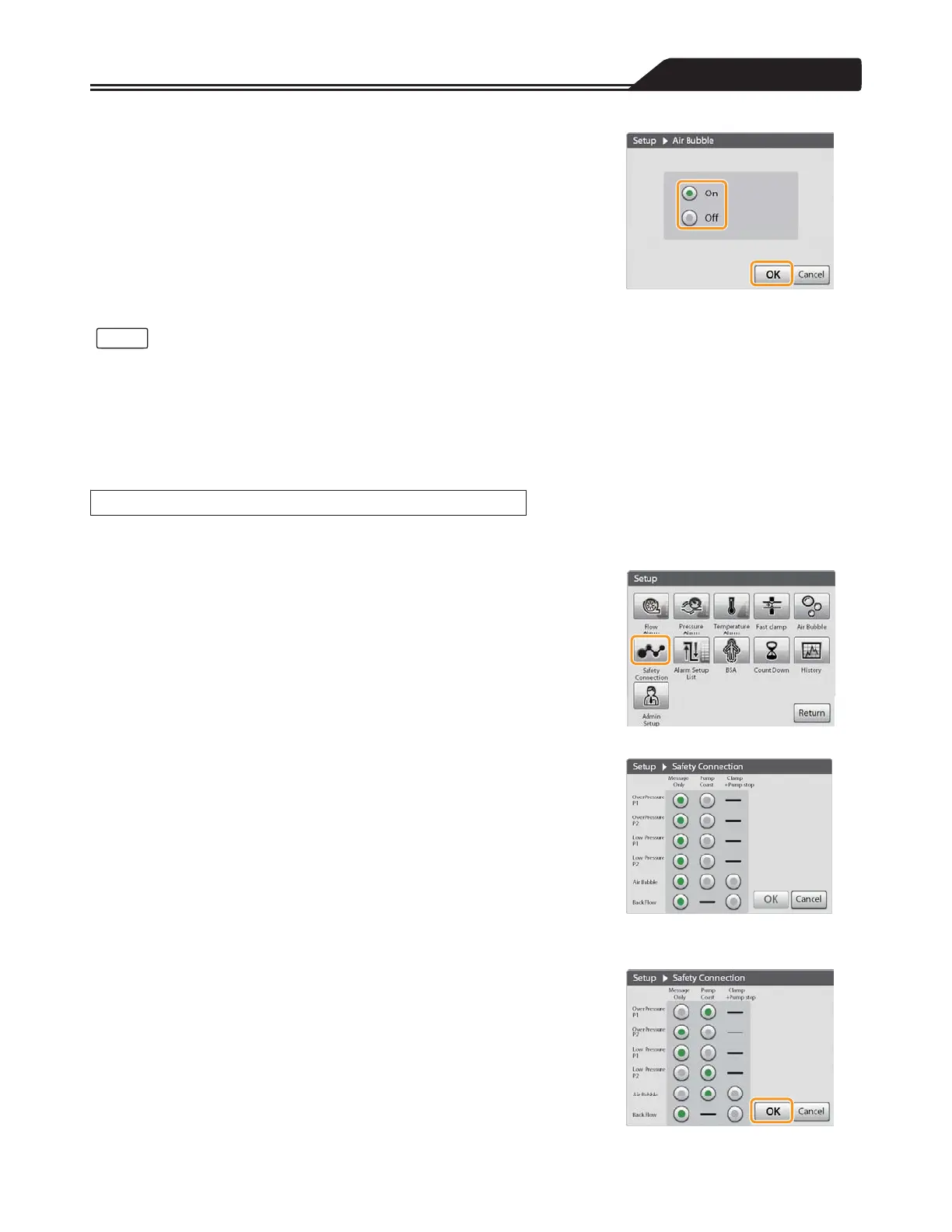
2. After tapping [On] or [Off], tap [OK] to complete the setting.
(Figure 3-30)
Figure 3-30
• If you do not tap [OK], the changes to the setting will not take effect.
• The air bubble detection sensitivity can be adjusted only through the admin setup.
<Indication of the ABD status icon>
The icon indication changes in accordance with the status of the air bubble detector function.
For details, refer to “LCD Touch Panel Display (When Operating Normally)” (page 9).
Response behaviours (Message Only/Pump Coast/Clamp+Pump stop) to the Over/Low Pressure Alarm, Air Bubble Detected
Alarm and Back Flow Alarm can be set.
1. Tap the Safety Connection icon. (Figure 3-31)
The Safety Connection screen opens.
2. Tap the response behaviour you want to set for each alarm.
(Figure 3-32)
[Message Only]:
Displays a message when the alarm is detected.
[Pump Coast]:
Displays a message when the alarm is detected and changes the motor
speed to the coast speed.
[Clamp+Pump stop]:
Displays a message when the alarm is detected, closes the
extracorporeal circulation circuit line with the Fast Clamp and stops the
Drive Motor.
3. Tap [OK] to complete the setting. (Figure 3-33)
Figure 3-31
Figure 3-32
Figure 3-33
91
Notes
Setting the Safety Connection








 To Next Page