Various menu settings
• If you do not tap [OK], the changes to the setting will not take effect.
• For details about the safety connection, refer to “Safety Connection” (page 65).
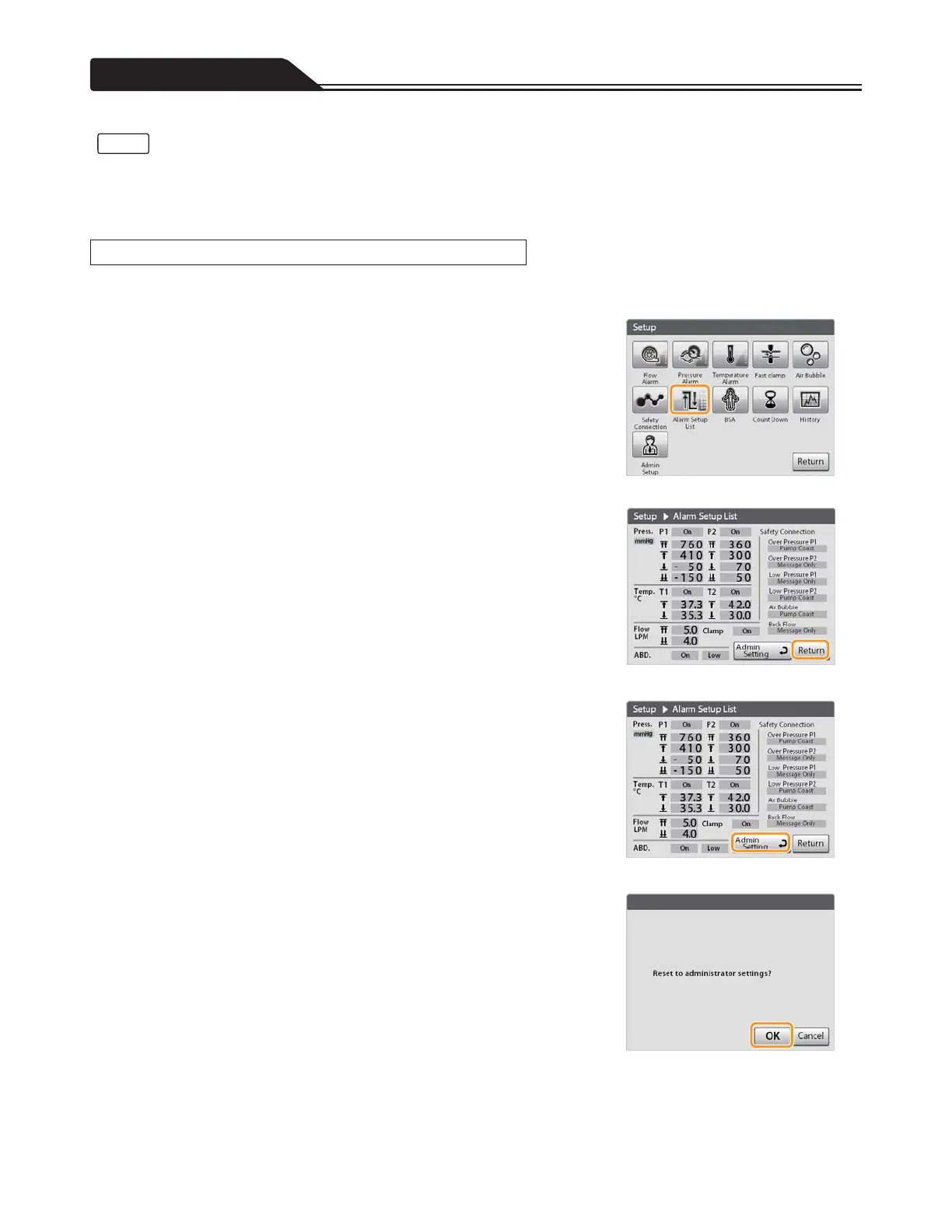
The on/off status of various functions, alarm or alert threshold values and the settings of the safety connections can be confirmed
in the list. Also, all of the settings can be reset to the admin setting.
1. Tap the Alarm Setup List icon. (Figure 3-34)
The Alarm Setup List screen opens.
<<To confirm the alarm settings>>
2. After confirming the settings, tap [Return]. (Figure 3-35)
Figure 3-34
<<To reset to the admin setting>>
2. Tap [Admin Setting]. (Figure 3-36)
Figure 3-35
3. Tap [OK]. (Figure 3-37)
The settings displayed in the screen of the Alarm Setup List are reset to the
admin setting.
Figure 3-36
Figure 3-37
92
Notes
Alarm Setup List








 To Next Page