Operation Procedure
• Auto-priming setting (on time/off time/motor speed) can be changed. For details about how to set, refer to “Setting Auto-priming”
(page 106).
• When 30 minutes have passed after starting the auto-priming, the auto-priming will automatically stop and “Auto-priming
Stopped” will be displayed on the message area.
When using the pressure measuring function, confirm that the setup of the pressure measuring function of the channel to be used
is on. (Refer to “Confirming the Setup” (page 48).)
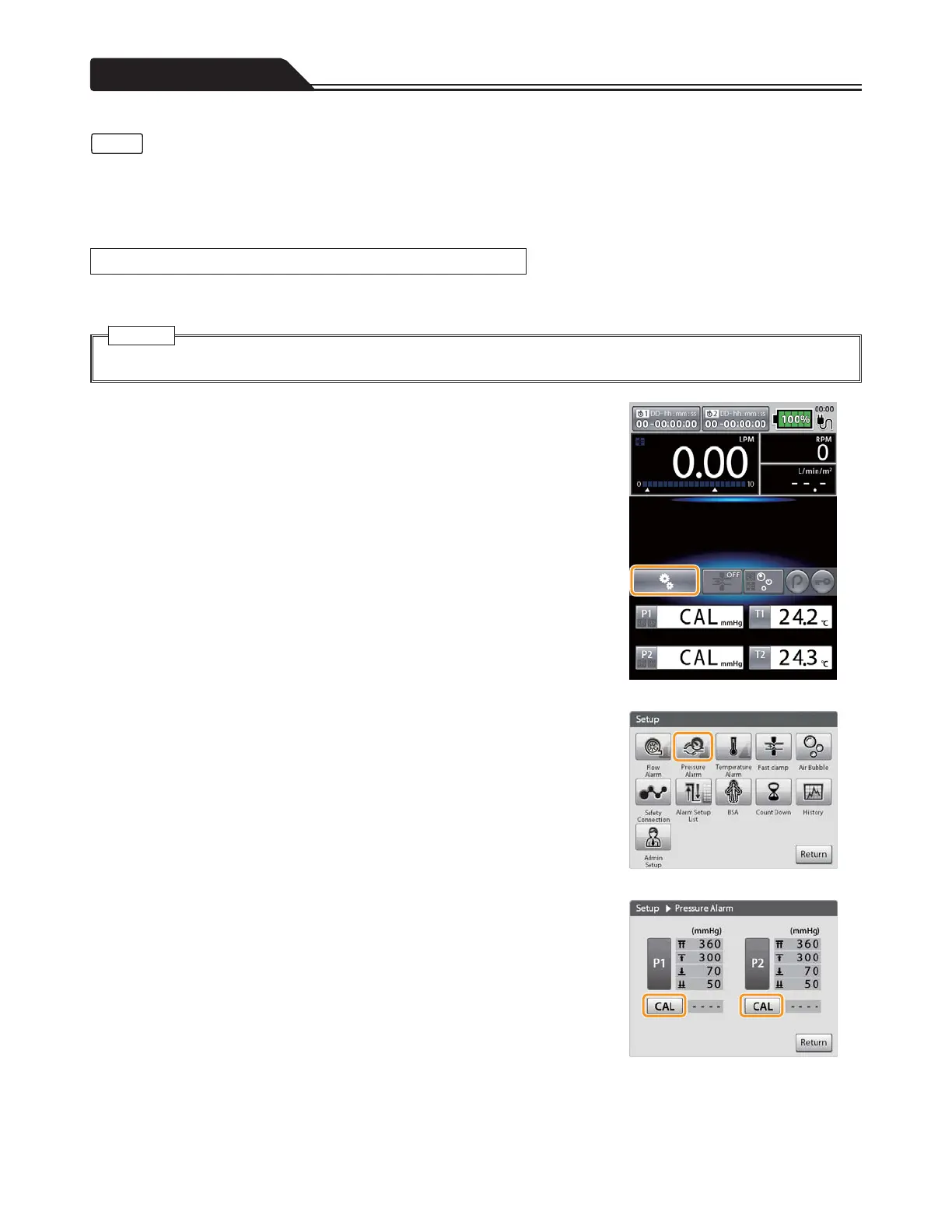
1. Tap the setup icon on the main screen. (Figure 1-47)
2. Tap the Pressure Alarm icon. (Figure 1-48)
Figure 1-47
3. Tap [CAL] of the pressure sensor (P1 or P2) to which you
want to perform calibration. (Figure 1-49)
Figure 1-48
Figure 1-49
50
• Check the instructions for use of the pressure sensor before use.
Caution
Notes
Calibration of the Pressure Sensor








 To Next Page