Various menu settings
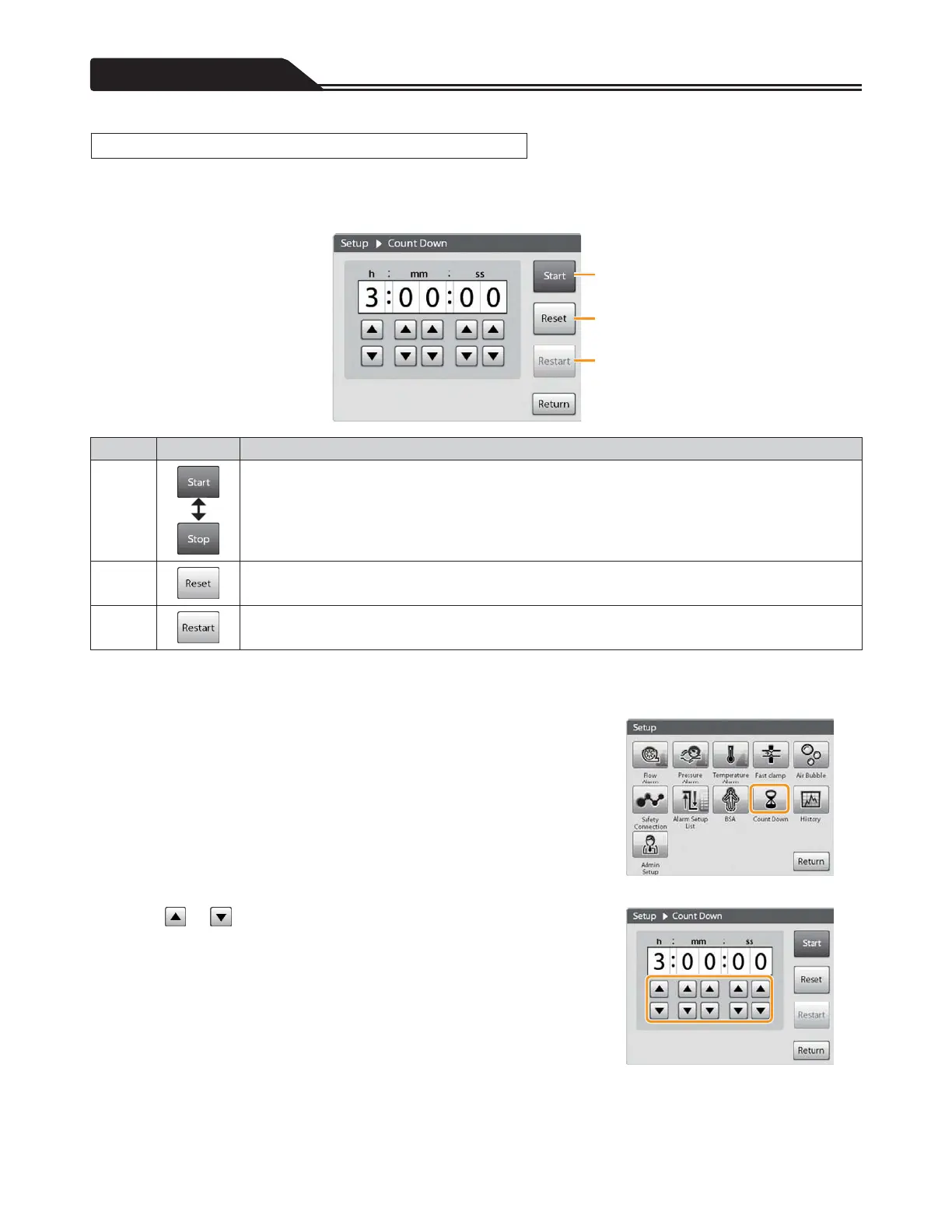
A count down timer can be set. When the set time has passed, you will be informed by sound and screen indication.
The maximum duration that can be set is 9 hours, 59 minutes and 59 seconds.
Count Down screen
a
b
c
Number Icon Description
a
Count down starts.
When count down starts, [Start] changes to [Stop].
Count down stops.
When count down stops, [Stop] changes to [Start].
b
The timer returns to 0 hours 00 minutes 00 seconds.
c
While counting down : Returns to the set time of the timer and restarts the count down.
While stopping count down: Returns to the set time of the timer.
Starting/Ending the Count Down Timer
1. Tap the Count Down icon. (Figure 3-42)
The Count Down screen opens.
2. Tap or to input the time you want to set. (Figure 3-43)
Figure 3-42
Figure 3-43
94
Setting Count Down








 To Next Page