Various menu settings
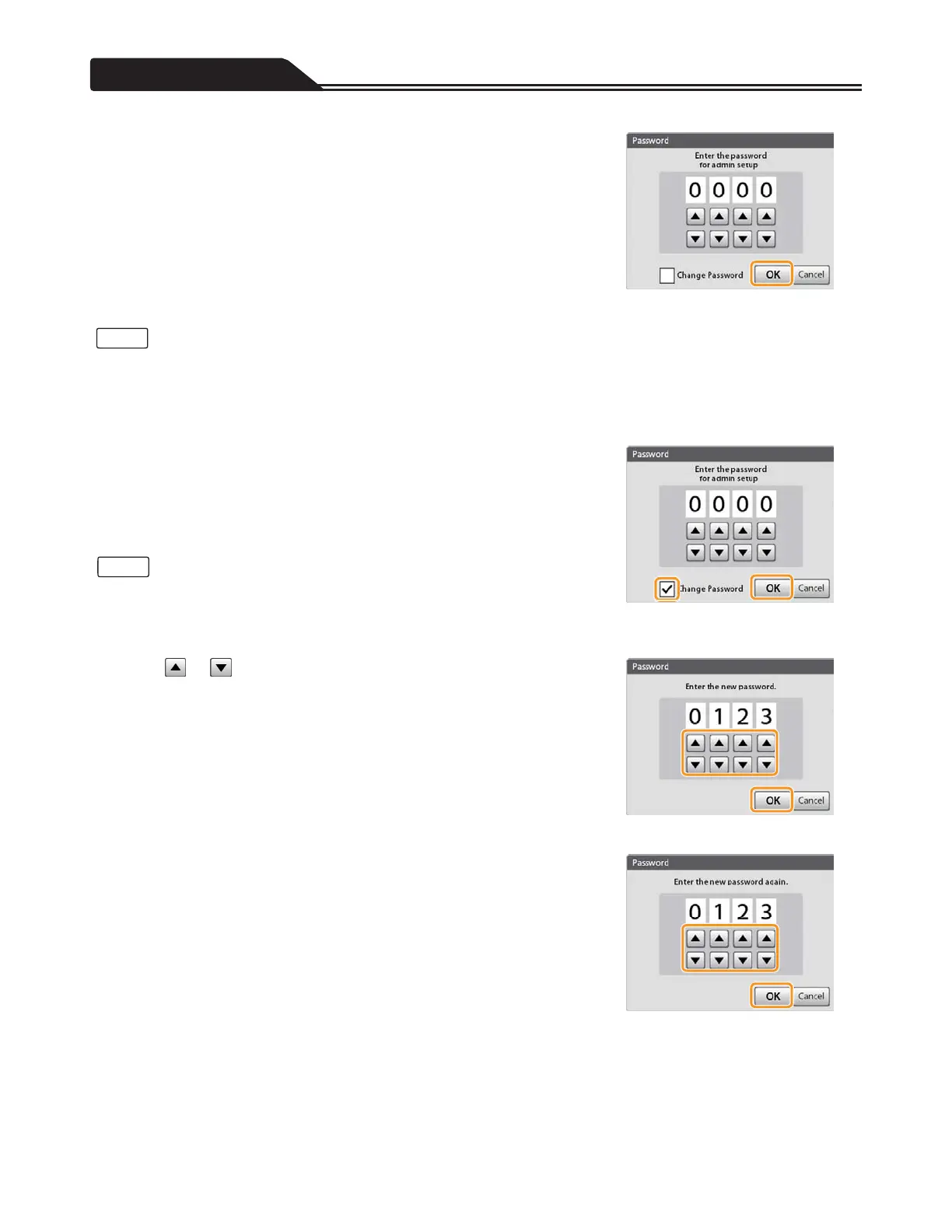
4. Tap [OK]. (Figure 3-61)
Figure 3-61
• When the input password is wrong, “Authentication failed.” is displayed. Tap [Return], and restart from step 2.
• When using for the first time, changing the password is recommended.
Changing the password
1. Perform steps 1 to 3 of “Opening the Admin Setup”
(page 99).
2. Tap the check box of [Change Password] to insert a check
mark, and tap [OK]. (Figure 3-62)
• When the input password is wrong, “Authentication failed.” is displayed. Tap
[Return], and restart from step 2 of “Opening the Admin Setup” (page 99).
• If you have forgotten your password that you set, ask Terumo
ʼs service
representative for initialization of password.
3. Tap or to input a new password you want to set, and
tap [OK]. (Figure 3-63)
Figure 3-62
4. Input the password again, and tap [OK]. (Figure 3-64)
Figure 3-63
Figure 3-64
100
Notes
Notes








 To Next Page