Parts Description
Number Name Description
g
Flow bar indicator
Displays the circulating flow with a bar. The set thresholds of the High Flow
Alarm/Low Flow Alarm are indicated with “
”.
h
Motor speed indicator
Displays the motor speed of the Drive Motor.
i
Perfusion index indicator
Displays the perfusion index value by inputting height and weight in the BSA
setup.
j
Action status indicator
The blue indicator changes when the system is operating.
k
Message area
Displays icons and messages such as the operating conditions, alarms, etc.
For details about the alarm messages, refer to page 134.
l
Setup icon
Opens the “setup menu” screen.
m
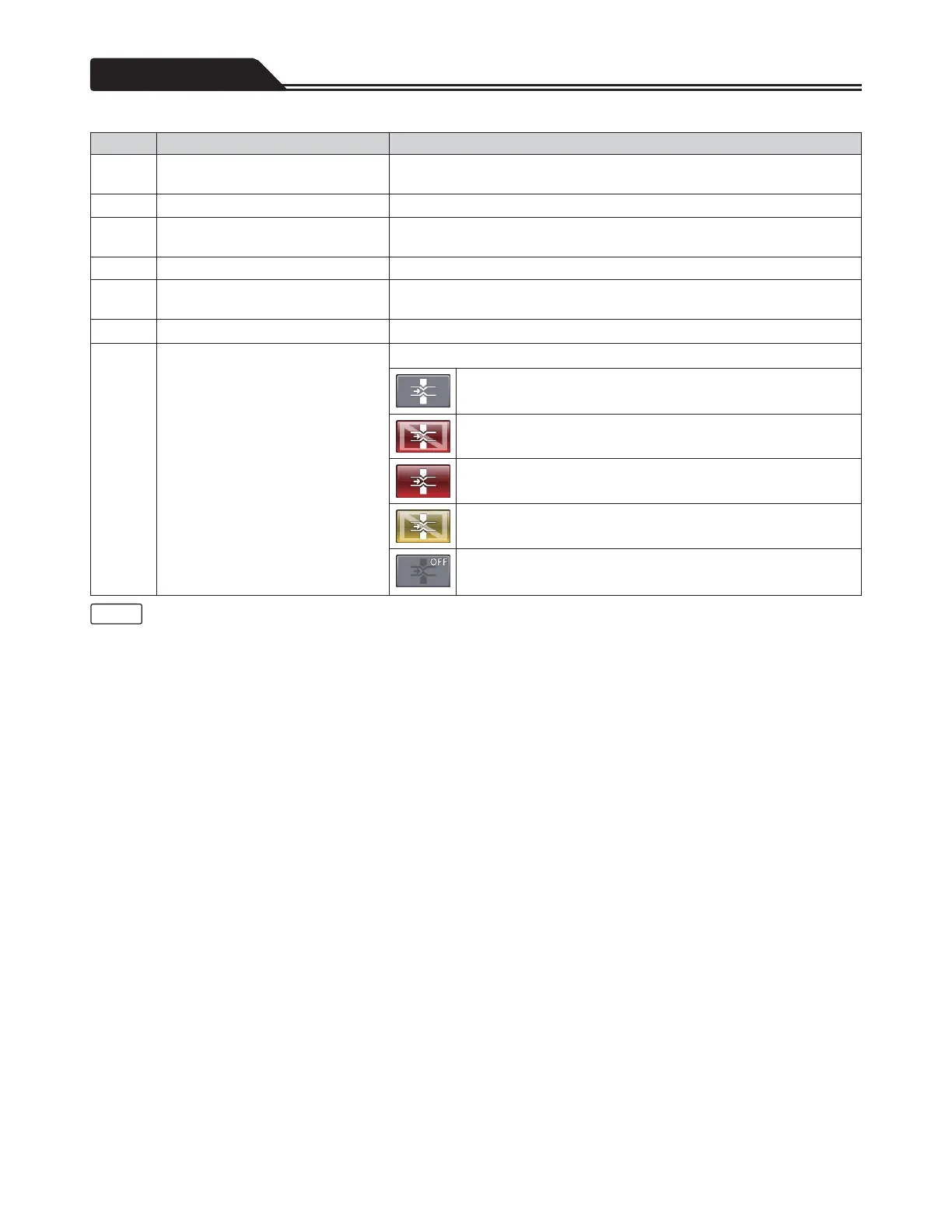
Clamp status icon
Displays the status of the Fast Clamp.
Indicates that the alarm of the Fast Clamp is not issued.
Indicates that a high priority alarm caused by the device is issued
at the Fast Clamp.
Indicates that a high priority alarm caused by the living body is
issued at the Fast Clamp.
Indicates that a low or middle priority alarm caused by the device
is issued at the Fast Clamp.
Indicates that the function of the Fast Clamp is off.
• The measured values of the flow are displayed in numerical indication (
f
flow indicator) and bar indication (
g
flow bar
indicator). The response of the numerical indication is slower to improve the display stability.
10
Note








 To Next Page