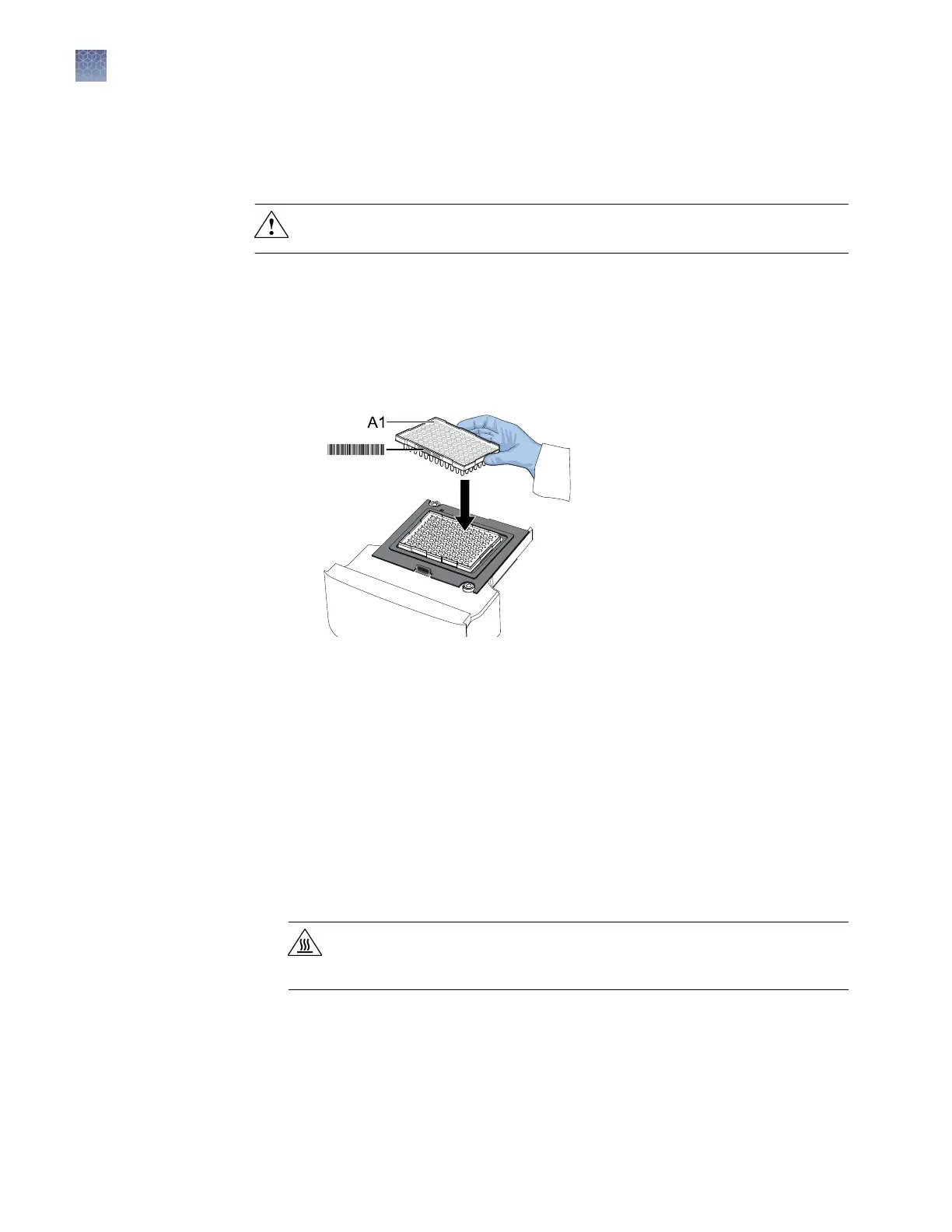
Load and unload a plate in the QuantStudio
™
1 Real-Time PCR
Instrument
CAUTION! Use at caps for 0.2-mL tubes. Rounded caps can damage the
heated cover.
1.
Load the plate.
a.
Open the instrument drawer.
b.
Load the plate onto the plate adapter so that the following criteria are met.
• Well A1 of the plate is in the top-left corner of the plate adapter.
• The barcode faces the front of the instrument.
Note: Do not remove the black plate adapter before loading a plate or tube
strips. If used, tube strips can t loosely in the adapter, but the heated cover
will apply the appropriate pressure to seat the tube strips securely in the
adapter.
c.
Close the instrument drawer.
2.
When the run ends, unload the plate.
a.
Open the instrument drawer.
b.
Remove the plate.
c.
Close the instrument drawer.
CAUTION! PHYSICAL INJURY HAZARD. During instrument operation,
the plate temperature can reach 100°C. Allow it to cool to room
temperature before handling.
Chapter 2 General procedures to operate the instrument
Load and unload a plate in the QuantStudio
™
1 Real-Time PCR Instrument
2
22
QuantStudio
™
1 Real-Time PCR System Installation, Use, and Maintenance Guide









 To Next Page