Before you begin
This section provides instructions for customer installation of the computer and the
instrument. For installation by a eld service engineer (FSE), contact Support to order
a service call.
Before starting the installation, complete the following tasks:
• Determine the conguration for your instrument and obtain the network
information you need (see “Networking“ on page 81).
• Review site requirements (see QuantStudio
™
1 Real-Time PCR System Site
Preparation Guide (Pub. No. MAN0017854).
• Review instrument and computer connections (see “Instrument and computer
connections“ on page 78).
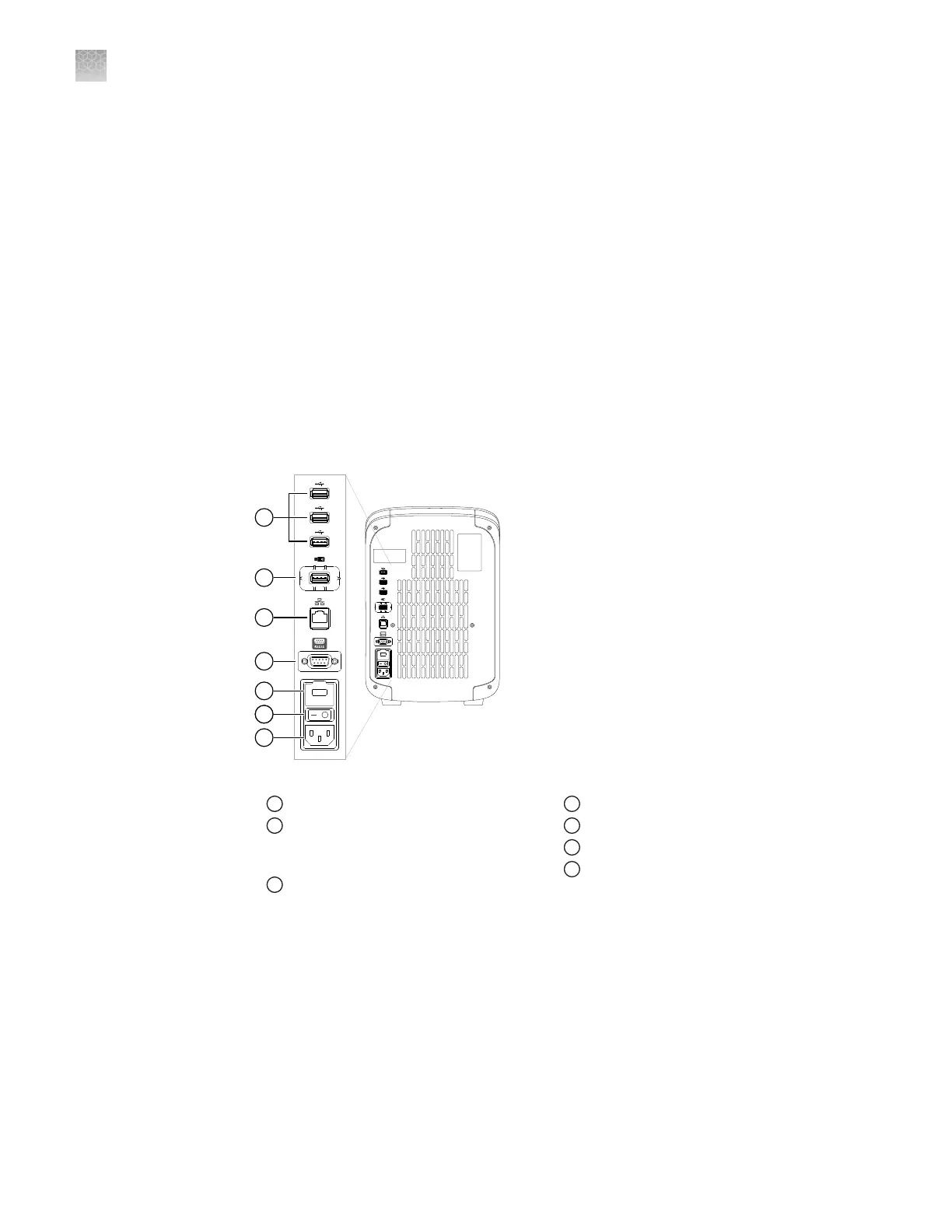
Instrument and computer connections
Figure 4 Instrument back panel
1
USB ports
2
WiFi USB port—Connect USB wireless
adapter for wireless network access
(ordered separately)
3
Ethernet Port—RJ45 port for
100/1,000 Mbps Ethernet communication
with the instrument
4
RS232 Port—For service use only
5
Fuse Cover
6
Power Switch
7
Power Port—100 to 240 VAC
Appendix A Install and connect the instrument to a network
Before you begin
A
78
QuantStudio
™
1 Real-Time PCR System Installation, Use, and Maintenance Guide









 To Next Page