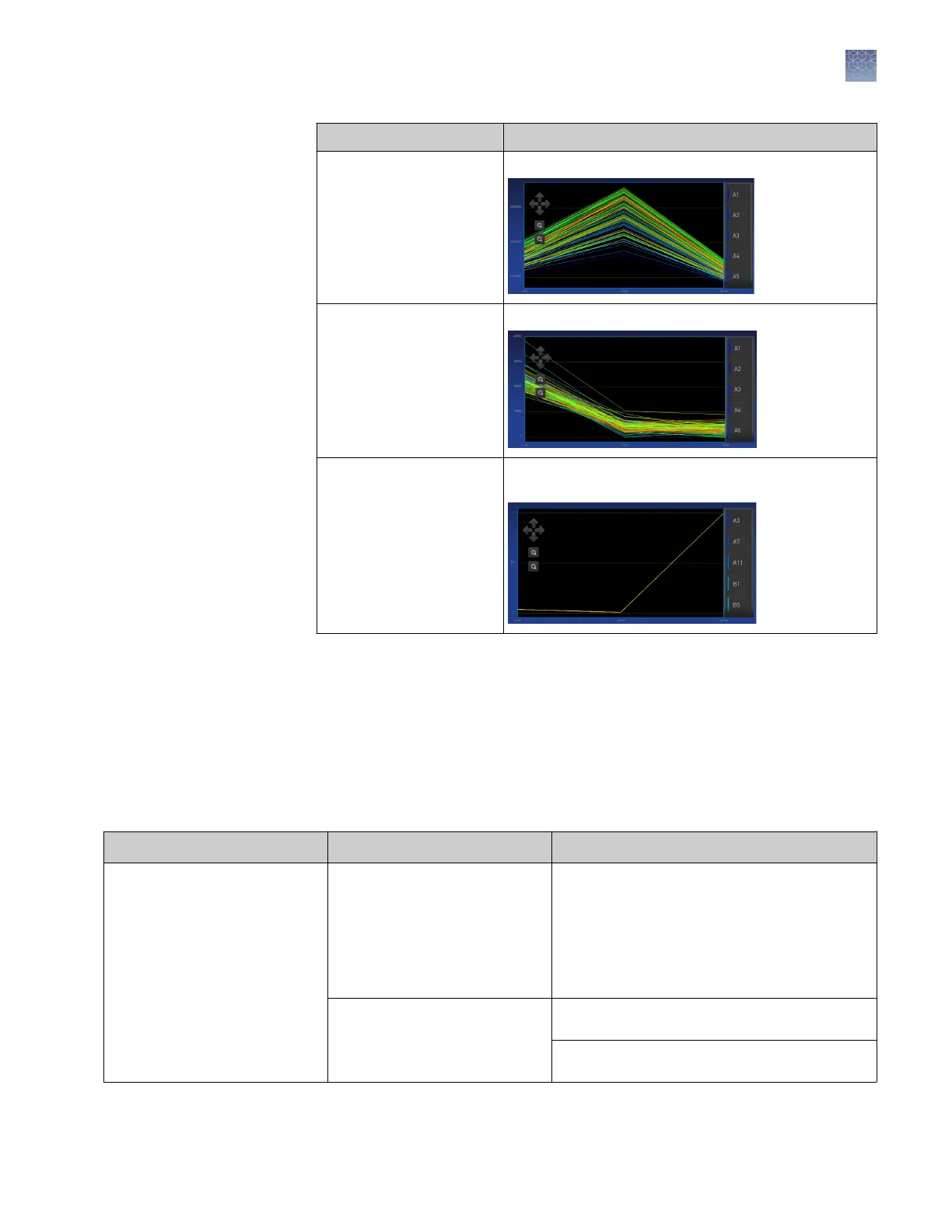
Calibration Example results indicating successful calibration
Uniformity Signals from each well following a uniform trend.
Background Few, if any, signals with abnormally high fluorescence.
Dye Signals from each well following a uniform trend, and
each dye peaks at the correct filter.
3.
In the Calibration Status screen, touch Accept Results or Reject Results.
Accepting the results saves the calibration data to the instrument and overwrites
existing data.
4.
(Optional) Touch Transfer EDS to transfer the calibration data to a USB.
Observation
Possible cause Recommended action
Calibration failed The plate was improperly
prepared.
Ensure the following:
• The correct plate was used for the
calibration performed.
• The plate was properly thawed.
• The plate was properly centrifuged.
• The plate was properly sealed.
The plate is damaged or
contaminated.
Check for damage, improper plate seal, or
contamination.
Order a replacement plate. If the replacement
plate fails, contact Support.
Troubleshoot
calibration failure
Chapter 5 Calibrate and verify instrument performance
Perform ROI/uniformity, background, and dye calibrations
5
QuantStudio
™
1 Real-Time PCR System Installation, Use, and Maintenance Guide
55









 To Next Page