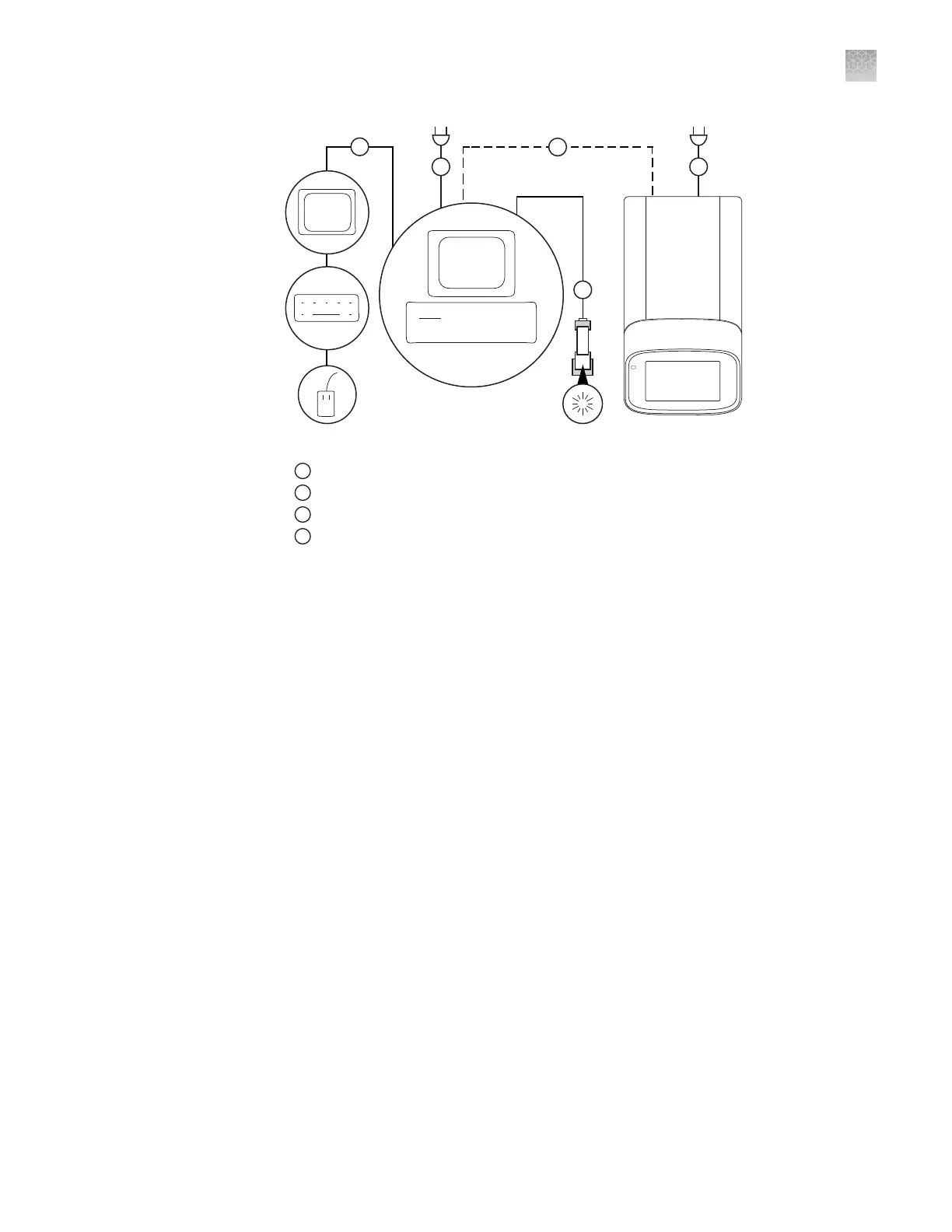
Figure 5 Instrument‑to‑computer connections (minitower configuration)
1
Detachable power supply cord compatible with local power supply receptacle.
2
Connection between the computer and the instrument.
3
Connection between the computer and the monitor, keyboard, and mouse.
4
Connection between the computer and the
(optional)
handheld barcode scanner.
Unpack and install the instrument
1.
Prepare the installation site as described in the QuantStudio
™
1 Real-Time PCR
System Site Preparation Guide (Pub. No. MAN0017854).
2.
Follow the pre-printed instructions on the instrument box to unpack the
instrument, accessories, and reference documentation. Save the packing material
for future use or recycle it.
The instrument box contains:
• Reference documentation: Welcome note, unpacking and set up instructions
card, system documentation insert
• One instrument
• Accessories: power cable, Ethernet cable, USB drive, reaction tube retainer
• Shipping plate
Note: Save the shipping plate but do not use it to operate the instrument.
If you ordered the wireless adapter, it is provided separately.
3.
Place the instrument on the bench.
4.
Plug the power cable into the power port on the back panel of the instrument,
then plug the cable into an electrical receptacle.
Appendix A
Install and connect the instrument to a network
Unpack and install the instrument
A
QuantStudio
™
1 Real-Time PCR System Installation, Use, and Maintenance Guide
79









 To Next Page