1
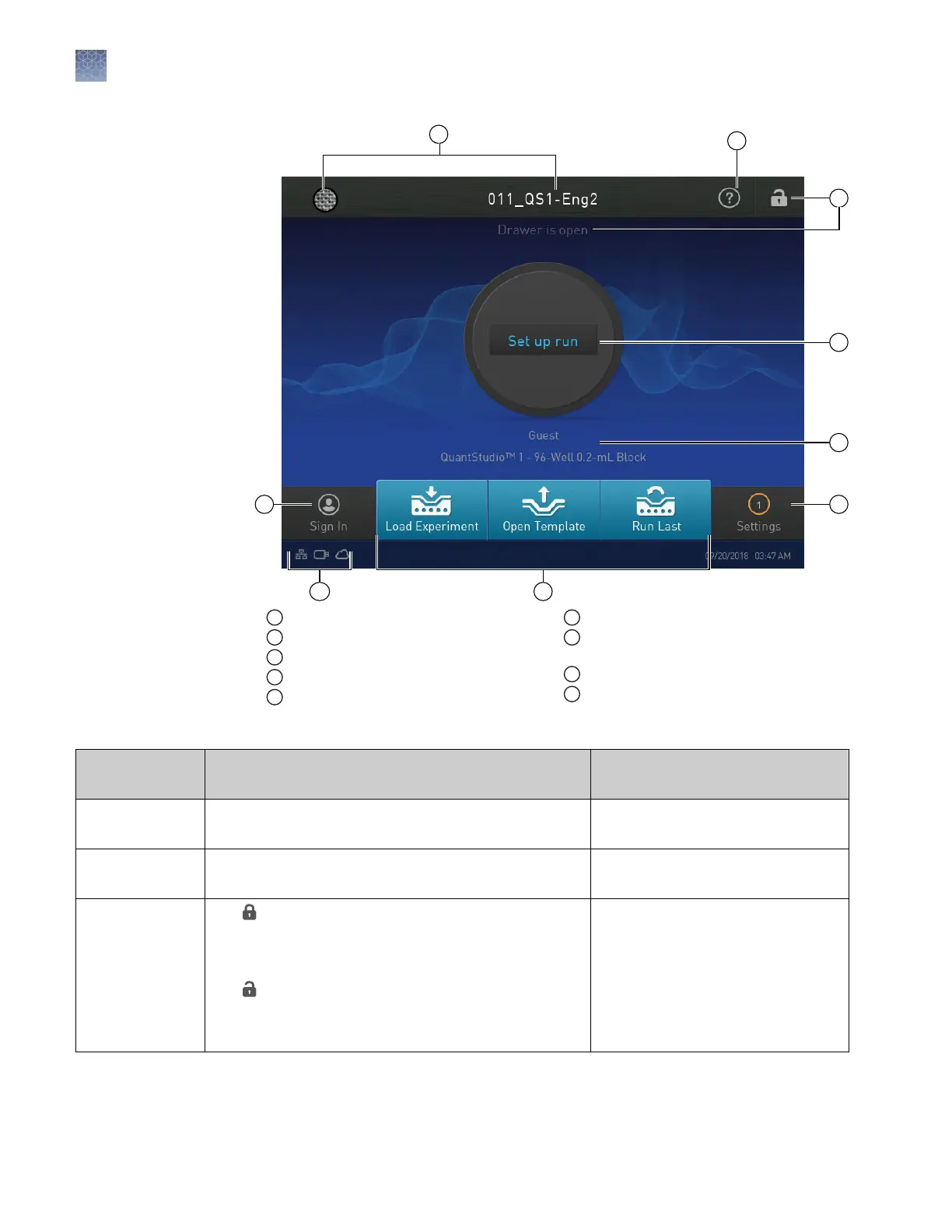
Avatar and Instrument name
2
Help icon
3
Drawer status
4
Status dial
5
Current user name; instrument block type
6
Settings button
7
Buttons for accessing Experiment
Template files (EDT)
8
Connectivity icons
9
Sign In (or My Profile) button
Table 2 Parts of the home screen
Element of the
home screen
Function For more information, see...
Avatar and
Instrument name
Set by the administrator to uniquely identify instrument. “Manage the instrument name
(Administrator only)“ on page 31.
Help icon Touch to launch the touchscreen Help system to access
step-by-step instructions.
—
Drawer status
• — The drawer is locked. The drawer locks during
experiment runs, calibration runs, and self
verification test runs. The drawer automatically
unlocks when a run is complete.
• — The drawer is unlocked.
• Drawer is open — The drawer is open. No message
displays when the drawer is closed.
—
Parts of the home
screen
Chapter 1 Product information
Instrument hardware description
1
12
QuantStudio
™
1 Real-Time PCR System Installation, Use, and Maintenance Guide









 To Next Page