Configure ramp rates and pause settings
• In the Method screen, touch Edit4Manage Steps4Advanced Options.
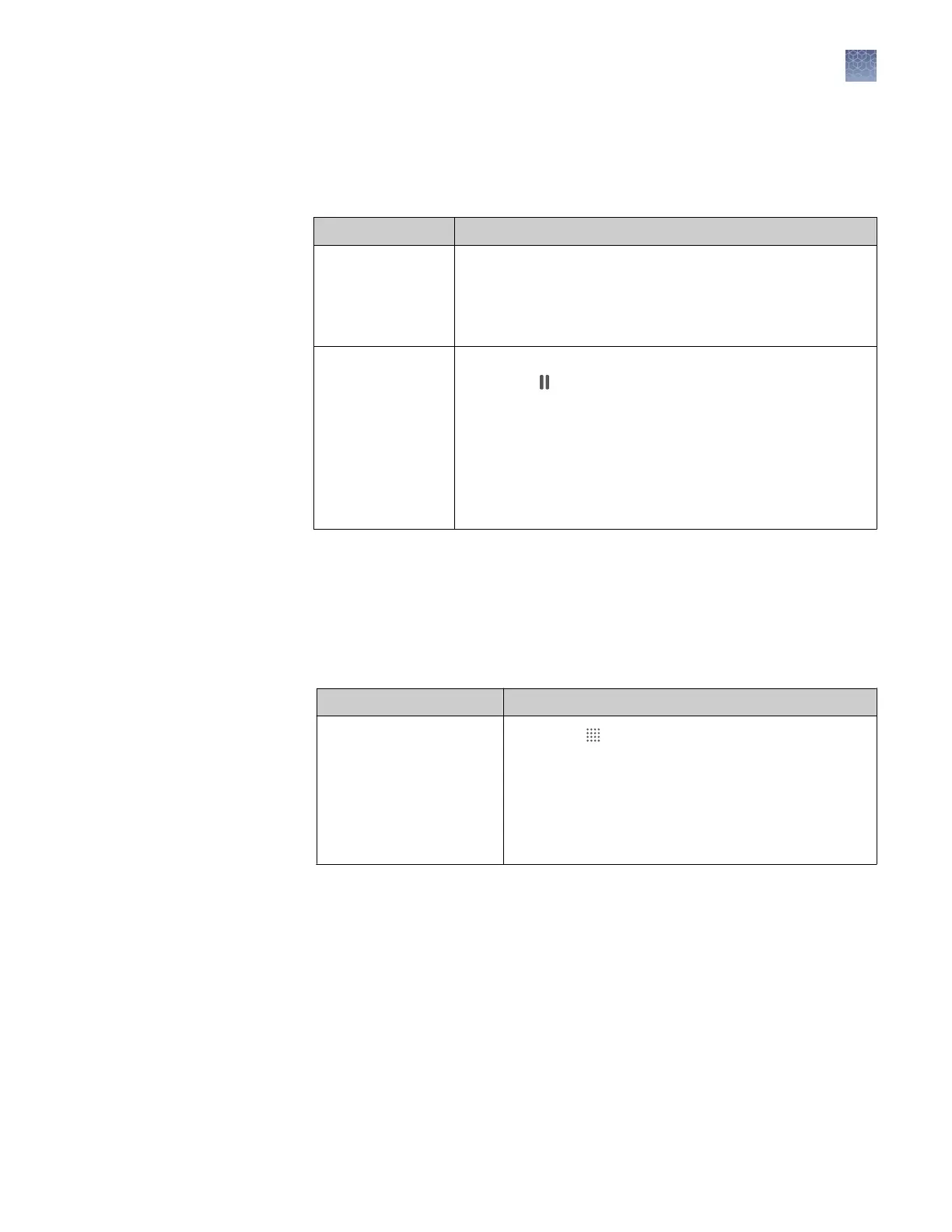
Option Procedure
Edit Ramp Rates
1. Touch Ramp Rates.
2. Touch the ramp rates fields.
3. Touch Enter.
4.
(Optional)
Edit additional steps, then touch Done.
Add a pause
1. Touch Add Pause.
2. Touch in a stage.
3. Enter the pause temperature, and the cycle after which
the pause will occur.
4. Touch Enter.
5. The pause is represented by a P in the corner of the
stage.
6. Touch Done.
1.
Access a template (EDT le). For more information, see the following sections.
• “Create and run an experiment from a template“ on page 40.
• “Run an experiment from a saved le“ on page 40.
• “Repeat the last instrument run“ on page 41.
2.
In the Plate screen, dene, assign, and view well details.
Option Procedure
Define and assign samples
in the plate layout view
1. Touch .
2. Touch Manage or touch an individual well.
3. Touch the Samples subtab.
4. Select one or more wells, then touch Edit.
5. Enter sample names for the selected wells, then
touch Done.
Define, assign,
and view well
details
Chapter 4 Create and run experiments on the instrument
Edit an experiment before starting a run
4
QuantStudio
™
1 Real-Time PCR System Installation, Use, and Maintenance Guide
45









 To Next Page