CFM-BL10Pro General instruction manual
29 / 87
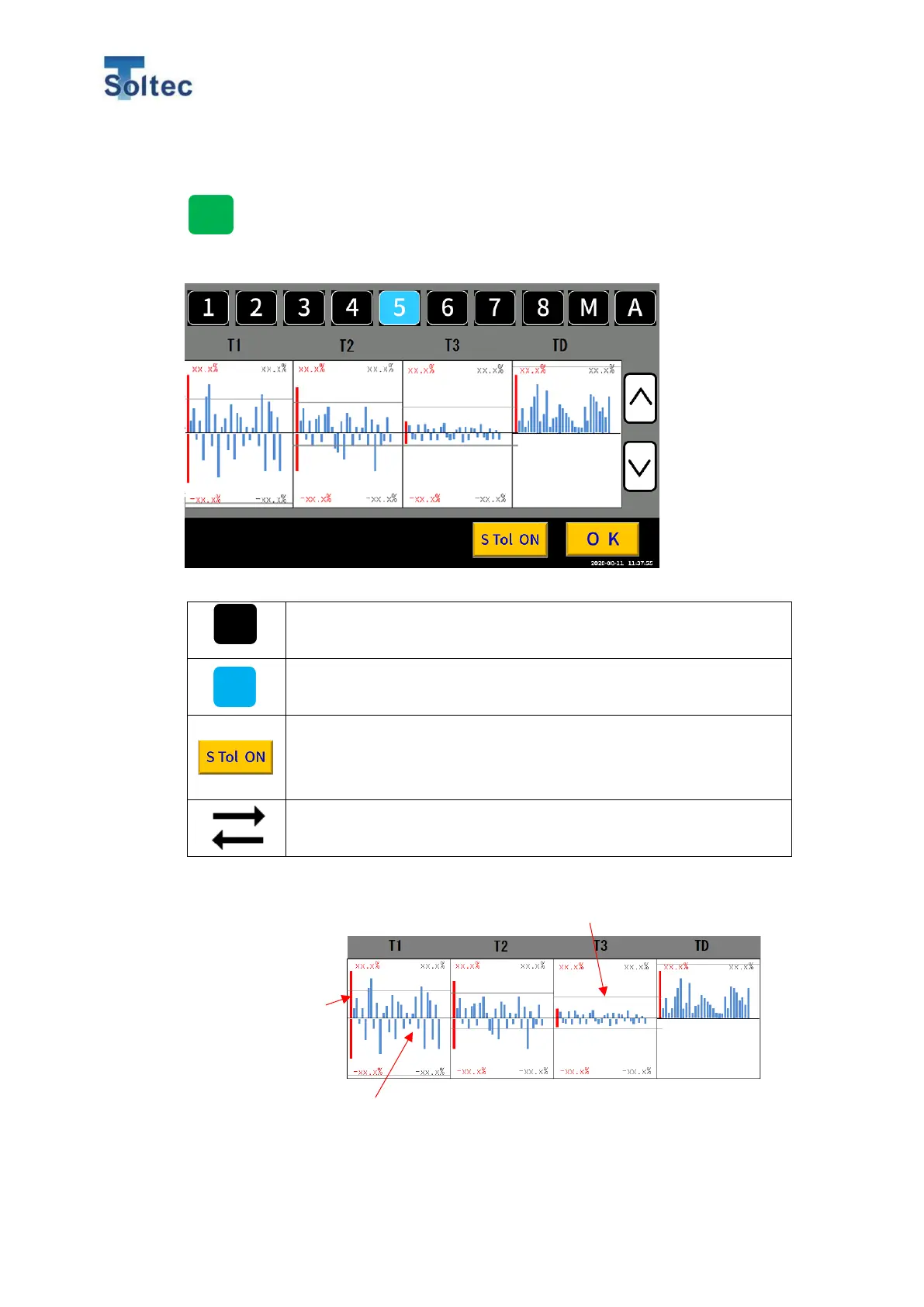
5.1.6. Tolerance display
At the top left of the OPE or Teach screen, Press “A”,” Number”, or ”M”
buttons to open the tolerance selection screen.
Tolerance select button (Black color: unselected)
By pressing the button, the tolerance will be selected.
Tolerance select button (Blue color: unselected)
Button for turning ON or OFF of S tolerance. When the button is
"ON", it means the S tolerance is enabled, and when it is OFF, it
means the S tolerance function is disabled.
By sliding the screen to the left or right, switch T1 ~ TD screen and
S1 ~ SD screen.
T1 ~ TD Transition graph
Red graphs are
the maximum and
minimum values
of measurement
values.
Gray lines are positive and negative tolerances.
Blue graphs are measurement values of the latest 30 samples. Positive
judgement values are on the upper side. Negative judgment values are on
the lower side.



 To Next Page