CFM-BL10Pro General instruction manual
55 / 87
area is displayed the transition % graphs for latest 30 crimps regarding the center
of the graph as the 0% (A reference force curve and measured force curve have
the same area values). The red graphs at the left end of each graph area show
the minimum and maximum values of the are latest 30 pieces. And, the tolerance
values that are displayed under graph area is appeared only when the Tolerance
mode is “A” or “M”.
(E.g.) Only when Tolerance mode is “A” or “M”, the tolerance values are displayed.
6.2.3. Program select screen
When Program function is On in System setting, click the CH bar on the top of the
force curve displayed area and the Program list is displayed. Select the program
you will produce and click ok button. This screen cannot be opened when the
Program function is OFF.
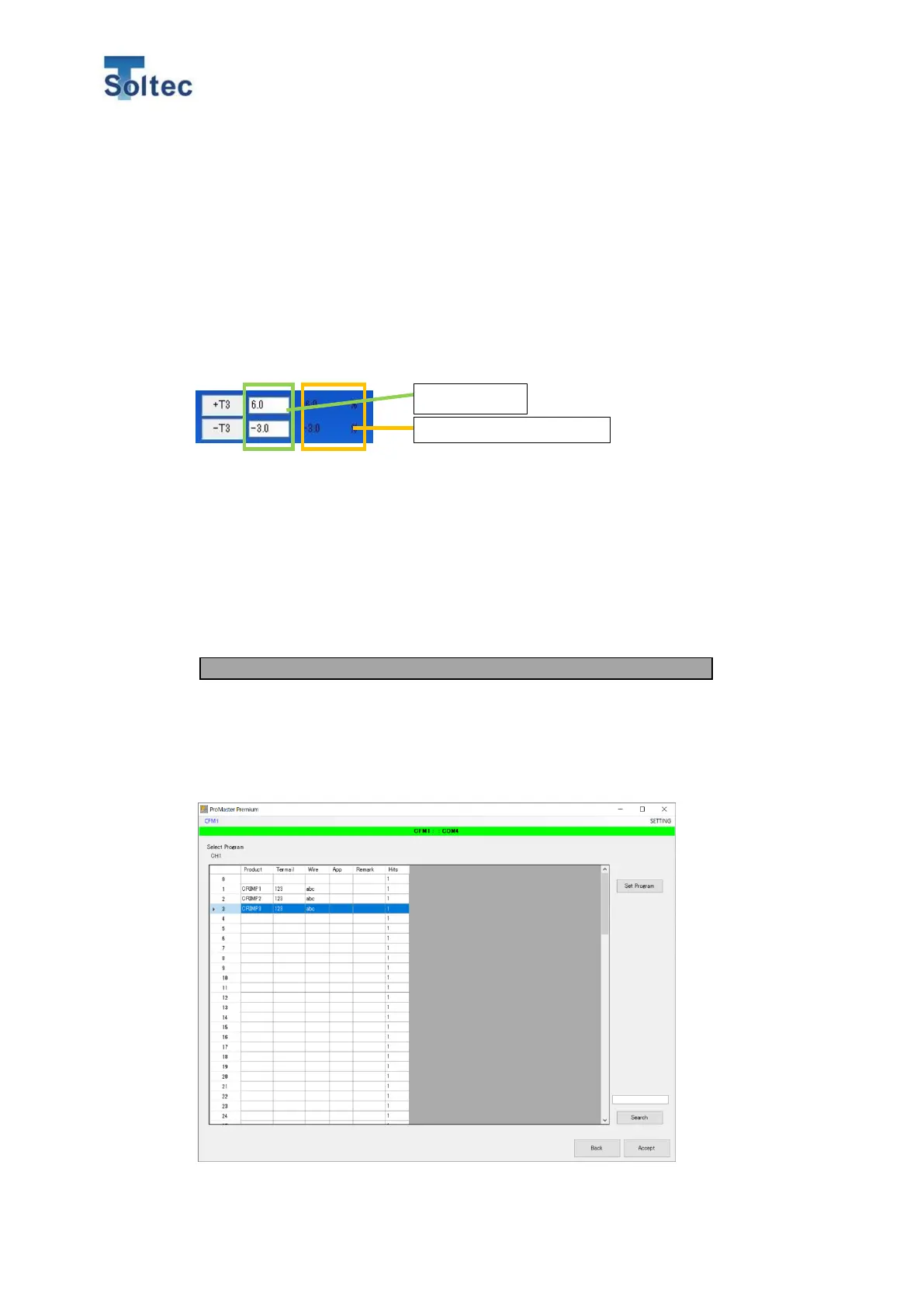
The values in the white frames shows the current tolerance values. The
tolerance values can be changed by putting values in these frames. If the “A”
mode is used and the tolerance values are changed, the values are
automatically saved in the tolerance “M”. The values on the right side of the
frame are the tolerance that is calculated by Auto tolerance based on AI. These
tolerance values are displayed every 30 good samples, even if CFM is not in the
Auto tolerance mode.
Recommended tolerance by AI



 To Next Page