CFM-BL10Pro General instruction manual
41 / 87
*Program
In order to correctly detect defective samples depending on each item(terminal,
wire and applicator), CFM can be save a condition for capturing force curve, force
curve position alignment and dividing point for T1 to T3 as one Program data. In
that Program data, an individual product number, terminal number, wire number,
applicator number and so on can be saved. Select a program from a list in which a
program you produce is saved. CFM operates a judgement based on the saved
conditions. When Program is enabled, a standard setting saved in Program number
0 is always applied to force curve capturing, position alignment and area division.
*Adaptive
Crimping force curve slightly changes based on a consumption of an applicator
blade, lubrication of crimping machine and temperature during continuous crimping.
These changes make a difference between an initial teaching force curve and a
measured force curve and good samples errors may increase. To reduce numbers
of good sample errors, CFM recalculates a reference force curve based on the
latest 10 good samples. Normally enable this function.
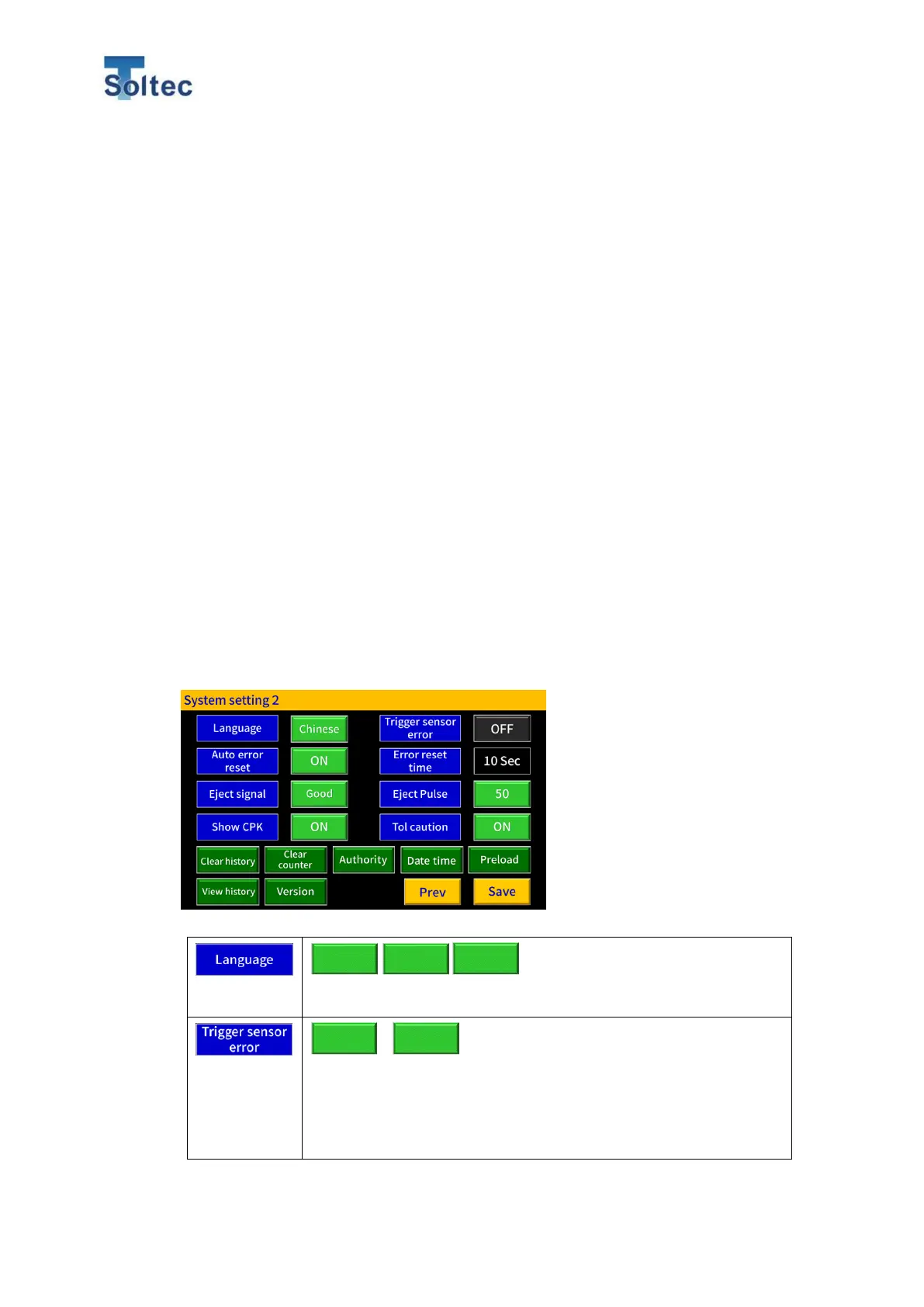
5.3.2. System setting 2
Switch the display language.
Only when an external trigger sensor is connected to CFM and
CFM is in Switch rise or fall mode, this function is available. CFM
issues a trigger sensor error when a trigger signal is input faster
than a crimp force signal. When CFM is trigger Auto mode, this
function is not available. The initial setting is OFF.



 To Next Page