CFM-BL10Pro General instruction manual
83 / 87
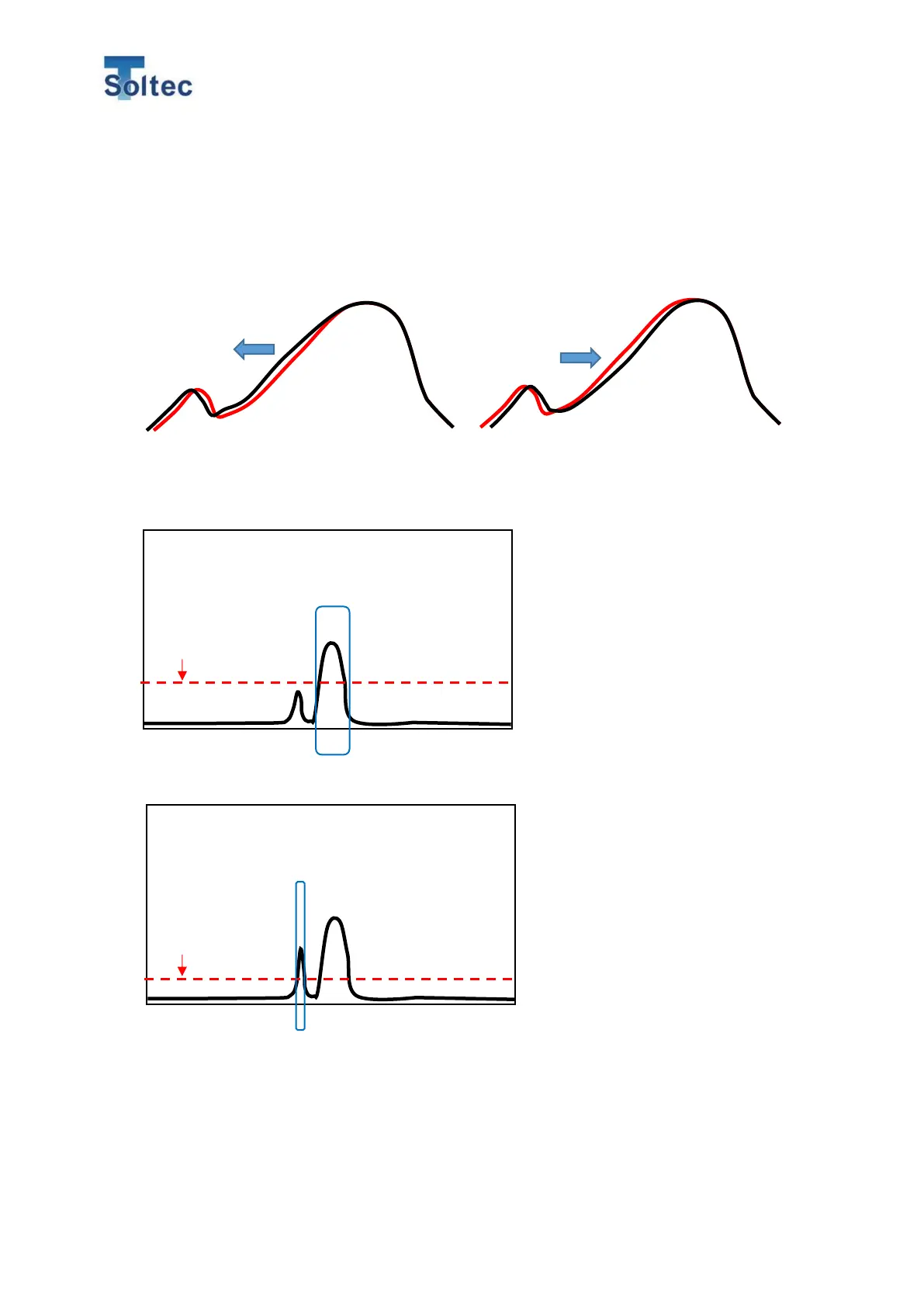
the actual curve does not match with the reference one. When the curves are not
aligned correctly with each other, it is difficult for CFM to compare those 2 curves and
make a precise judgement. Therefore, it is suggested to set the Alignment to 40% on
the right. In case of using servo crimping machines, you should set at 70% on the
left. Refer to 5.2.1 Program edit screen for how to set the alignment function.
Cause 5: The waveform is unstable and different each time crimping. This causes
CFM to acknowledge the wrong curve, thereby making false alarms.
After doing TEACH, even if you use the same applicator, terminal, and wire, the noise
may still get in before or after the actual force curve depending on the conditions of
the crimping machines or applicators. This could attribute to mechanical or electrical
This graph shows the left half
of the wave either shifts to the
left / right
CFM acknowledges this
curve as an actual one.
CFM acknowledges this
curve as an actual one.
CFM detects 2 different force curves,
in which the 1
st
one may be from the
mechanical noise. Since the 1
st
one is
below the trigger level, CFM only
takes the 2
nd
curve for inspection.
In this case, the mechanical noise (1
st
curve) exceeds the trigger level, CFM
wrongly recognizes it as a force
curve.



 To Next Page