E-10 Videojet DataFlex 6530 Service Manual - Rev AA
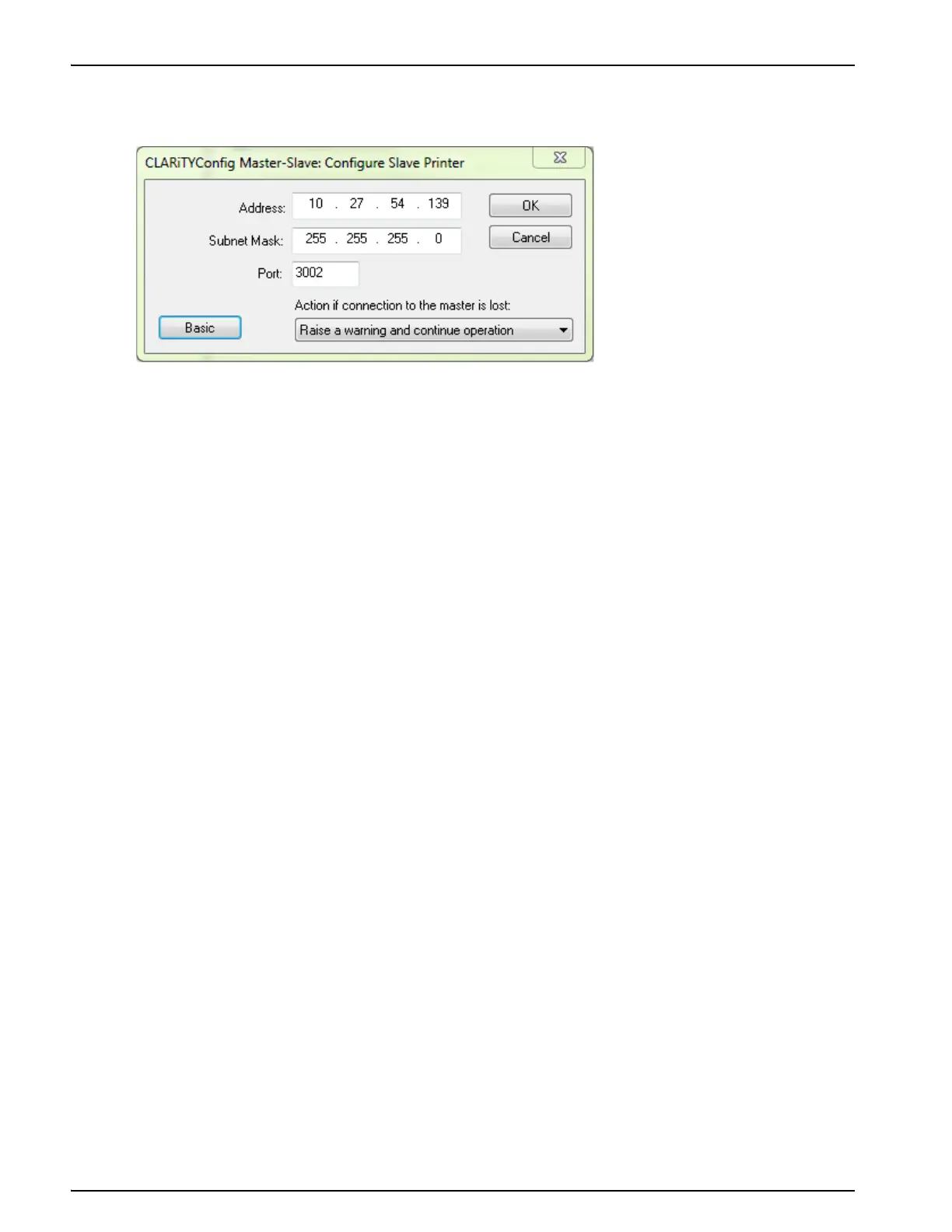
3. Click on the Advanced button, to change to advanced configuration. The advance configure
slave printer dialog box appears (Figure E-10).
4. Enter the IP address, network subnet mask, and the port number of the slave printer in the in
Address field, Subnet Mask field, and Port field respectively.
5. Select the option to be taken in the event of communication failure between the Master
printer and Slave printer from the drop-down list.
The three options available are:
- No Action (ignore the condition)
- Raise a Warning message and continue operation
- Raise a Fault message and suspend operation (stop printing)
6. Touch OK to configure the Slave printer.
Once the slave printer is configured, on a Standard Videojet DataFlex 6530 Printer, the 'JOB'
button on the screen of CLARiTY is disabled (greyed out) as shown in Figure E-4 on page E-5.
After a short period of time the Slave printer may raise a Warning or Fault message (depending
on the setting you chosen in 'Action if connection to the Master is lost') to indicate that the
Master printer is absent, as shown in Figure E-5 on page E-5.
Once the Master has been configured and communication established between printers, the
warning message can be cleared from the Slave printer screen.
Repeat the above steps to install the remaining Slave printers in the group.
Figure E-10: Advanced Configure Slave Printer Dialog Box



 To Next Page