ELECTRICAL SYSTEM
B2420, WSM
9-S25
(14) Mater Panel
Connector Voltage
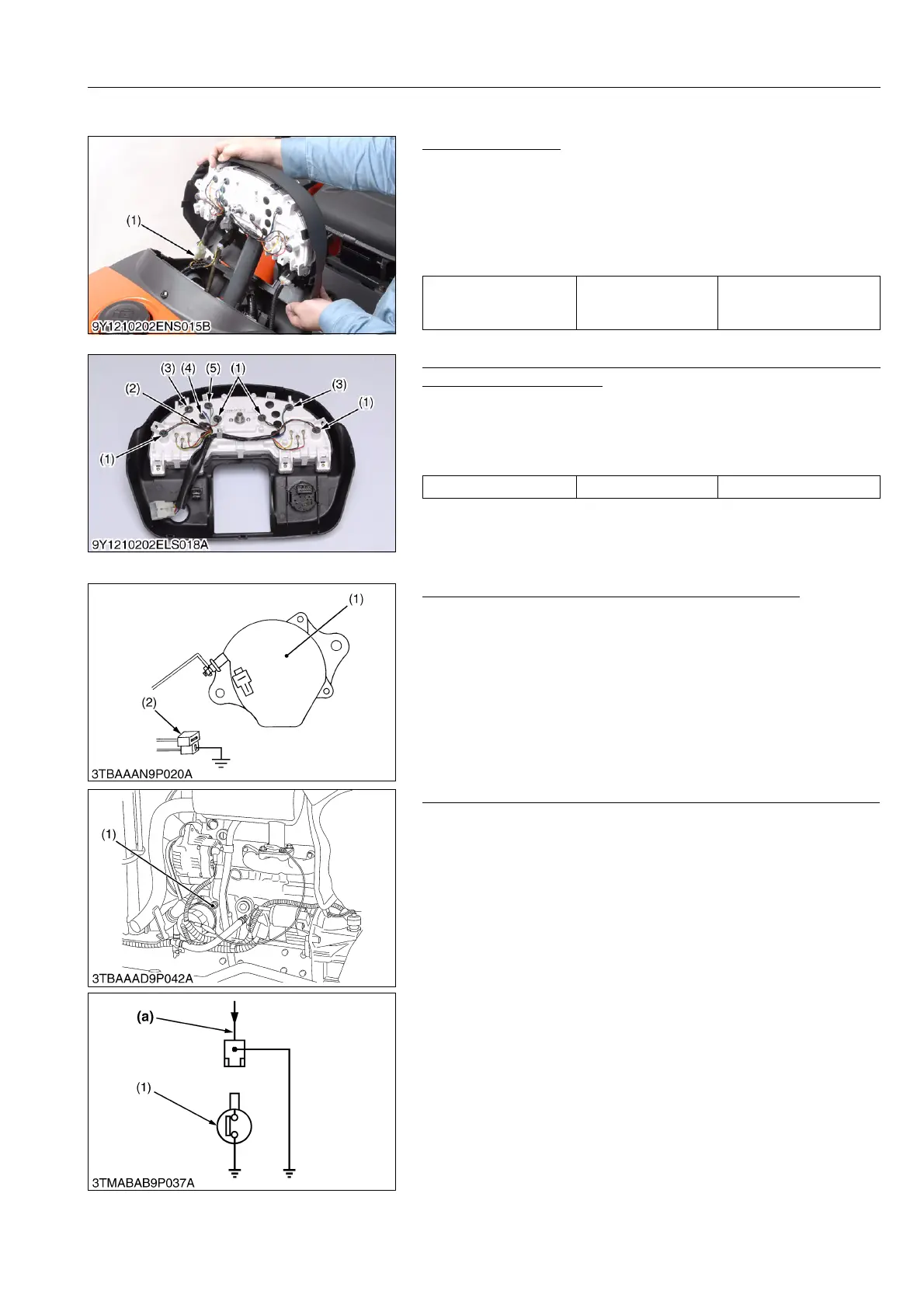
1. Remove the panel board and disconnect the connector from it.
2. Turn the main switch ON.
3. Measure the voltage with a voltmeter across the terminal and
the earth terminal.
4. If the voltage differs from the battery voltage, the wiring harness,
fuses and main switch should be checked.
9Y1210436ELS0057US0
Monitor Lamp (for Charge, Engine Oil Pressure, Pre-heat,
Illumination and Hazard)
1. Removing the meter panel from the tractor.
2. Remove the each lamp.
3. Measure the lamp resistance.
4. If it is infinity, replace the lamp with new.
9Y1210436ELS0058US0
Charging Circuit (Panel Board and Wiring Harness)
1. Disconnect the 2P connector (2) from the alternator after turning
the main switch OFF.
2. Turn the main switch on and connect a jumper lead from the
wiring harness connector terminal (White / Red) to the chassis.
3. If the charge lamp does not light, the panel board circuit,
alternator, wiring harness or fuse is fault.
9Y1210436ELS0059US0
Engine Oil Pressure Switch (Panel Board and Wiring Harness)
1. Disconnect the lead from the engine oil pressure switch after
turning the main switch OFF.
2. Turn the main switch ON and connect a jumper lead from the
lead to the chassis.
3. If the engine oil pressure indicator lamp does not light, the panel
board circuit or the wiring harness is faulty.
9Y1210436ELS0060US0
Voltage
Terminal
(Red / Yellow)
– Terminal (Black)
Approx. 12V Battery
Lamp spec. All lamp 12 V, 1.7 W
(1) Illumination
(2) Pre-heat
(3) Hazard
(4) Charge
(5) Engine Oil Pressure
(1) Alternator (2) 2P Connector
(1) Engine Oil Pressure Switch (a) From Engine Oil Pressure Lamp


 To Next Page