138
Customize Menu Settings for Individual Use (Set Mode)
Set Mode: SIGNALING Menu Operations
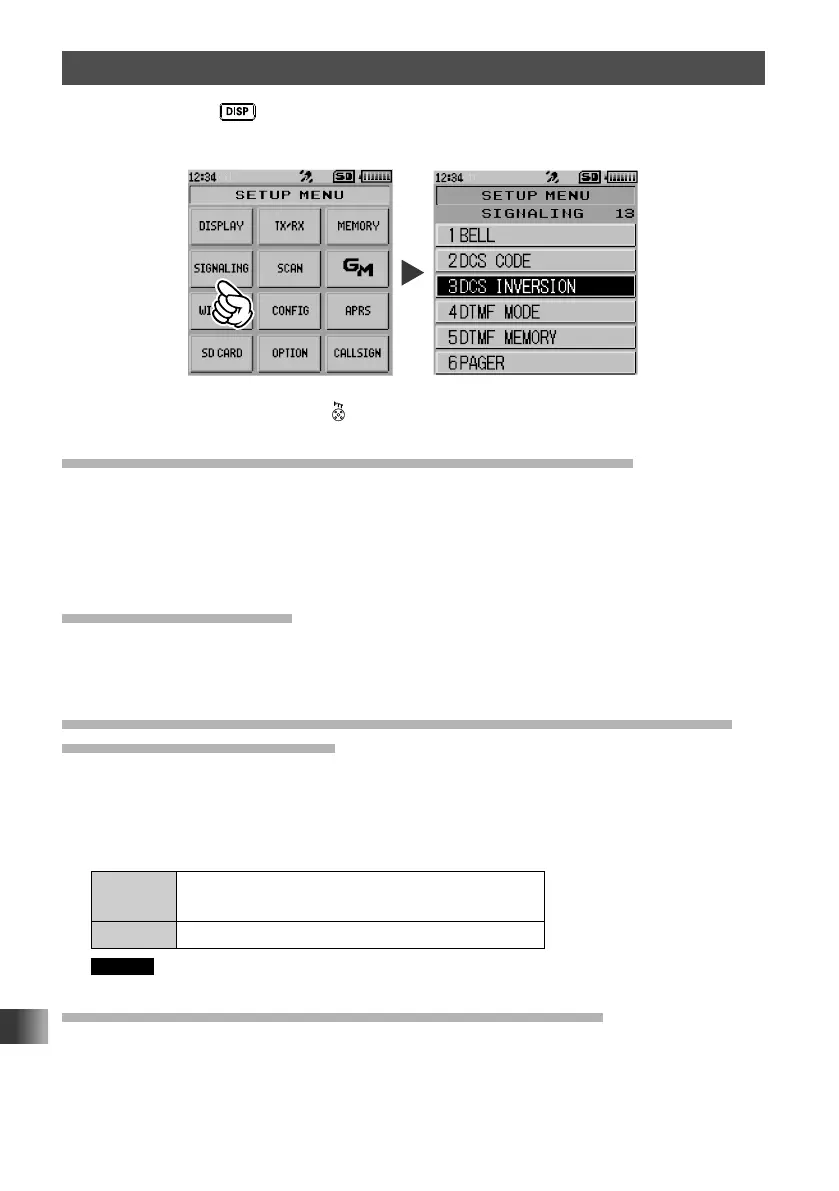
Press and hold the key for over one second to display “SETUP MENU”, then touch
[SIGNALING] to set the individual items.
After completing the setup, press to exit from Set mode.
Notification of a Call from a Remote Station by the Bell
Set whether or not to alert you of a call from a remote station using the bell by selecting
[1 BELL].
For details, see “Notification of a Call from a Remote Station by the Bell Function” on
page 114.
Selecting a DCS Code
Select the DCS code out of the 104 codes from 023 to 754 by selecting [2 DCS CODE].
For more details, see “Setting the DCS Code” on page 112.
Transmitting and Receiving a DCS Code with an Inverted Phase
DCS INVERSION Function
The transmit and receive DCS code phase may be inverted when using the digital code
squelch function.
1 Touch [3 DCS INVERSION].
2 Rotate the DIAL to select the phase combination for transmit/receive.
RX Homeomorphic / Both Phase / Inverted
Phase
TX Homeomorphic / Inverted Phase
Remark The default setting: Receive [Homeomorphic], Transmit [Homeomorphic]
Setting the Transmission Method of the DTMF Code
Set the transmission method of the registered DTMF code by selecting [4 DTMF MODE].
For details, see “Transmitting the Registered DTMF Code” on page 104.



 To Next Page