14
Before Using the Transceiver
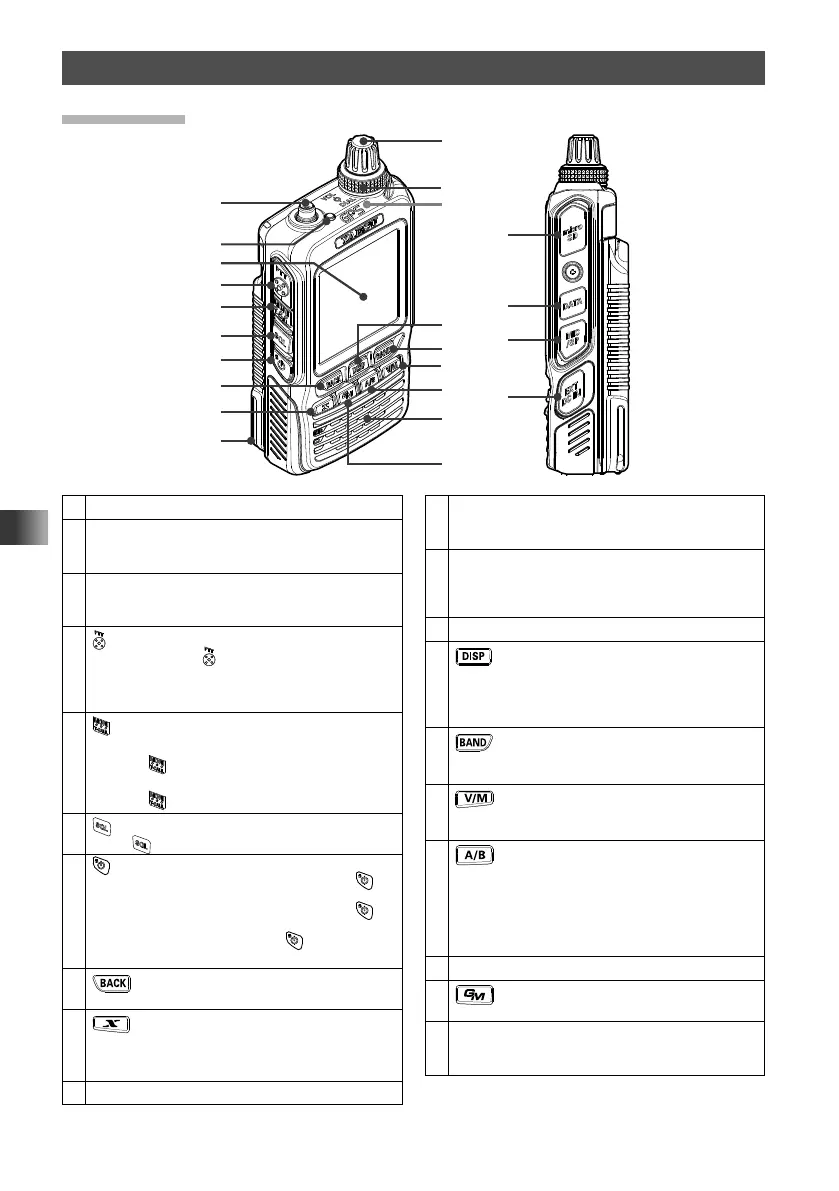
Names and Functions of Controls
Transceiver
①
③
④
⑤
⑥
⑦
⑩
⑬
⑮
⑰
⑲
②
⑧
⑨
⑯
⑭
⑳
㉑
㉒
㉓
⑫
⑱
①
Antenna terminal (SMA)*
②
TX/BUSY LED
Lights green (A-band) or blue (B-band) during
receive and lights red during transmit.
③
Touch screen display
Touch to set the frequency and various other
settings.
④
[PTT] switch
• Press and hold
to transmit, and release it to
receive.
• Pressing [PTT] while in Set mode completes the
Set mode function.
⑤
[MONI/T-CALL] switch
USA/EXP version
While
is pressed: Squelch OFF
European version
While
is pressed: T.CALL (1750 Hz)
⑥
[SQL] switch
Press
, rotate VOL: Squelch level adjustment
⑦
Power switch
• When the power is off, press and hold
for
over one second: Power on
• When the power is on, press and hold
for
over one second: Power off
• When the power is on, press
: Engages and
releases the key lock
⑧
[BACK] key
• Press to return to the previous screen.
⑨
[x] key
• In normal mode, press to start WIRES-X.
• When WIRES-X is activated, press and hold for
over one second to return to the normal mode.
⑩
Battery pack*
⑪
DIAL
Rotate to change the frequency or select a
memory channel.
⑫
VOL
Adjusts volume. Turn clockwise to increase
the audio level, and turn counterclockwise to
decrease the audio level.
⑬
GPS antenna
⑭
[DISP] key
• Pressing each time switches between the
frequency display and the backtrack display.
• Press and hold for over one second to enter Set
mode.
⑮
[BAND] key
• Pressing each time increases the frequency
band.
⑯
[V/M] key
• Pressing each time switches between VFO
mode and memory mode.
⑰
[A/B] key (switching between operating
bands)
• Pressing each time switches between A-band
and B-band.
• Press and hold for over one second to switch
between the Dual Band Receive mode and the
Mono Band Receive mode.
⑱
Microphone
⑲
[GM] key
Press to turn the GM function on/off.
⑳
microSD memory card slot*
Open the cover and insert your microSD memory
card.



 To Next Page