159
Functions to Use as Necessary
Functions to Use as Necessary
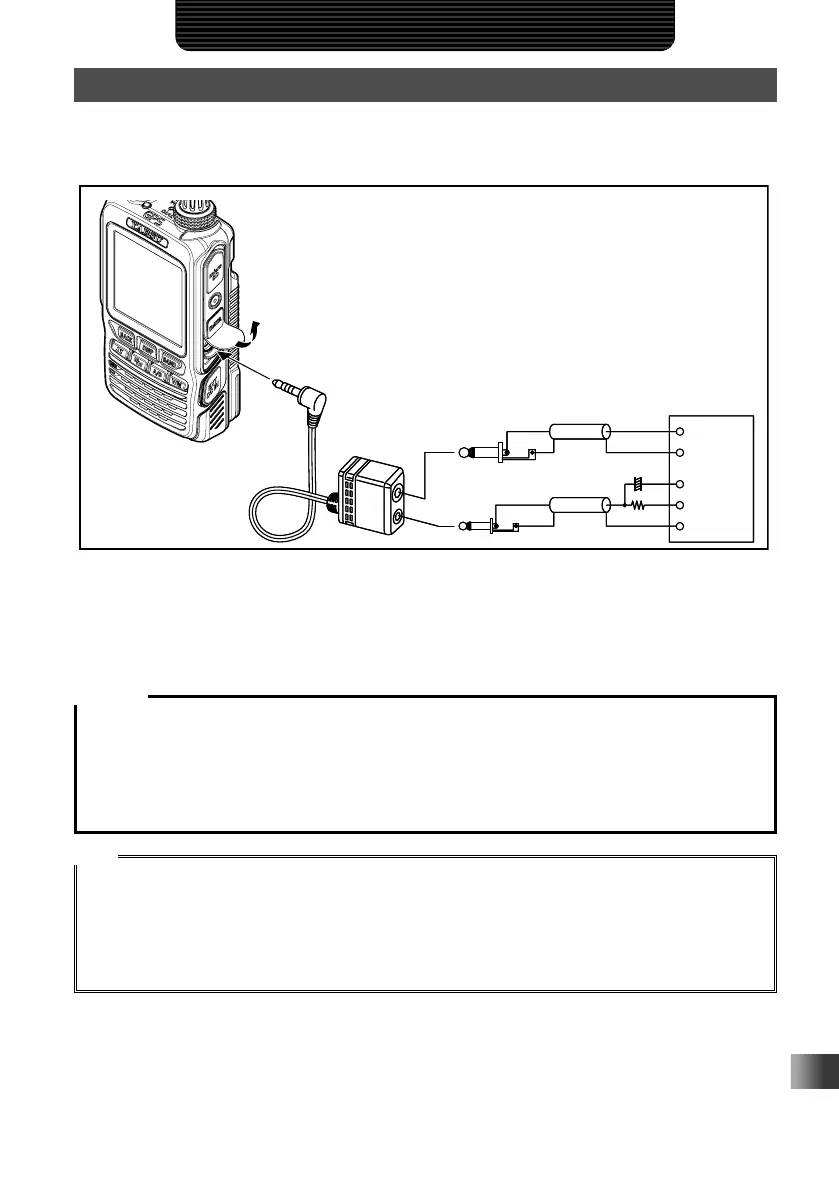
Using the Transceiver for Packet Communication
You can perform packet communication with your transceiver by connecting a TNC
(Terminal Node Controller) using an optional Microphone Adapter (CT-44).
TNC
SP
GND
GND
2 kΩ
10 F
ȣ
MIC
MIC
EAR
PTT
TNC
SP
GND
GND
2 kΩ
10 F
ȣ
MIC
MIC
EAR
PTT
After connecting the TNC to the transceiver, set the output signal level to the TNC by
adjusting the sound volume level of your transceiver.
Also, adjust the signal level input to your transceiver using the output level adjustment
volume on the TNC (Input level cannot be adjusted on your transceiver).
Caution
When sending a vast volume of data, the transmission takes a longer time and the transceiver may be
overheated. If the transmission is continued for a long time, the overheat prevention circuit will operate
and the transmission power decreases. If the transmission is continued further, the transmission will be
automatically stopped to prevent the transceiver from overheating and consequently malfunctioning. If
the overheat prevention circuit has operated and then the transceiver returns to the receive mode, turn
the transceiver off, or leave it in the receive mode until the temperature falls.
Tips
• Set the receive battery Save Function to OFF during packet communication by selecting [CONFIG]
→ [17 SAVE RX] in the Set mode.
• Reception can be interfered with by noise generated from your PC.
• If the transceiver enters an abnormal receive state, disconnect the transceiver from the PC, and
reconnect it to the PC using a photo coupler device or noise filter.
• For details on how to connect TNC to the PC, refer to the TNC instruction manual.



 To Next Page