93
Smart Navigation Function
There are 2 methods of navigation with the Smart Navigation function.
• Real-time navigation function
• Backtrack function
Caution
Before using the smart navigation function, press and hold the key for over one second to
enter Set mode, then from [DISPLAY] → [1 TARGET LOCATION], select [COMPASS].
Real-Time Navigation Function
GPS position information and voice signals are simultaneously transmitted in the V/D
mode of C4FM digital. For this reason, the position and direction of the remote station
can be displayed in real time even during communication.
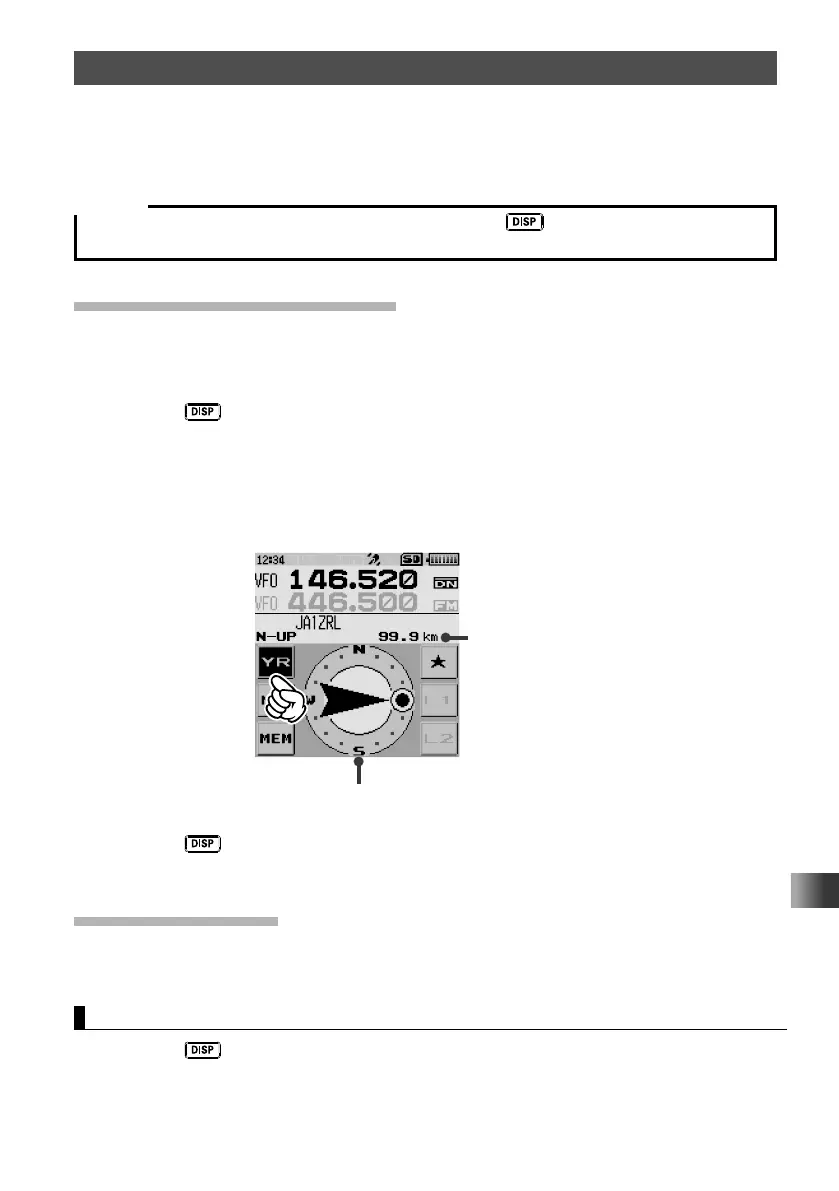
1 Press the key.
The navigation screen appears.
2 Touch [YR].
The distance and direction to the remote station operating on the same frequency in
the V/D mode are displayed.
Distance to
remote station
3 Press the key.
The screen returns to the normal frequency display.
Backtrack Function
By registering the point such as the departure point in advance, the distance and
direction to the registered point from your current position can be displayed in real time.
Registering Your Current Position (Departure Point) (up to 3 Positions can Be Registered)
1 Press the key.
The back track screen appears.



 To Next Page