Configuration
LITECOM, Commissioning and maintenance instructions 17.0 | 04.2024 | en 104
10.5.1 Overview of the “Calendar” app
The following contains an overview of the functions in the Calendar app.
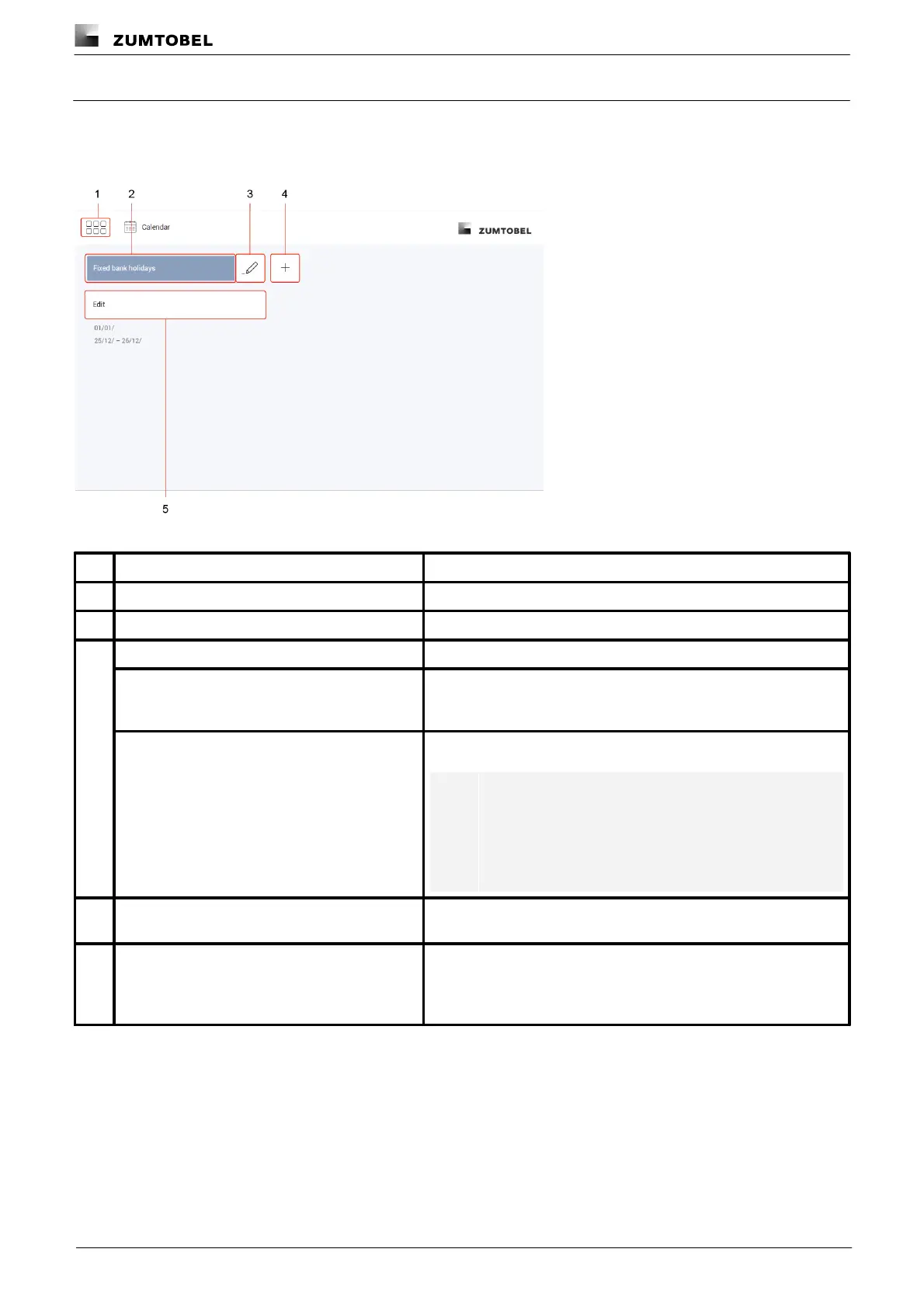
Path: App overview > Calendar
Figure 26: "Calendar" app view
The app overview can be accessed via this button.
Select an existing date group to edit it.
Change the name of an existing date group.
To create a date group that is only slightly different from an existing
date group, the existing group can be copied. All dates are copied
over in this case. The copied date group can then be edited.
All dates are deleted when a date group is deleted.
Note
If the date group is used in a function (e.g. conditional
scene recall), it is also deleted there. The function (in this
case conditional scene recall) continues to function but
no longer has any stored exceptions.
Create a new date group. Name the date group as required (e.g.
fixed bank holidays).
Select the type of date group and then add date entries. As soon as
dates are added, the dates are displayed under the Edit button:
· In format DD/MM for annually recurring dates
· In format DD/MM/YYYY for one-off dates
Table 58: Functions in the "Calendar" app



 To Next Page