Configuration
LITECOM, Commissioning and maintenance instructions 17.0 | 04.2024 | en 151
10.12.1 Overview of the “DALI data” app
The following contains an overview of the functions in the DALI data app.
Path: App overview > DALI data
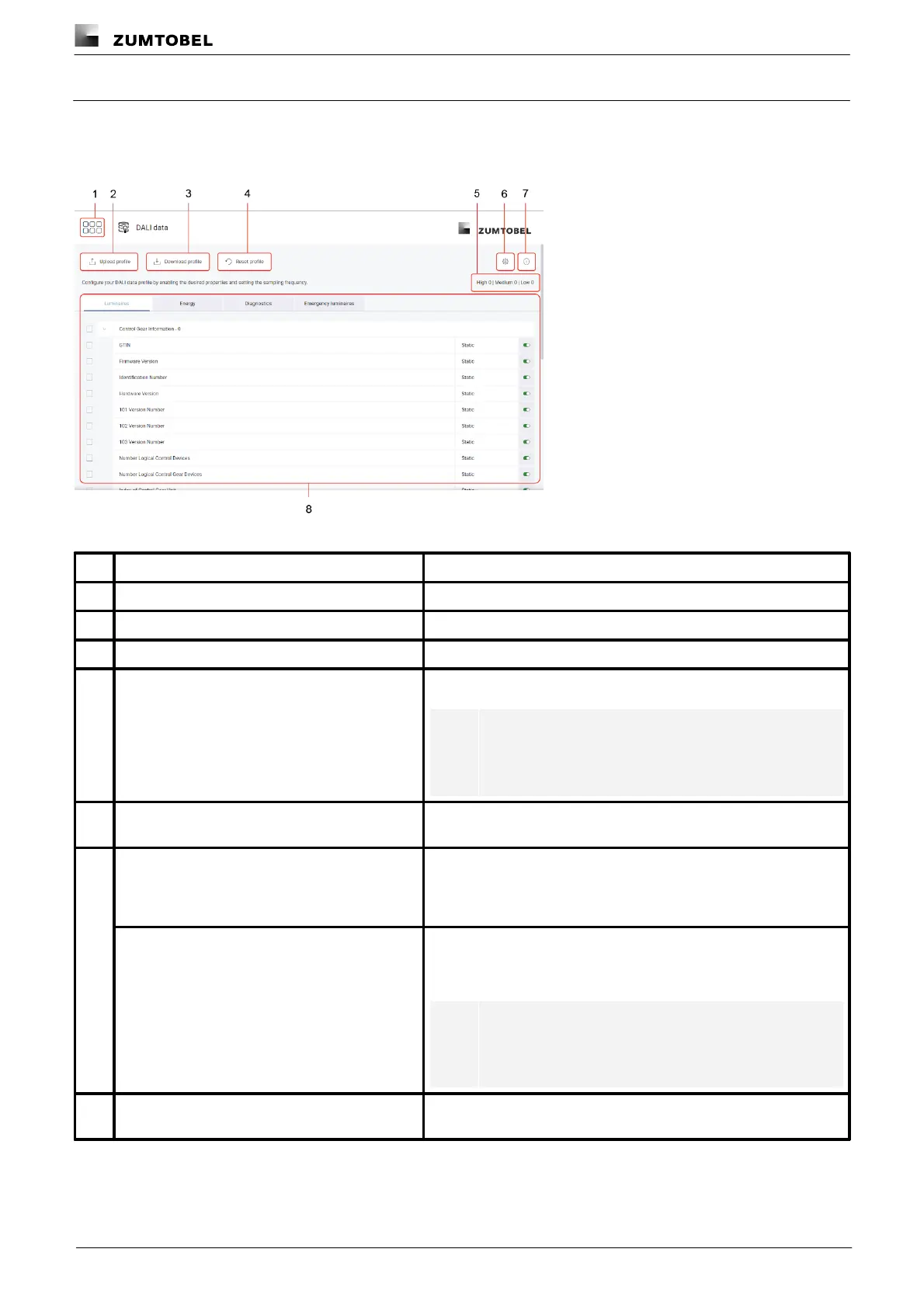
Figure 49:View of the “DALI data” app
The app overview can be accessed via this button.
Tap this button to upload a saved DALI data profile.
Tap this button to download the DALI data profile.
Tap this button to reset the DALI data profile to the default settings.
Note
When the profile is reset, energy data polling and
accumulation are disabled in the settings.
Number of enabled properties
The number of enabled properties is displayed here with the
respective frequency.
This button takes you to the settings. You can poll the DALI data
functionality of the connected luminaires, enable or disable general
DALI data polling, and enable or disable energy data polling and
accumulation.
Access device selection via the settings. You can define which
devices are polled for DALI data here. You can also manually start
DALI data polling for individual devices.
Note
DALI data polling is enabled by default for all devices for
which DALI data functionality has been polled.
Use this button to view a window with information about the DALI
data app.



 To Next Page