Configuration
LITECOM, Commissioning and maintenance instructions 17.0 | 04.2024 | en 121
10.8.1 Overview of the “Protective functions” app
The following contains an overview of the functions in the Protective functions app.
Path: App overview > Protective functions
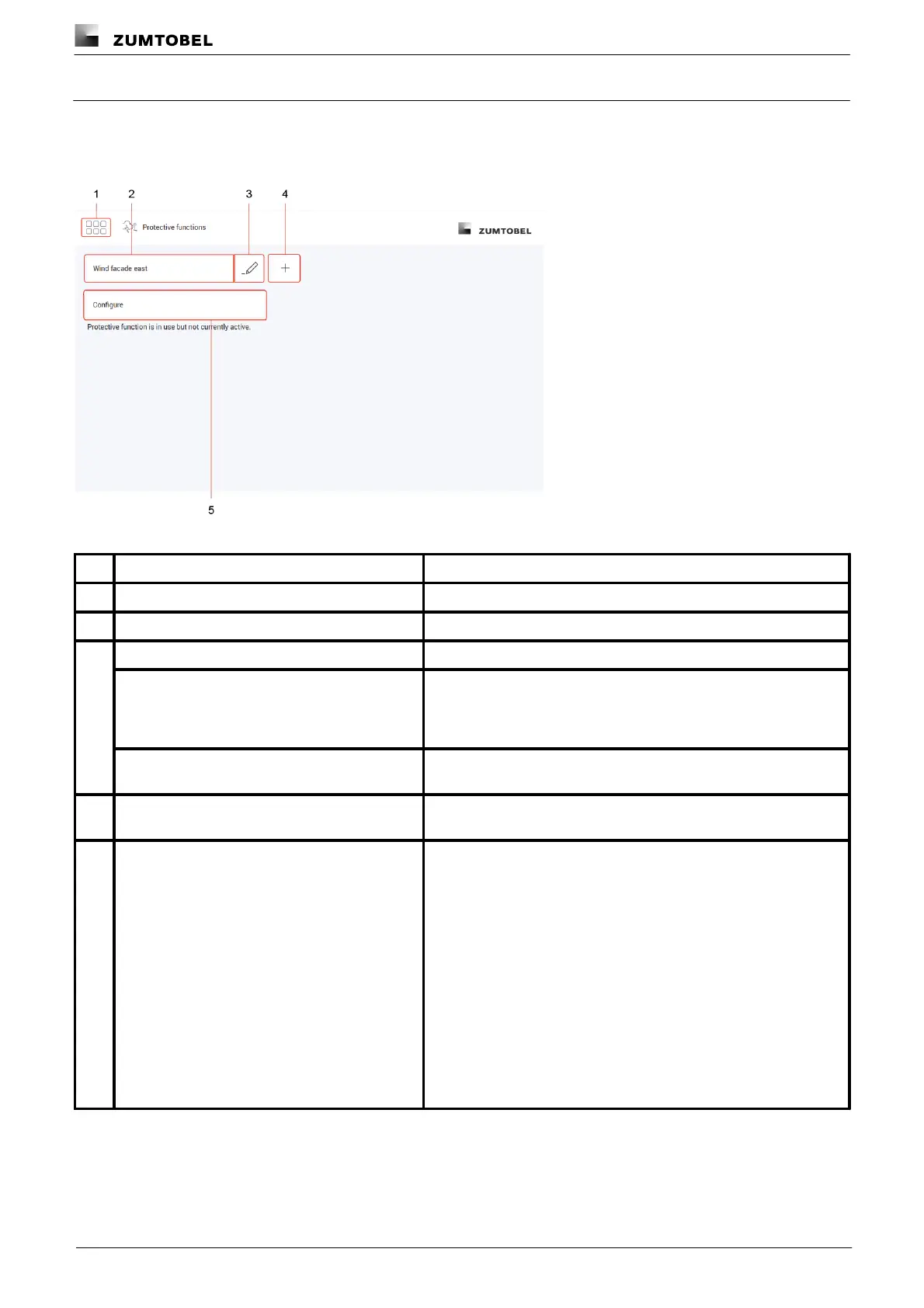
Figure 41: "Protective functions" app view
The app overview can be accessed via this button.
Select protective function
Select an existing protective function to configure it.
Rename protective function
Change the name of an existing protective function.
To create a protective function that is only slightly different from an
existing protective function, the existing protective function can be
copied. All settings are applied in this case. The copied protective
function can then be configured.
Delete protective function
When a protective function is deleted all settings for the protective
function are deleted.
Create new protective function
Create a new protective function. Name the protective function as
required (e.g. Wind façade east).
Configure protective function
As soon as Configure is tapped, the trigger can be selected and the
protective function configured.
The current status of the selected protective function can be seen
below the Configure button:
· Protective function not in use.
The protective function has been configured but is not being used
even if the input contact triggers.
· Protective function is in use but not currently active.
The protective function has been configured but the input contact
has not triggered.
· Protective function is active.
The protective function is active as the input contact has triggered.
· Protective function is active due to device failure.
· Protective function is active due to device deletion.



 To Next Page