Configuration
LITECOM, Commissioning and maintenance instructions 17.0 | 04.2024 | en 143
10.11 Control device linking
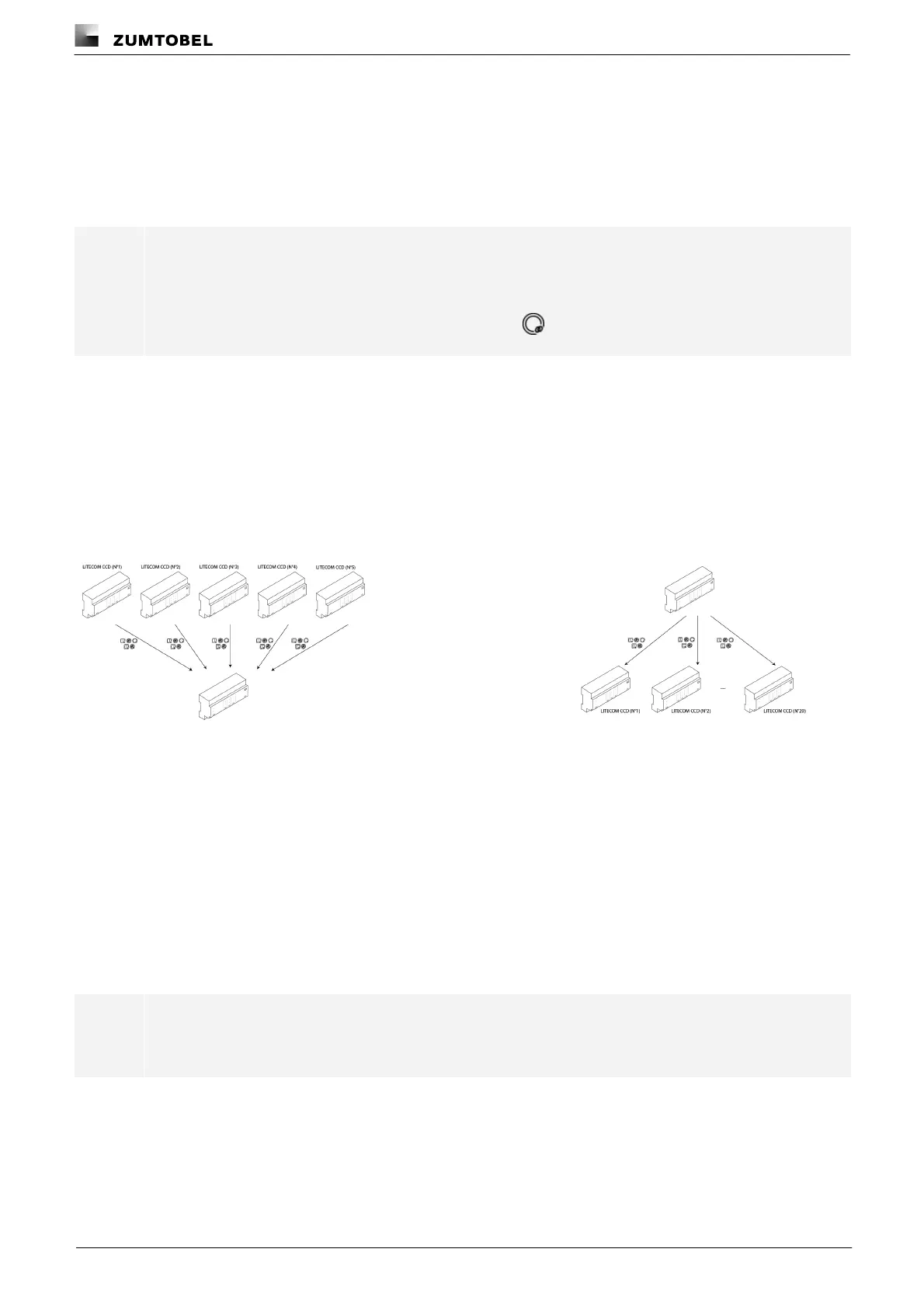
Linking LITECOM CCD control devices allows you to integrate the devices of another LITECOM CCD in the
system image and use them for automation, for example. Once the LITECOM CCD control device has been
added to the link, the devices are linked by assigning a room and group to them. Global devices are assigned to
the entire system. As soon as the devices have been linked, they can be used for further configuration. Linked
LITECOM CCDs and linked devices can be removed from the link at any time.
Note
· Linking a LITECOM CCD that is part of an Infinity system gives you access to all linked devices in
this Infinity system. Only one LITECOM CCD can be linked per Infinity system.
· Linked devices are marked with a linking icon, e.g.
Linking limitations
· Linking to a LITECOM CCD (consumer): no more than 5 LITECOM CCDs can be linked to the current
LITECOM CCD. A maximum of 5 devices from each of the 5 linked LITECOM CCDs in turn can be linked. Data
from a maximum of 25 devices in total can be supplied to the linked LITECOM CCD.
· Linking from a LITECOM CCD (generator): No more than 5 devices from up to 20 LITECOM CCDs can be
linked. The linked LITECOM CCDs can use data from a maximum of 100 devices in total.
Figure 46:Linking to the control device (consumer)
Figure 47:Linking from the control device (generator)
The following devices can be linked:
· Input contacts
· Control equipment
· Sensors (light sensors, presence detectors)
· Weather station
· Sky scanner
Note
A sky scanner and weather station (no more than one each) can be added per LITECOM CCD.



 To Next Page