11-6
Contacts
Contacts maintains a list of your friends and colleagues, in which you can easily
manage or find their information on this device.
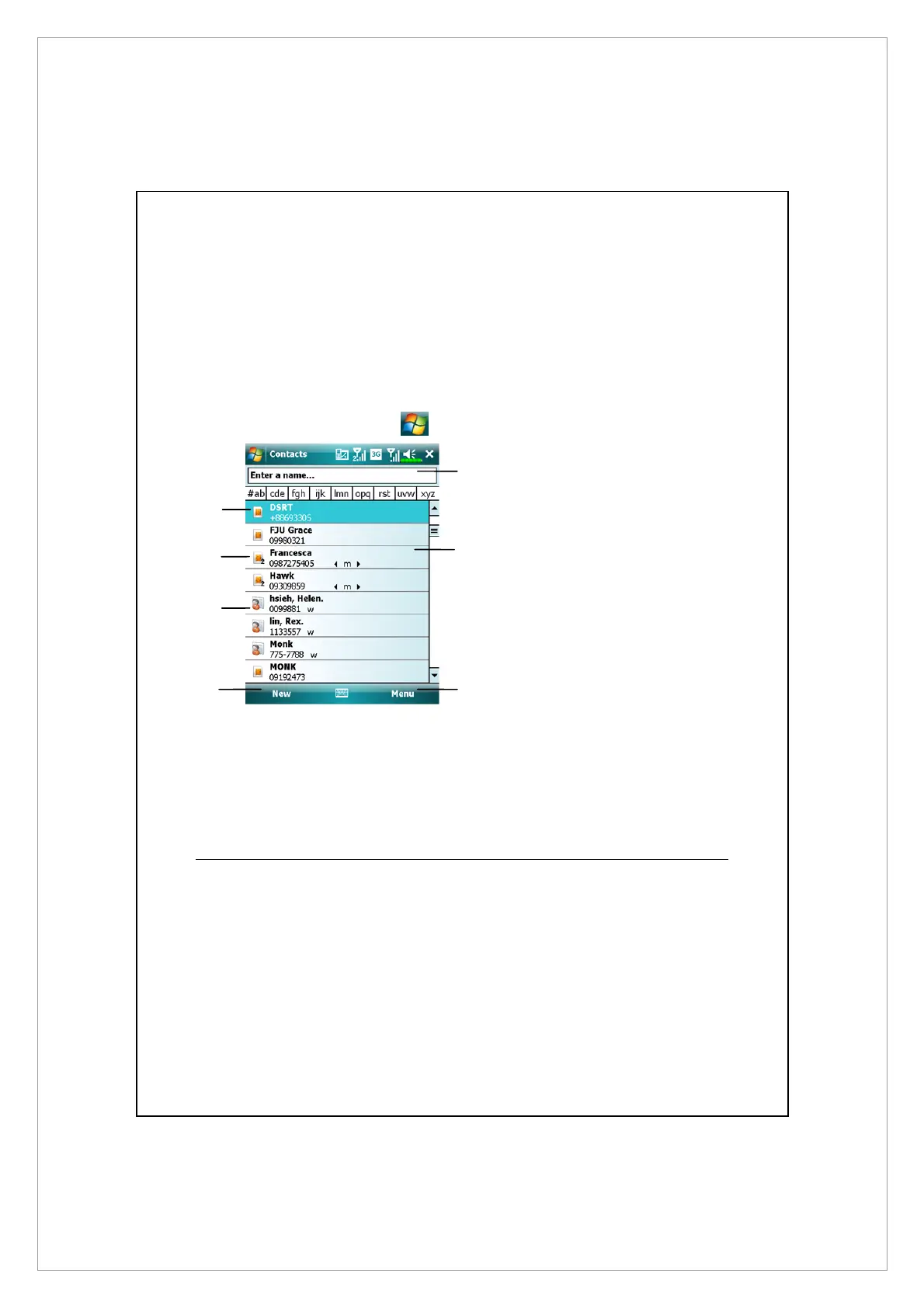
To enter Contacts screen, tap
> Contacts.
X
Contact entry stored on SIM1 card.
Y
Contact entry stored on SIM2 card.
Z
Contact entry stored as Outlook
Contact on your device.
[
Tap to create a new contact.
\
Tap and enter part of a name to
quickly find it in the list.
]
Tap to display the contact details;
tap and hold to display a pop-up
menu of actions.
^
Tap to bring up relevant options
for Contacts screen.
Finding a Contact
Contact list shows altogether contacts on your SIM card, SIM2 card and device.
To find a contact, try the following methods:
1. On the contact list, enter a contact name in the box under the navigation
bar; to show all contacts again, clear the text in the box.
2. In the contact list, tap Menu > Filter and then select the type of contact that
you want displayed.
[
\
]
^
Z
Y
X



 To Next Page