Voice Command Satellite Navigation 3-9
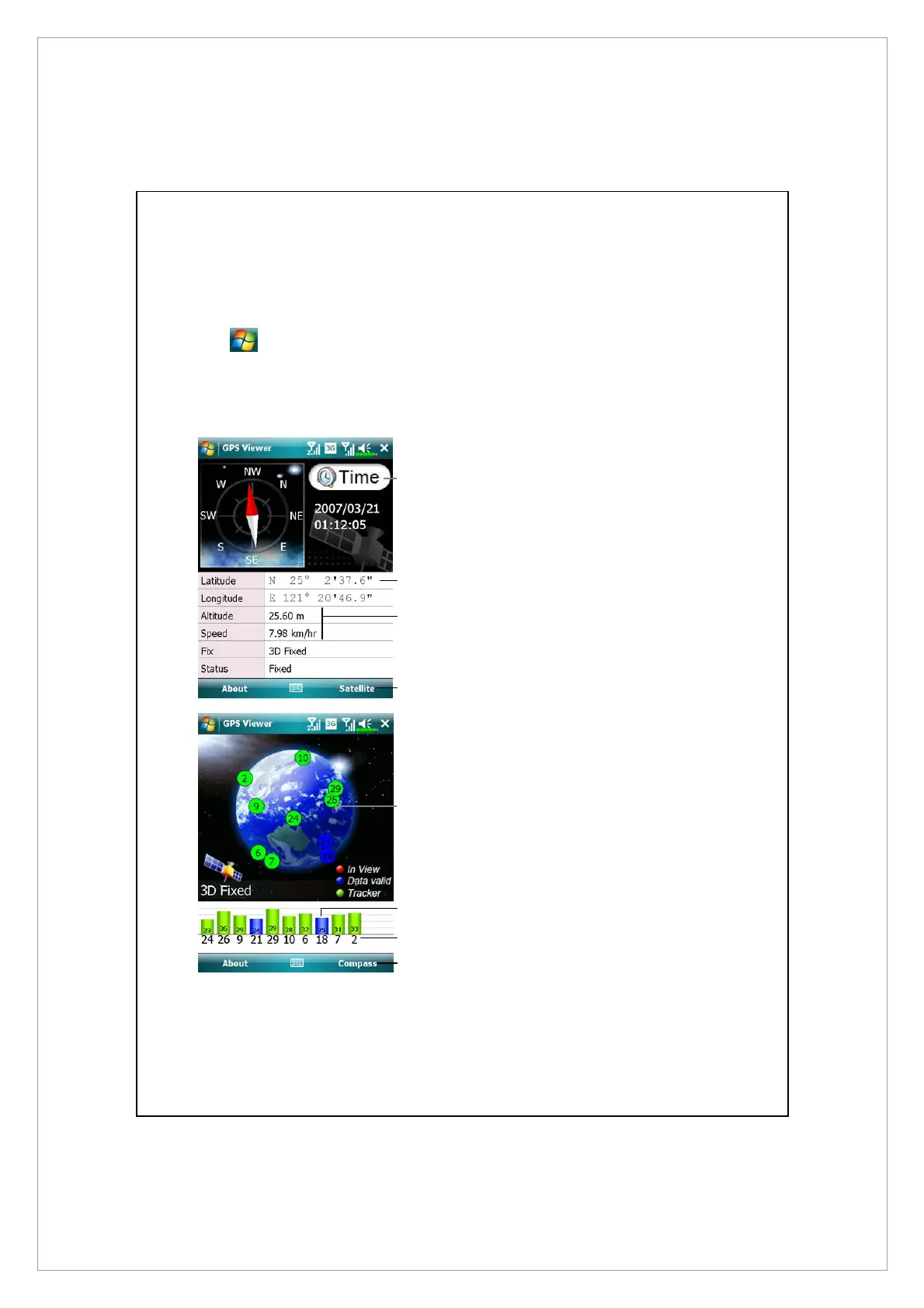
GPS Viewer
Tap
> Programs > GPS > GPS Viewer.
You may use this Pocket PC to automatically search the GPS coordinates of your
location and check if the GPS functions work properly.
1. Run this program in a location
with good signal reception.
n
Greenwich Mean Time (GMT):
After connecting to a satellite
and obtaining the GMT, it will be
displayed on the screen.
Tap to set the satellite time as the
system time.
o
Report GPS tracking information.
p
Tap to change the unit.
[
Switch to Satellite mode.
2. Tap Satellite to switch to Satellite
mode.
n
Red: Satellite detected (In View).
Blue: Satellite data detected (Data
Valid).
Green: Tracking completed
(Tracker).
o
Signal strength: The larger the
figures, the stronger the signal.
p
Satellite ID: The IDs expressed in
numbers in this field correspond
to the IDs on the earth image
above.
q
Switch to Compass mode.
o
[
n
p
q
o
n
p



 To Next Page