ALIEN MEGA/MAX USER MANUAL
124
9.2.3 Configuring NTP Server
Purpose:
A Network Time Protocol (NTP) Server can be configured on your DVR to ensure the
accuracy of system date/time.
Steps:
1. Enter the Network Settings interface.
Menu > Setup > Network
2. Select the NTP tab to enter the NTP Settings interface.
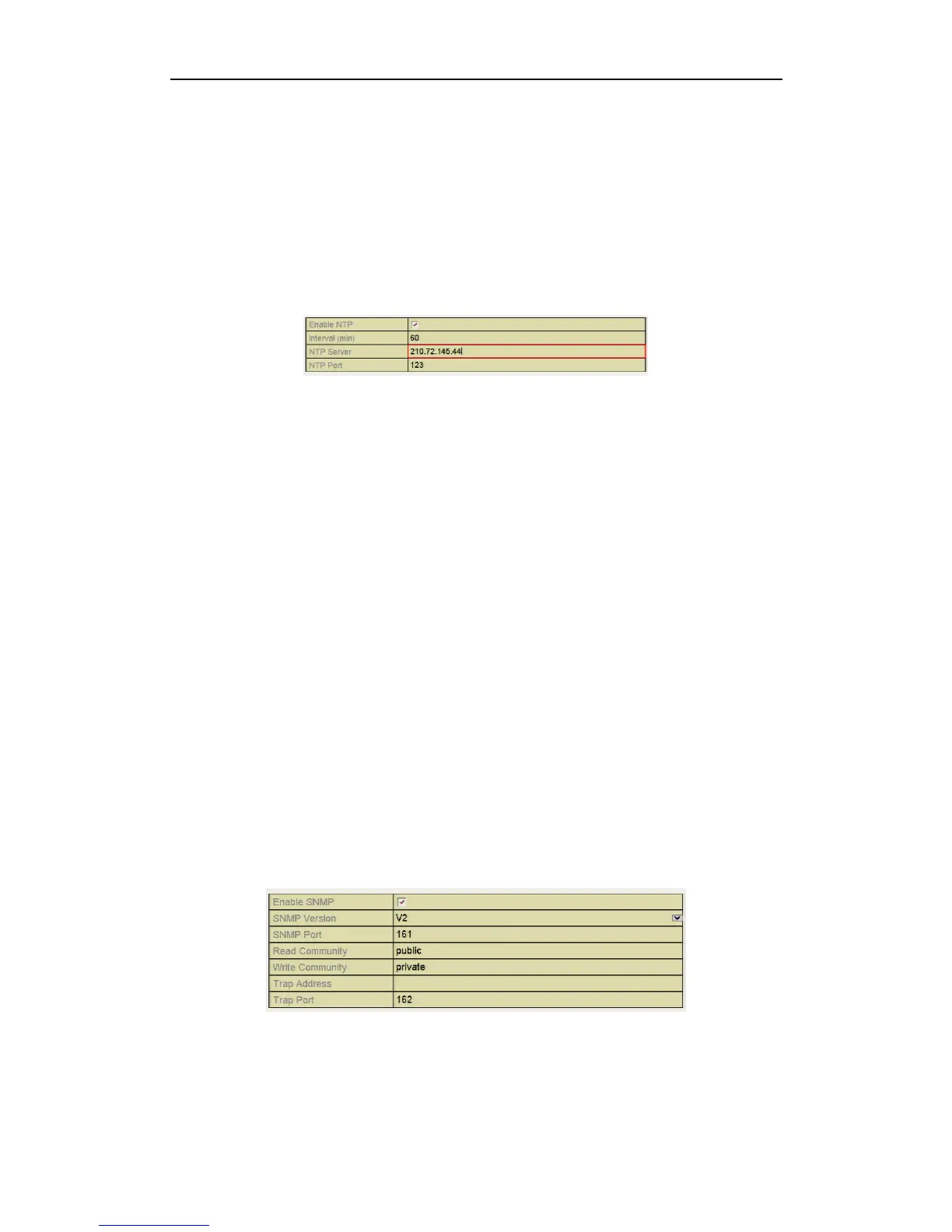
Figure 9.2.3.1 NTP Settings Interface
3. Check the Enable NTP checkbox to enable this feature.
4. Configure the following NTP settings:
• Interval: Time interval between synchronisation with NTP server. The time
is in minutes.
• NTP Server: IP address of NTP server.
• NTP Port: Port of NTP server.
5. Click the Apply button to save and exit the interface.
The time interval can be set from 1 to 10080 minutes and the default value is 60
minutes. If the DVR is connected to a public network, you should use an NTP server
that has a time synchronisation function, such as the server at the National Time
Center (IP Address: 210.72.145.44).
9.2.4 Configuring SNMP
Purpose:
You can use SNMP protocol to get device status and parameters related information.
Steps:
1. Enter the Network Settings interface.
Menu > Setup > Network
2. Select the SNMP tab to enter the SNMP Settings interface.
Figure 9.2.4.1 SNMP Settings Interface
3. Check the Enable SNMP checkbox to enable this feature.



 To Next Page