ALIEN MEGA/MAX USER MANUAL
74
5.8 Configuring Redundant Recording
Purpose:
Enabling redundant recording, allows recorded files held on the hard drive to be
automatically duplicated on another hard drive setup as the redundant HDD.
Before you start:
You must set the Storage mode in the HDD advanced settings to Group before you set
the HDD property to Redundant. For detailed information, please refer to Chapter 9.8
Managing HDD Group. There should be at least another HDD which is in Read/Write
status.
Steps:
1. Enter HDD Information interface.
Menu> Drives>General
Figure 5.8.1 HDD General
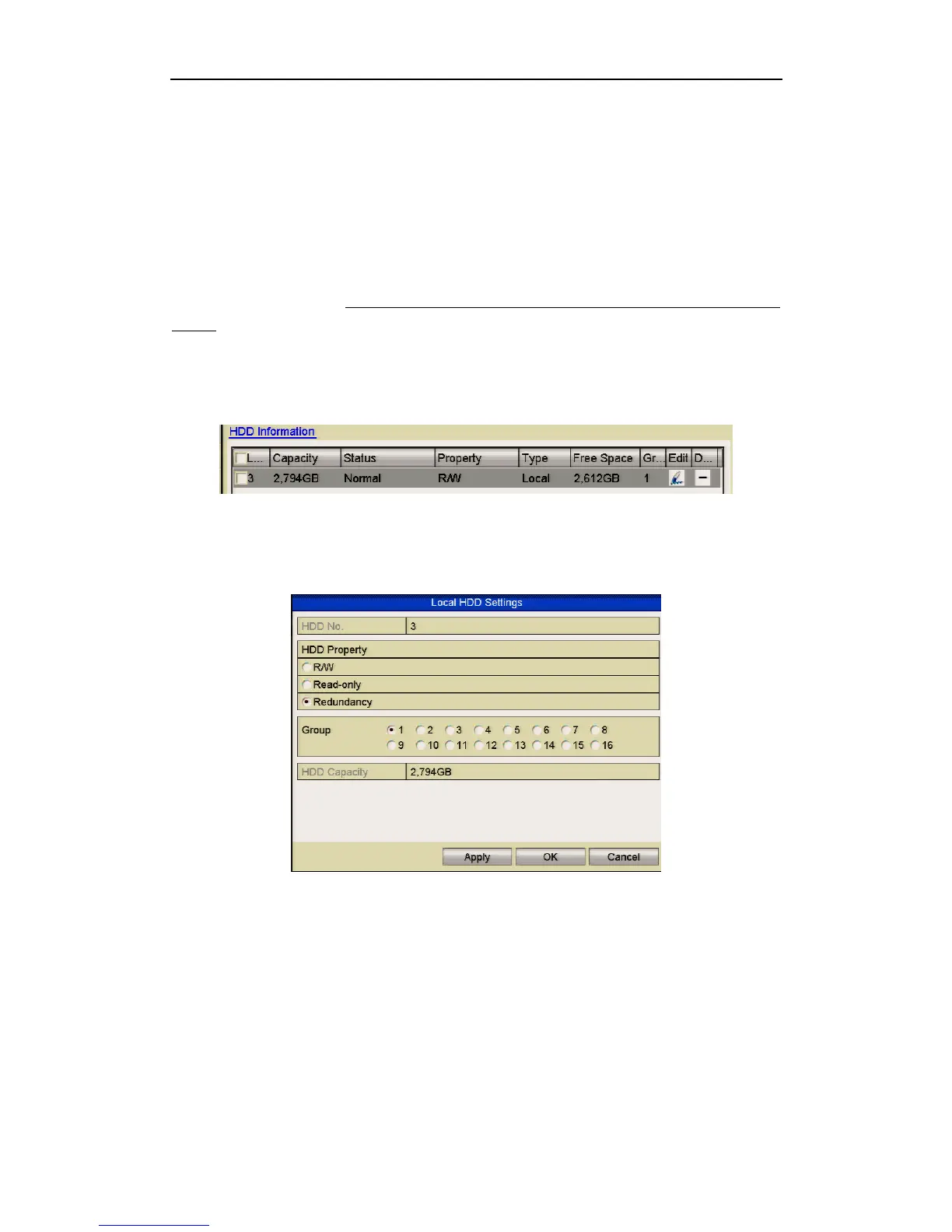
2. Select the HDD and click Edit to enter the Local HDD Settings interface.
1) Set the HDD property to Redundant by clicking Redundancy.
Figure 5.8.2 HDD General-Editing
2) Click Apply to save the settings.
3) Click OK to return to previous menu.
3. Enter the Record setting interface.
Menu> Video> Encoding
1) Select the Record tab.



 To Next Page