ALIEN MEGA/MAX USER MANUAL
76
5.9 Configuring HDD Group for Recording
Purpose:
You can group the HDDs and save the recorded files in certain HDD groups.
Steps:
1. Enter HDD setting interface.
Menu>Drives>Advanced
2. Select Advanced.
Check whether the storage mode of the HDD is in Group mode. If not, set it to
Group. For detailed information, please refer to Chapter 9.8 Managing HDD
Groups.
3. Select General.
Click signature under Edit to enter editing interface.
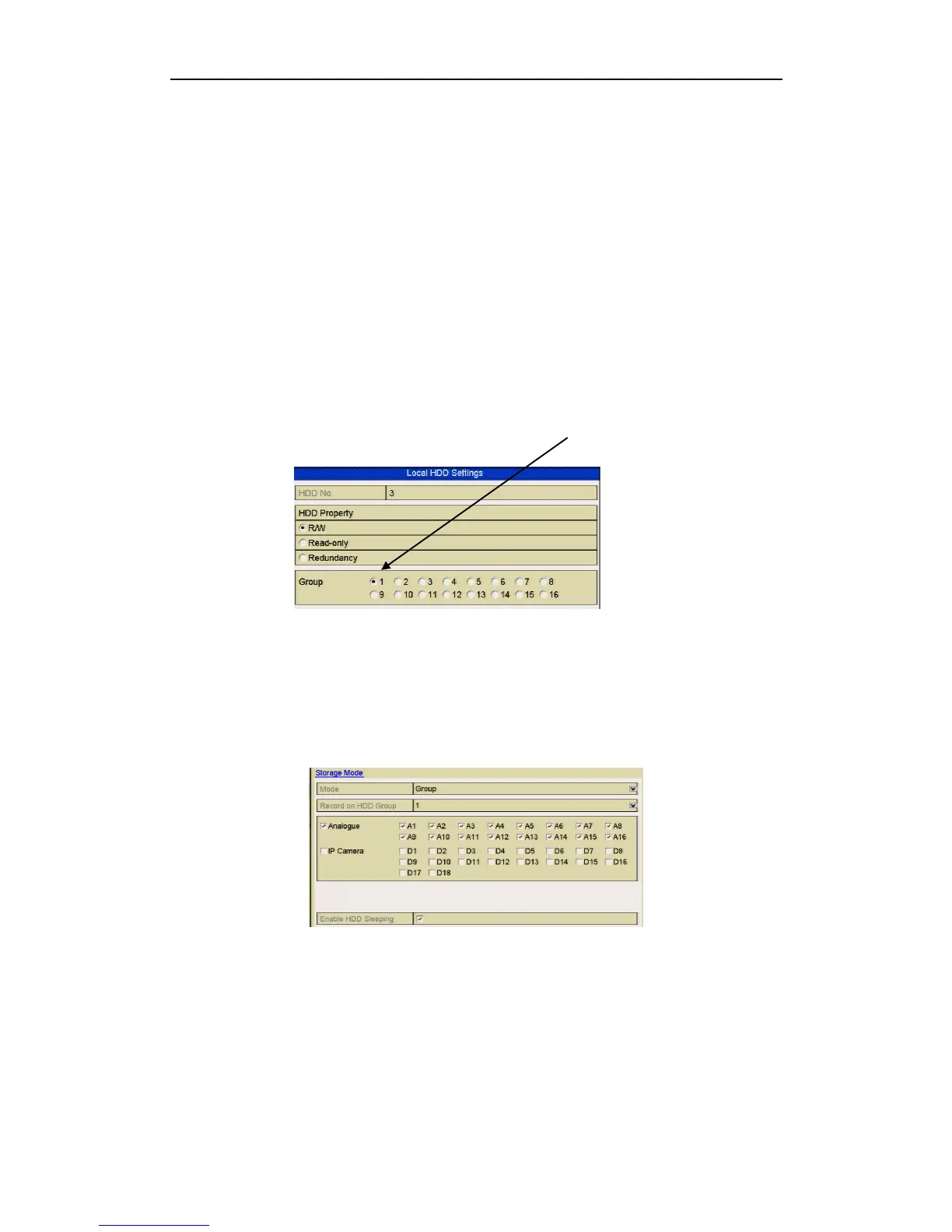
4. Configuring HDD group.
1) Choose a group number for the HDD group.
Figure 5.9.1
Drives General
2) Click Apply to save your settings.
3) Click OK to return to previous menu.
Repeat the above steps to configure more HDD groups.
5. Choose the Channels which you want to save the recorded files in the appropriate
HDD group.
1) Select Advanced.
Figure 5.9.2. HDD Advanced
2) Choose Group number from the dropdown list in Record on HDD Group
3) Check the channels you want to save in this group.
4) Click Apply to save settings.
After you have configured the HDD groups, you can configure the Recording settings
following the procedure provided in Chapter 5.



 To Next Page