ALIEN MEGA/MAX USER MANUAL
123
NO-IP:
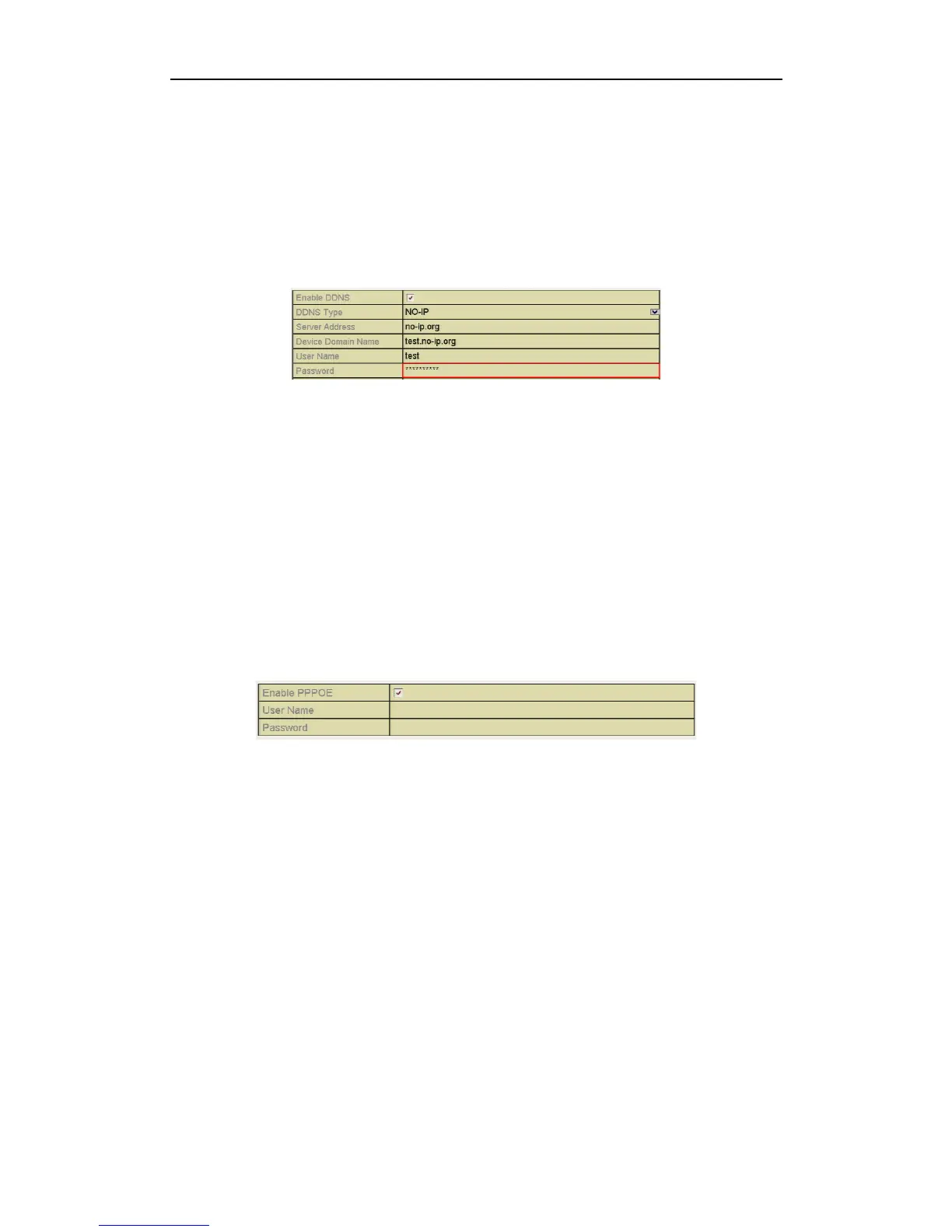
Enter the account information in the corresponding fields. Refer to the DynDNS
settings.
1) Enter Server Address for NO-IP.
2) In the DVR Domain Name text field, enter the domain obtained from the
NO-IP website (www.no-ip.com).
3) Enter the User Name and Password registered in the NO-IP website.
Figure 9.2.1.5 NO-IP Settings Interface
9.2.2 Configuring PPPoE Settings
Purpose:
The DVR also allows access by Point-to-Point Protocol over Ethernet (PPPoE).
The PPPoE service is not generally used in the UK and is aimed at the American
market.
Steps:
1. Enter the Network Settings interface.
Menu > Configuration > Network
2. Select the PPPoE tab to enter the PPPoE Settings interface.
Figure 9.2.2.1 PPPoE Settings Interface
3. Click the PPPoE checkbox to enable this feature.
4. Enter User Name and Password for PPPoE access.
The User Name and Password should be assigned by your ISP.
5. Click the Apply button to save the settings.
6. After successful settings, the system asks you to reboot the device to enable the
new settings, and the PPPoE dial-up is automatically connected after reboot.
You can go to Menu > Maintenance > System Info > Network interface to view
the status of PPPoE connection.



 To Next Page