ALIEN MEGA/MAX USER MANUAL
53
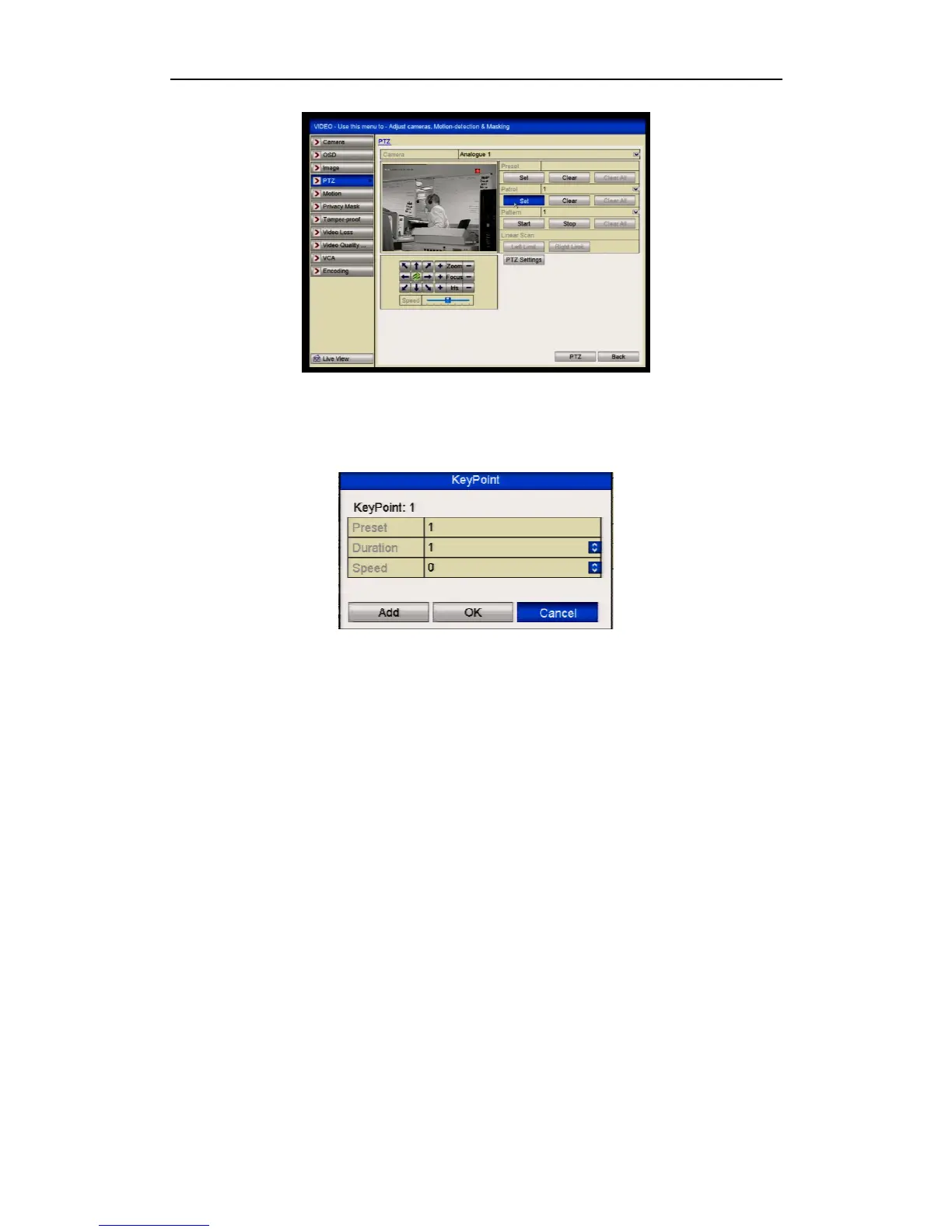
Figure 4.2.3.1 PTZ Settings
2. Select patrol No. in the drop-down list of patrol.
3. Click the Set button to add key points for the patrol.
Figure 4.2.3.3 Key point Configuration
4. Configure key point parameters, such as the key point No., duration of staying at
key point (dwell time) and speed of patrol. The key point corresponds to the
preset. The Key Point No. determines the order at which the PTZ will follow
while cycling through the patrol. The Duration refers to the dwell time it stays at
the corresponding key point. The Speed defines the speed at which the PTZ will
move from one key point to the next.
5. Click the Add button to add the next key point to the patrol, or you can click the
OK button to save the key point to the patrol.
You can delete all the key points by clicking the Clear button for the selected
tour/patrol, or click the Clear All button to delete all the key pints for all
tours/patrols.
4.2.4 Calling Patrols
General:
The DVR uses a standardised method of controlling Tours/Patrols. These may not
always work with every PTZ. Most PTZs use allocated preset numbers to trigger
tours/patrols so these will normally work, providing the presets are within the range
that the DVR can control.



 To Next Page