x930 Series Installation Guide for Virtual Chassis Stacking
21
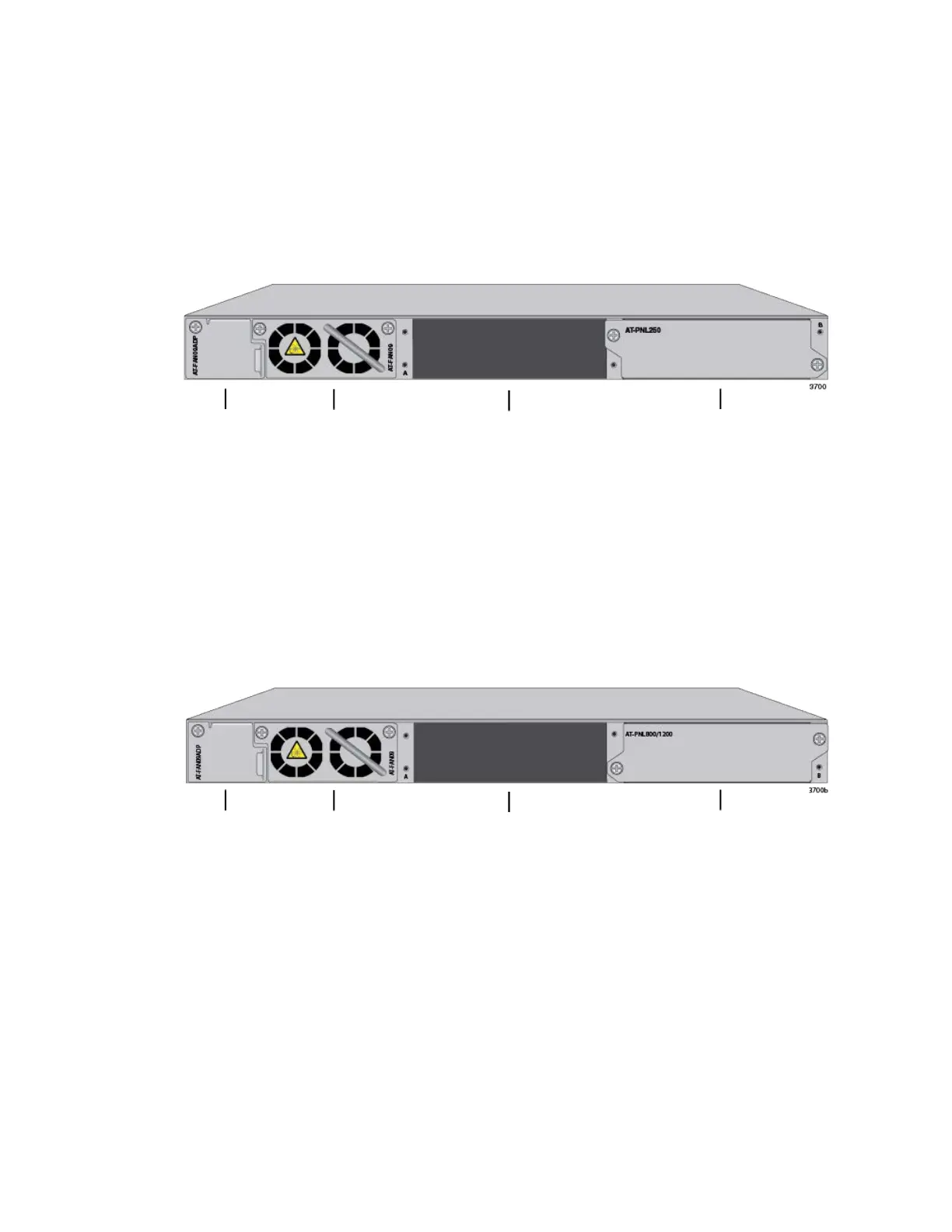
Figure 3 shows the back panel of the non-PoE AT-x930-28GTX, AT-x930-
28GSTX, and AT-x930-52GTX Switches. The back panel has these pre-
installed components:
AT-FAN09ADP module
AT-FAN09 fan module
AT-PNL250 blank panel
Figure 3. Back Panel of the AT-x930-28GTX, AT-x930-28GSTX, and AT-
x930-52GTX Switches
Figure 4 shows the back panel of the PoE AT-x930-28GPX and AT-x930-
52GPX Switches. The back panel has these pre-installed components:
AT-FAN09ADP module
AT-FAN09 fan module
AT-PNL800/1200 blank panel
Figure 4. Back Panel of the AT-x930-28GPX and AT-x930-52GPX
Switches
AT-FAN09
Fan Module
Power Supply Slot B
Power Supply Slot A
AT-FAN09ADP
Module
with AT-PNL250 Blank Panel
AT-FAN09
Fan Module
Power Supply Slot B
Power Supply Slot A
AT-FAN09ADP
Module
with AT-PNL800/1200 Blank Panel



 To Next Page
 Loading...







