Installation and Operating Instructions 147
Alarm Operations
If the Latch Messages option is selected (see Alarms Setup on
page 78), the unit displays the alarm message until the Clear
Latched button on the Utility Options screen is clicked (see Utility
Options on page 105).
Alarm Groups
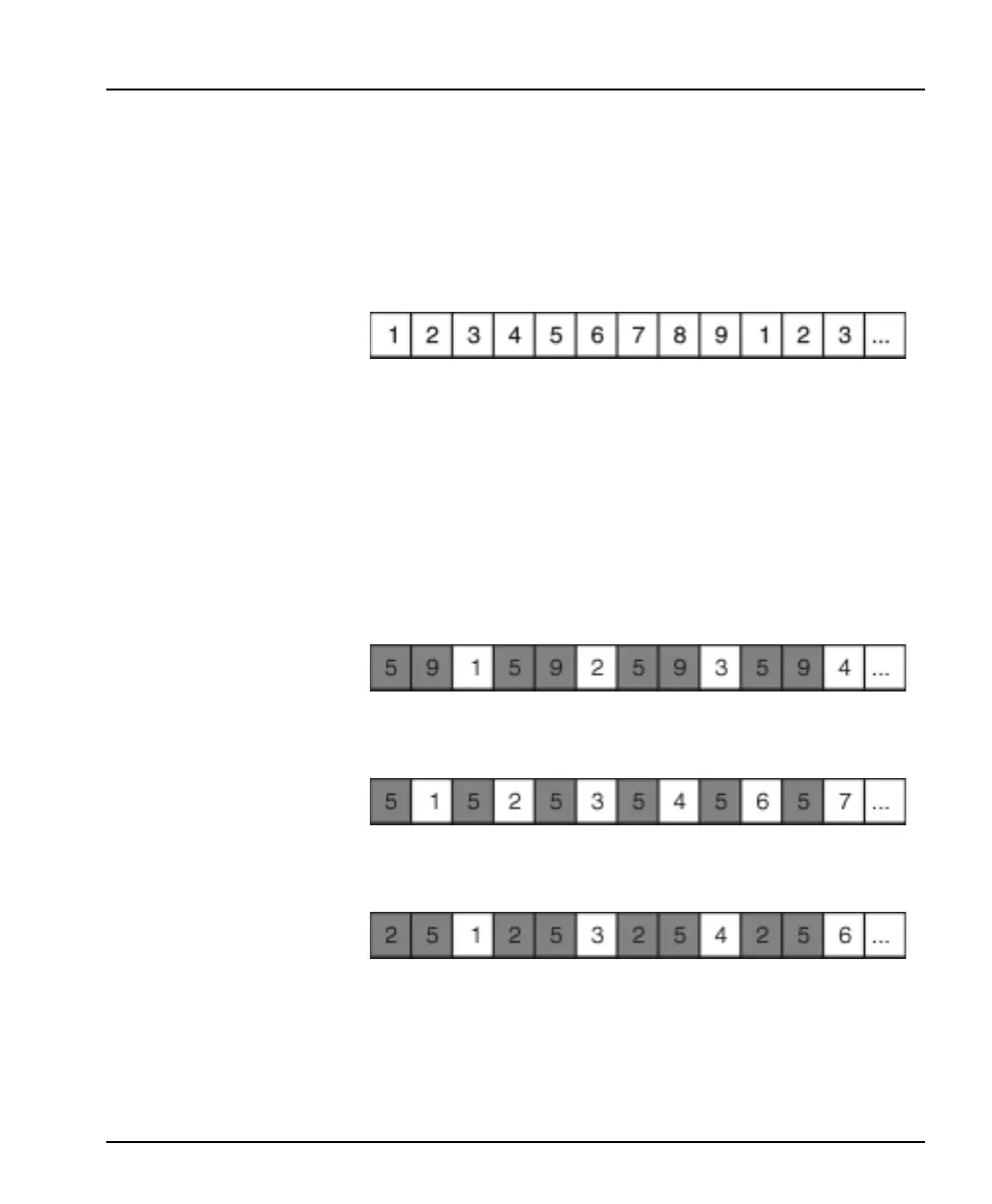
During normal operation, the Intellex unit samples cameras in
camera number order. Each time through the sequence, the unit
samples one image from each camera (unless disabled). For
example, with nine cameras connected, the sequence is:
When an alarm is detected, the unit increases the number of
samples from the camera associated with the alarm. It adds the
camera to the alarm group. After the unit samples each nonalarm
camera, it samples from all cameras in the alarm group. As alarms
start and stop, cameras are added to and removed from the alarm
group.
For example, if alarms are detected at inputs 5 and 9, the unit creates
an alarm group containing these two cameras. The sequence
changes as shown below. The group is repeated after each nonalarm
camera.
Suppose alarm input 9 clears. The unit drops camera 9 from the
alarm group, but camera 5 is still in the alarm group.
Suppose an alarm is now detected at alarm input 2. The unit adds
camera 2 to the alarm group, which still includes camera 5.
The Intellex unit processes multiple alarms in the order they occur.



 To Next Page