Installation and Operating Instructions 7
Front Panel
Chapter 2 — Installation
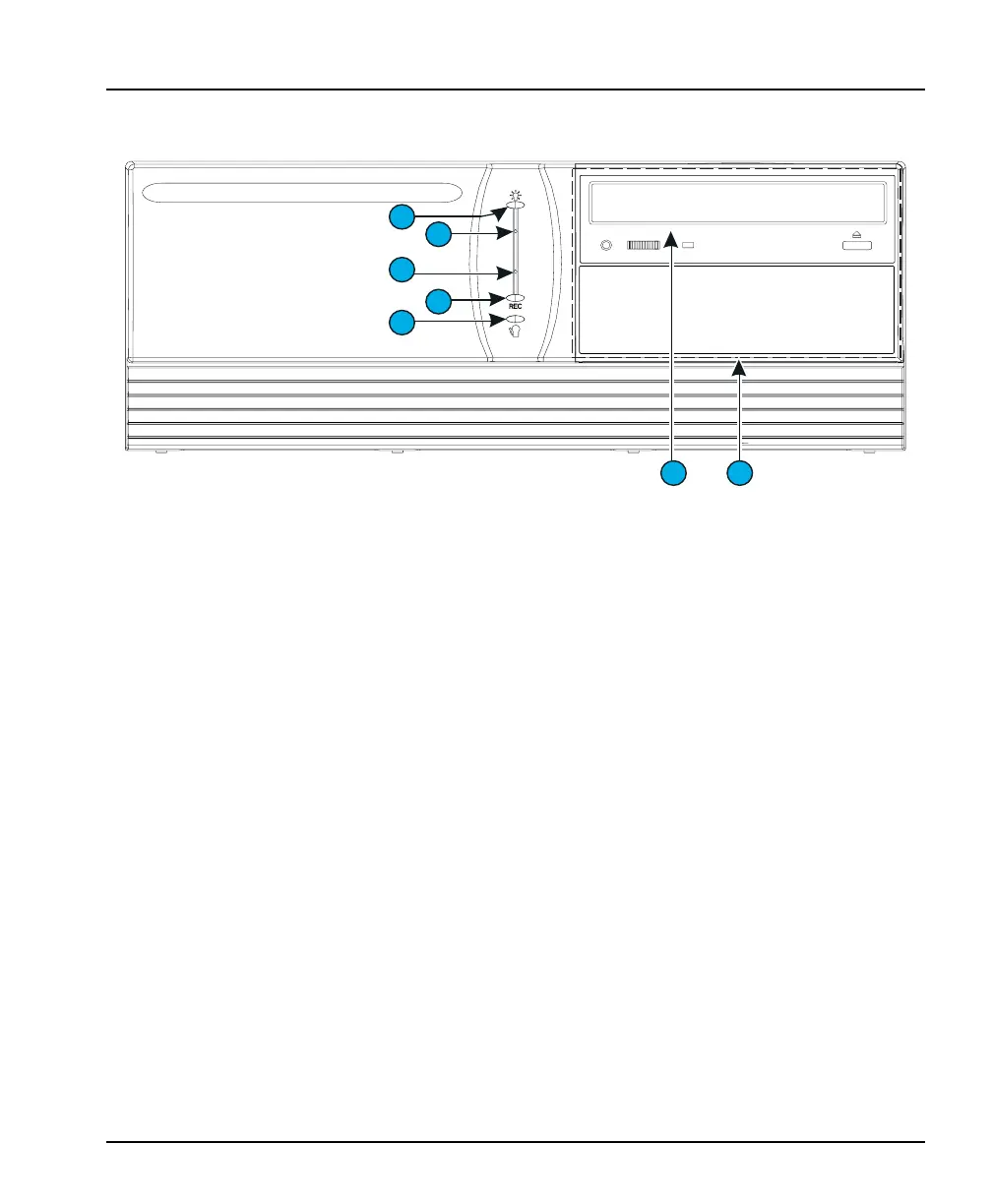
Figure 3 — Controls and Indicators
FRONT PANEL
1. Power Indicator — This light appears when the unit is
operating.
2. Power — Insert a paper clip into this pinhole to turn unit
power on or off.
3. Reset — Insert a paper clip into this pinhole to reset the
unit. The unit powers up and performs its standard system
diagnostics.
4. REC (Recording Indicator) — This light appears when the
unit is recording images to the image database.
5. Alarms Indicator — This light appears when alarm events
have occurred, but have not yet been reviewed. It also blinks
when a notification screen appears.
6. CD or Optional CD-RW — Standard CD can be used for
software upgrades. If the CD-RW option is purchased, video
clips can be exported to a blank CD.
7. Front Panel Cover (not shown) — This hinged cover
protects the CD or optional CD-RW
1
6
7
2
3
4
4
5



 To Next Page