9-2
129390199 Operator Manual Troubleshooting
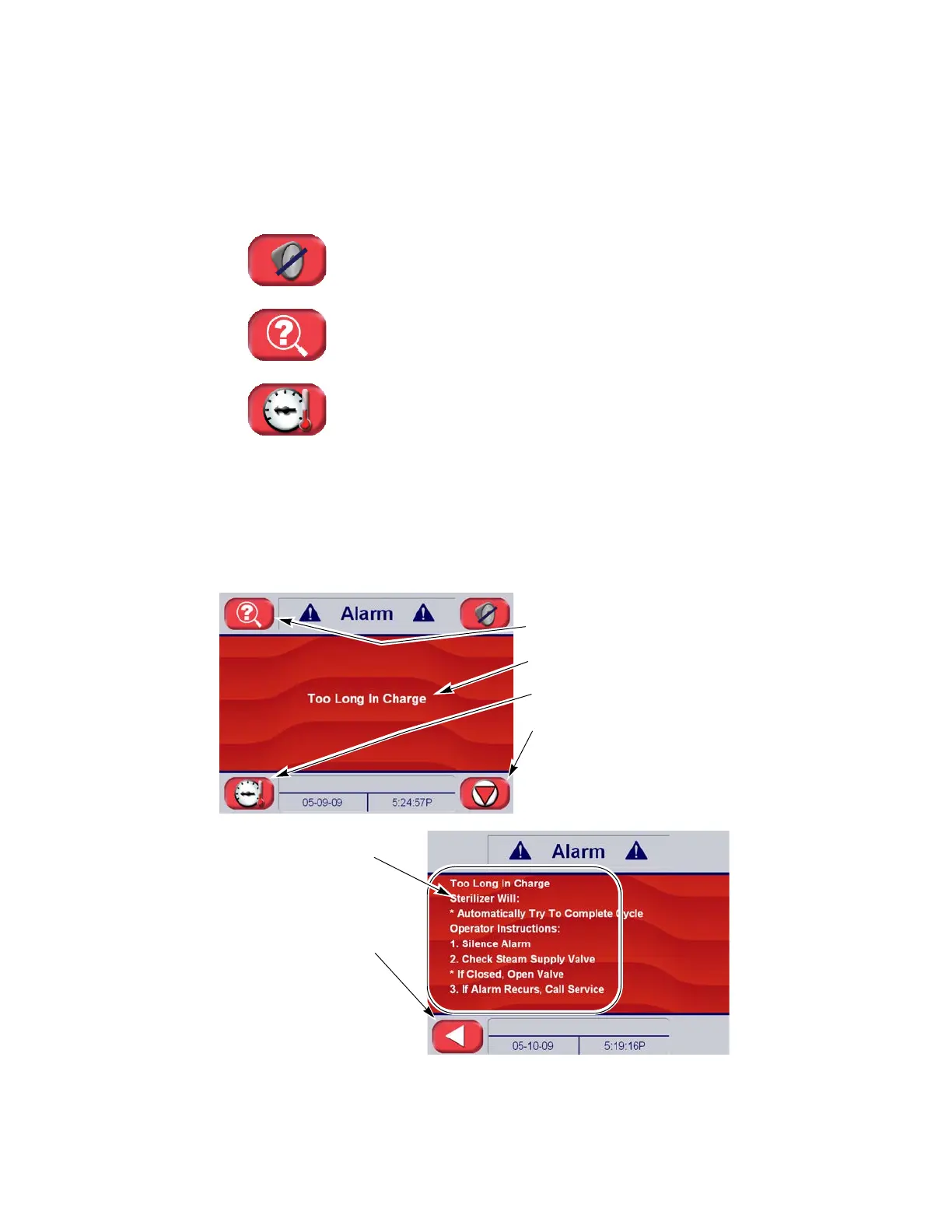
9.1.1 Typical Alarm Screen When an alarm condition occurs, the alarm tone sounds and the
touch screen automatically displays the corresponding alarm
screen. Typically, each alarm screen indicates the alarm name, the
time of day and the date. The alarm details screen (if available),
provides more information, including operator instructions. The alarm
status screen indicates current chamber status, steam jacket status
and other sterilizer activity (see Figure 9-1).
Touch-screen buttons, located on alarm screen are used to perform
the following functions:
• Pressing Silence Alarm turns off the audible alarm signal.
• Pressing Alarm Detail Button to advance to the alarm details
screen.
• Press Status button to access information on steam jacket and
chamber status. This is similar to the standard status screen (see
S
ECTION 5.4. CONTROL, PAGE 5-4).
Important: In the event of an alarm condition, the operator should
always follow the instructions indicated on the alarm detail screen (if
available).
Figure 9-1. Alarm and Alarm Detail Screen Features
Alarm Detail Button
Alarm Name
Jacket and Chamber Status Button
Silence Alarm Audible Signal
Button
Alarm Detail Information
Press Return Button to
Return to Alarm Screen






 To Next Page