5-8
129390199 Operator Manual Component Identification
5.7.2 Abort Touch-Screen
Button
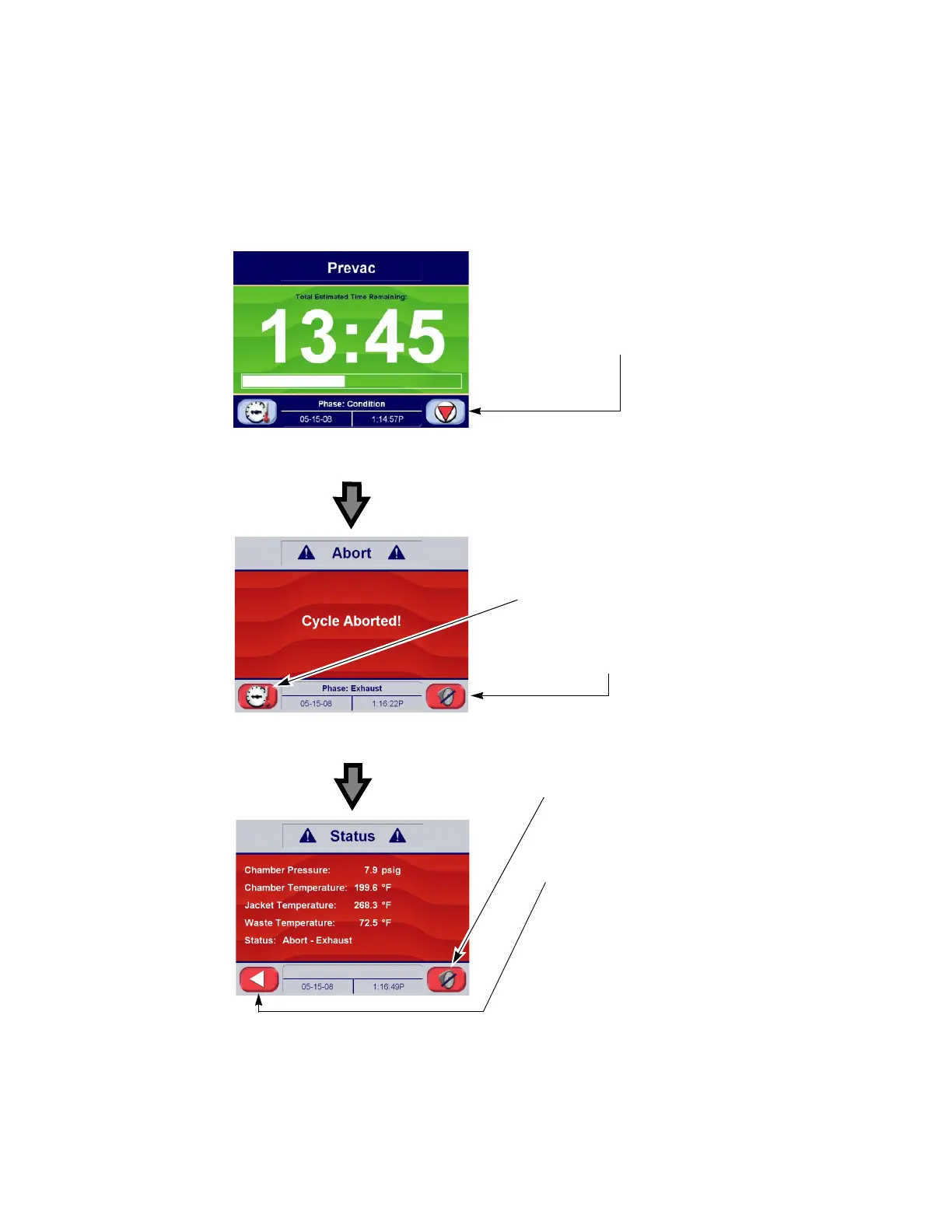
The Abort button is used to end a cycle before it completes normally.
A cycle only needs to be aborted if an abnormal condition or a
control problem develops during the cycle. Pressing Abort causes
the sterilizer chamber to depressurize (if pressurized), or air break (if
in vacuum); the door seal deactivates, the control prompts the
operator to open the door and the sterilizer returns to its normal out-
of-cycle state. If an abnormal condition persists after fully aborting
the cycle, contact your supervisor or a qualified service technician
before trying to operate the sterilizer further.
Figure 5-11. Cycle Abort Button and Screens
Cycle Abort Button:
Press to Initiate Cycle Abort.
Refer to SECTION 6.15. ABORTING
C
YCLES, PAGE 6-36 for more
information
Cycle Progress Screen
Press to Display Chamber
Status During Abort, refer to
S
ECTION 6.15. ABORTING CYCLES,
PAGE 6-36 for more information
Cycle Abort Screen
Press to Silence Alarm
Signal During Abort
Press to Silence Alarm
Signal During Abort
Cycle Abort Status Screen
Press to Return to
Cycle Abort Screen






 To Next Page