5-10
129390199 Operator Manual Component Identification
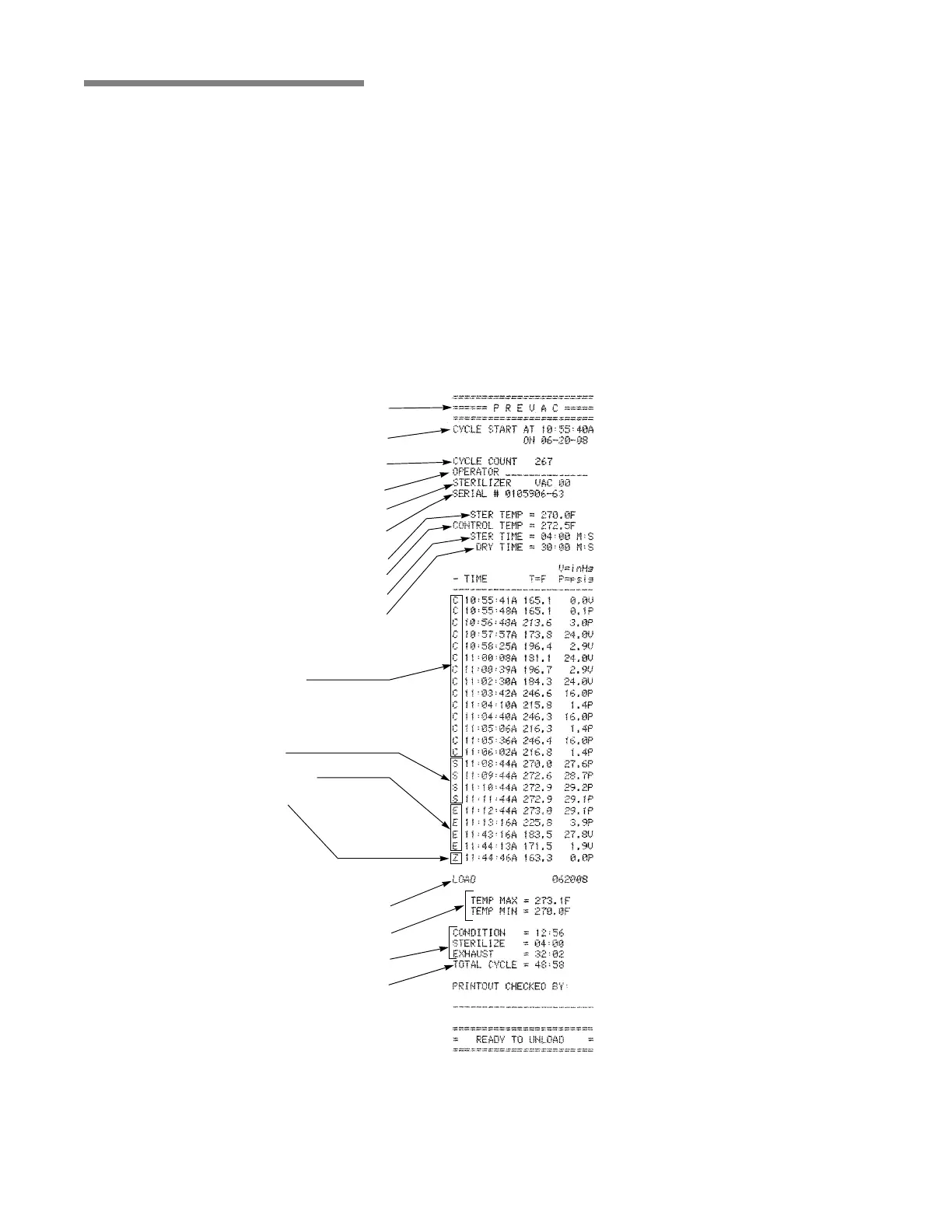
5.9 Printouts Refer to Figure 5-14.
The printout reports useful information about each cycle the sterilizer
runs; including the load number, which is a unique identifying code.
Each load number is printed in the following format: a two-digit
month (e.g., April = 04), a two-digit day (e.g., twenty eighth day =
28) and a two-digit daily cycle count (e.g., first cycle = 01, second =
02, etc.).
• Example of a complete load number: “042801” (April 28, first
cycle).
During the cycle, status lines on the printouts show the time the line
was printed, chamber temperature and the level of vacuum or
pressure in the chamber. Each status line also begins with a letter
code. This code indicates during which cycle phase the print line
occurred, or what kind of event caused the print line to occur.
Refer to Figure 5-14 for other printout features.
Figure 5-14. Typical Printout
Cycle Type
Cycle Start Time & Date
Total Cycle Count
Operator I.D.
Machine Number
Serial Number
Sterilize Temperature
Control Overdrive Temperature
Sterilize Time
Dry Time
Status Print Codes:
Conditioning:
• Charge
• Vacuum/Pressure Pulses
Sterilize
Exhaust & Dry
Complete
Load Number
Sterilize Temperature (Min./Max.)
Time in Phase
Total Cycle Time
A
d
d
i
t
i
o
n
a
l
S
t
a
t
u
s
P
r
i
n
t
C
o
d
e
s
:
F
=
A
la
r
m
(
F
a
ilu
r
e
)
L
=
L
e
a
k
T
e
s
t
(
V
a
c
u
u
m
o
r
H
o
l
d
)






 To Next Page