AvL Proprietary and Confidential
Content is Subject to Change without Notice Page 184 of 195
"Warning stow may cause elevation to move to the
deploy range. Press OK to continue."
"Connect all RIOMs and select OK to continue"
"Disconnect all removable RIOMs and select OK to
continue"
8.2 Communicating with the GUI
Should the AAQ Graphical User Interface (GUI) application not show a connection to the Antenna Control Unit
(ACU), follow the steps below.
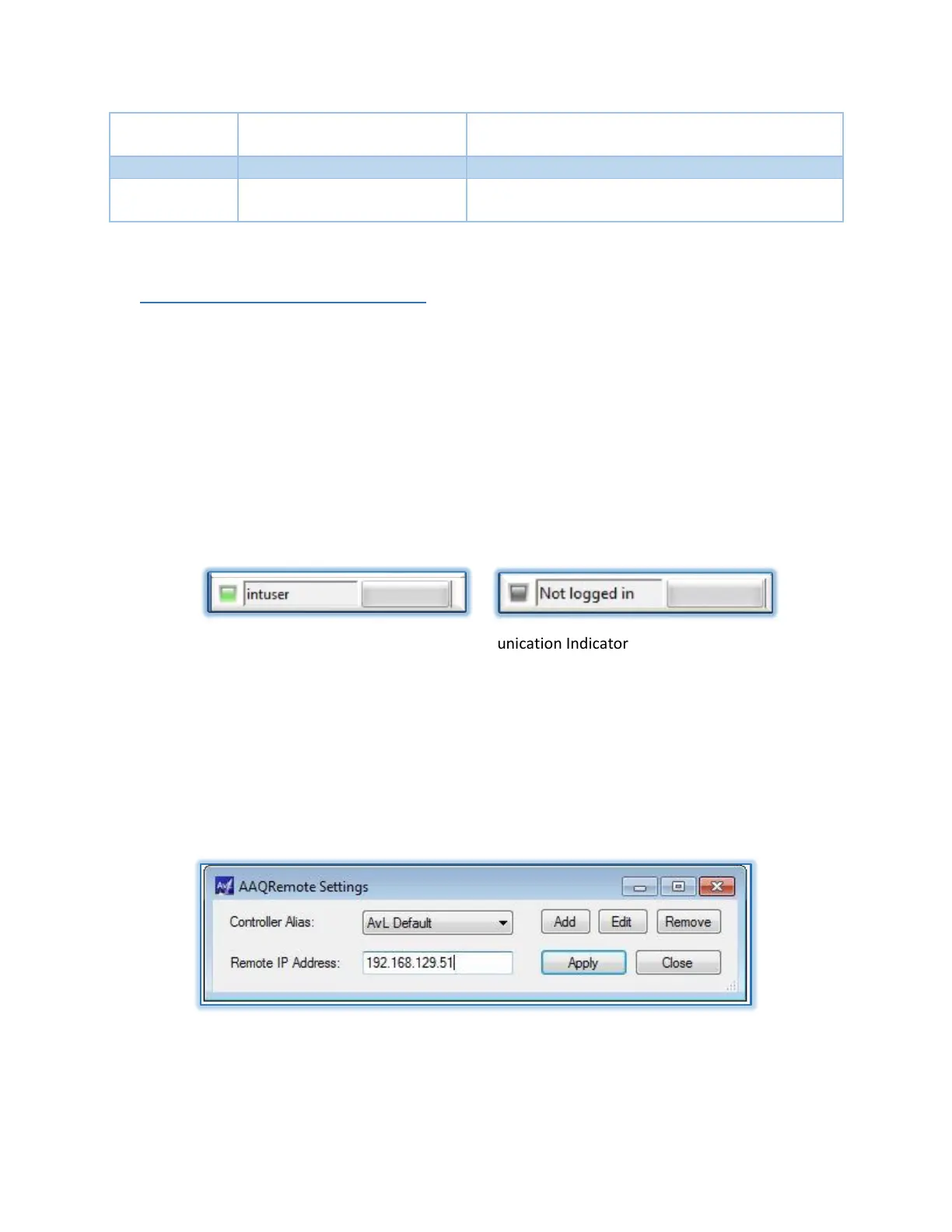
8.2.1 Comms. LED Indicator
Communication between the GUI and ACU is indicated by an LED located in the bottom left corner of
the GUI. Green indicates communication is present, while gray indicates no communications are
present.
Figure 8.2.1 – GUI Communication Indicator
8.2.2 Remote IP Address
View the Remote IP address in the AAQRemote Settings window located in FILE>SETTINGS tab. Verify
that the IP address on the Client Computer is correct.
Figure 8.2.2 – Remote Settings Address


 To Next Page