CHAPTER 5 – Controls and use
Chap. 5
- 9/48 -
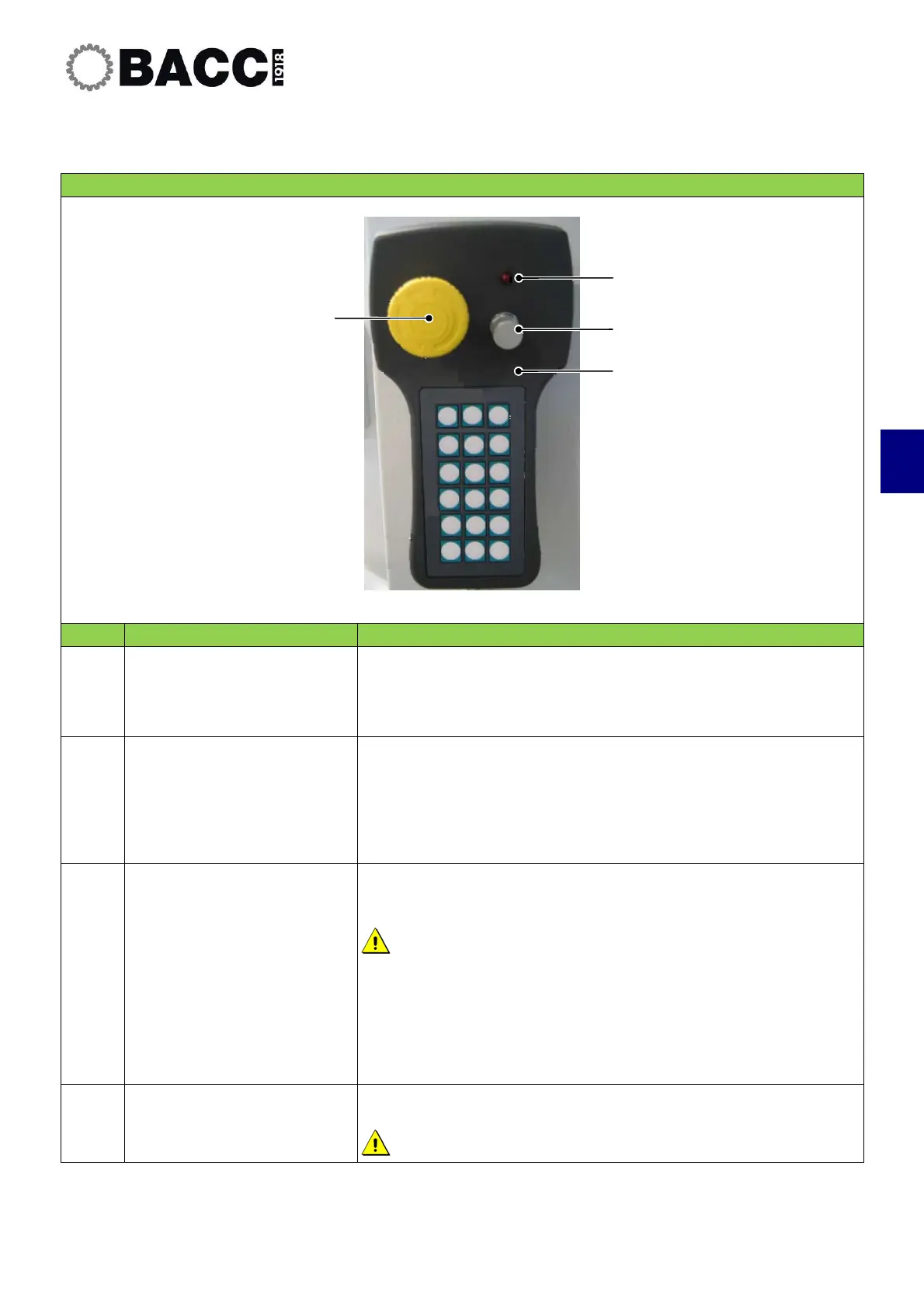
5.1.3 Portable pushbutton panel
CONTROLS ON THE PORTABLE PUSHBUTTON PANEL
POS. CONTROL DESCRIPTION
1
“Pushbutton panel
enabled” pilot light
When the pilot light is on, the pushbutton panel is enabled.
The panel may be enabled using the Soft key
When the pilot light is off, the pushbutton panel is disabled.
2
"Override" potentiometer
The potentiometer may be used to vary the speed of the axes
and the spindles between 0 and 100%.
The potentiometer is enabled in both Manual and Automatic
modes.
3
Life Man Switch
Press this pushbutton to confirm the operations controller using
the portable pushbutton panel.
When the pushbutton is released, the operation is terminated.
Collision hazard.
For all manual movements: Keep an eye on the orientation of the
axes.
The speed of all the movements is reduced to a maximum of 2
m/min.
Rotation of the electric spindle in manual mode is not permitted.
4
"Stop" Pushbutton
Press this control to stop the axes and spindles.
Pressing the STOP control does not turn off the machine.
1
2
3
4


 To Next Page