Sample Control 32
5.6 Sampling Mode
The oscilloscope only supports real-time sampling. In this mode, the oscilloscope samples and displays waveform within
a trigger event. The maximum real-time sample rate is 1GSa/s.
Press the RUN/STOP button to stop the sample, the oscilloscope will hold the last display. When stopped the vertical
control and horizontal control are used to pan and zoom the waveform.
5.7 Interpolation Method
Under real-time sampling, the oscilloscope acquires the discrete sample values of the waveform being displayed. In general,
a waveform of dots display type is very dicult to observe. In order to increase the visibility of the signal, the digital
oscilloscope usually uses the interpolation method to display a waveform.
Interpolation method is a processing method to “connect all the sampling points”, and using some points to calculate
the whole appearance of the waveform. For real-time sampling interpolation method is used, even if the oscilloscope in
a single captures only a small number of sampling points. The oscilloscope can use interpolation method for lling out
the gaps between points, to reconstruct an accurate waveform.
To set the Interpolation Method:
Press the Acquire button on the front panel to enter the Acquire Function menu.
Press the Interpolation softkey to toggle between Sinx/x and X.
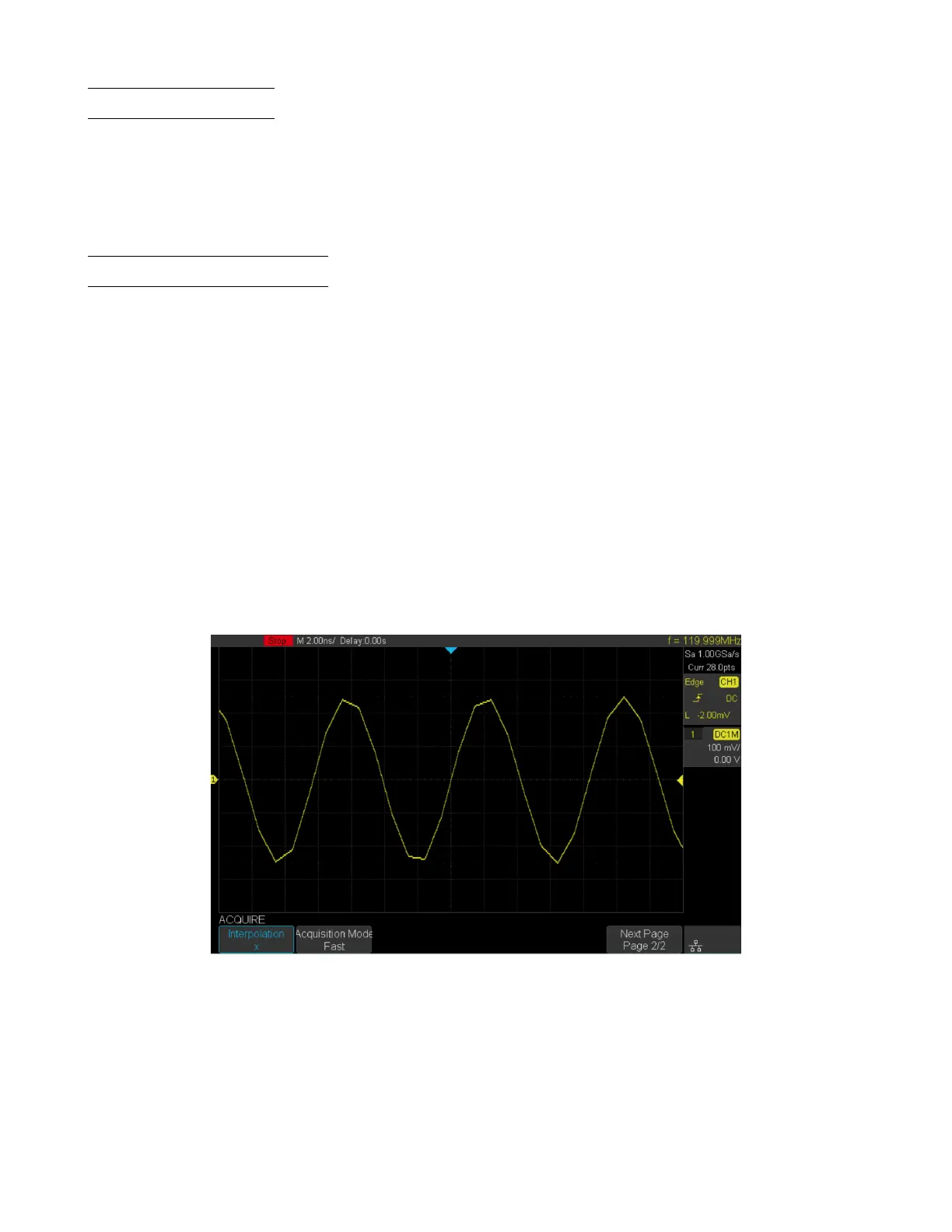
• X: In the adjacent sample points are directly connected on a straight line. This method is only conned to rebuild
on the edge of signals, such as square wave.
Figure 5.5 Interpolation Method X













 To Next Page