Cursors
Cursors are horizontal and vertical markers that indicate X-axis values and Y-axis values on a selected waveform source.
Cursors can be used to make custom voltage and time measurements on the oscilloscope signals.
10.1 X Cursors
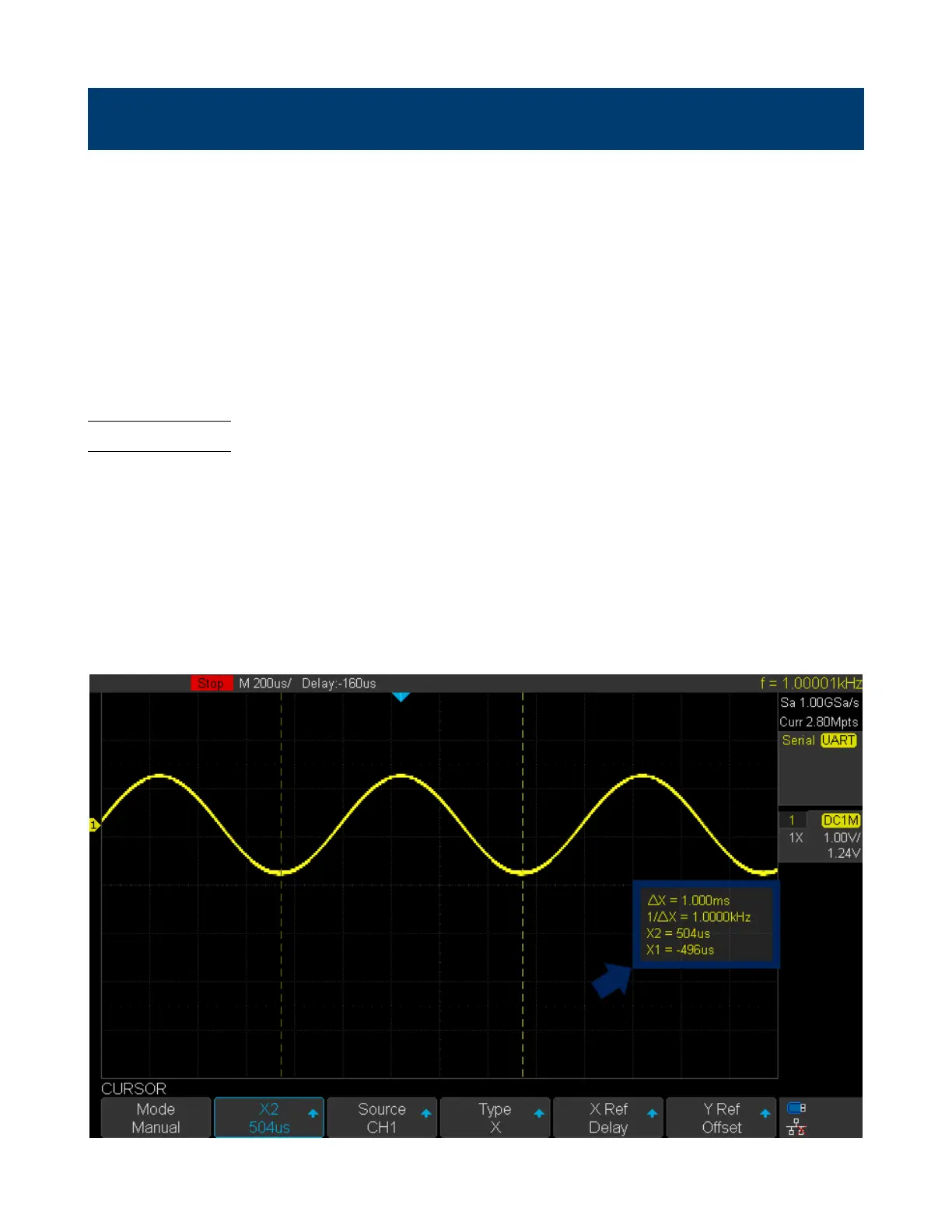
X cursors are vertical dashed lines that adjust horizontally and can be used to measure time (when the source is FFT
waveform, X cursors measure frequency).
X1 cursor is the left (default position) vertical dotted line; it can be moved to any place of the screen.
X2 cursor is the right (default position) vertical dotted line; it can be moved to any place of the screen.
Use the Universal Knob to set the X1 and X2 cursor values. The values are displayed in the cursors box along with the
dierence between X1 and X2 (T) and 1/T. (See gure 10.1)
When cursor type is set to X2-X1, use Universal Knob to move the X1 and X2 cursors together. The value under the
menu option is the dierence between the X1 and X2 cursors.
Figure 10.1 X Cursors Box




 To Next Page